EasyManua.ls Logo

LG 32LC7D-UB - Back Panel Information

LG 32LC7D-UB
94 pages
Print Icon
To Next Page IconTo Next Page
To Previous Page IconTo Previous Page
Loading...
PREPARATION
8
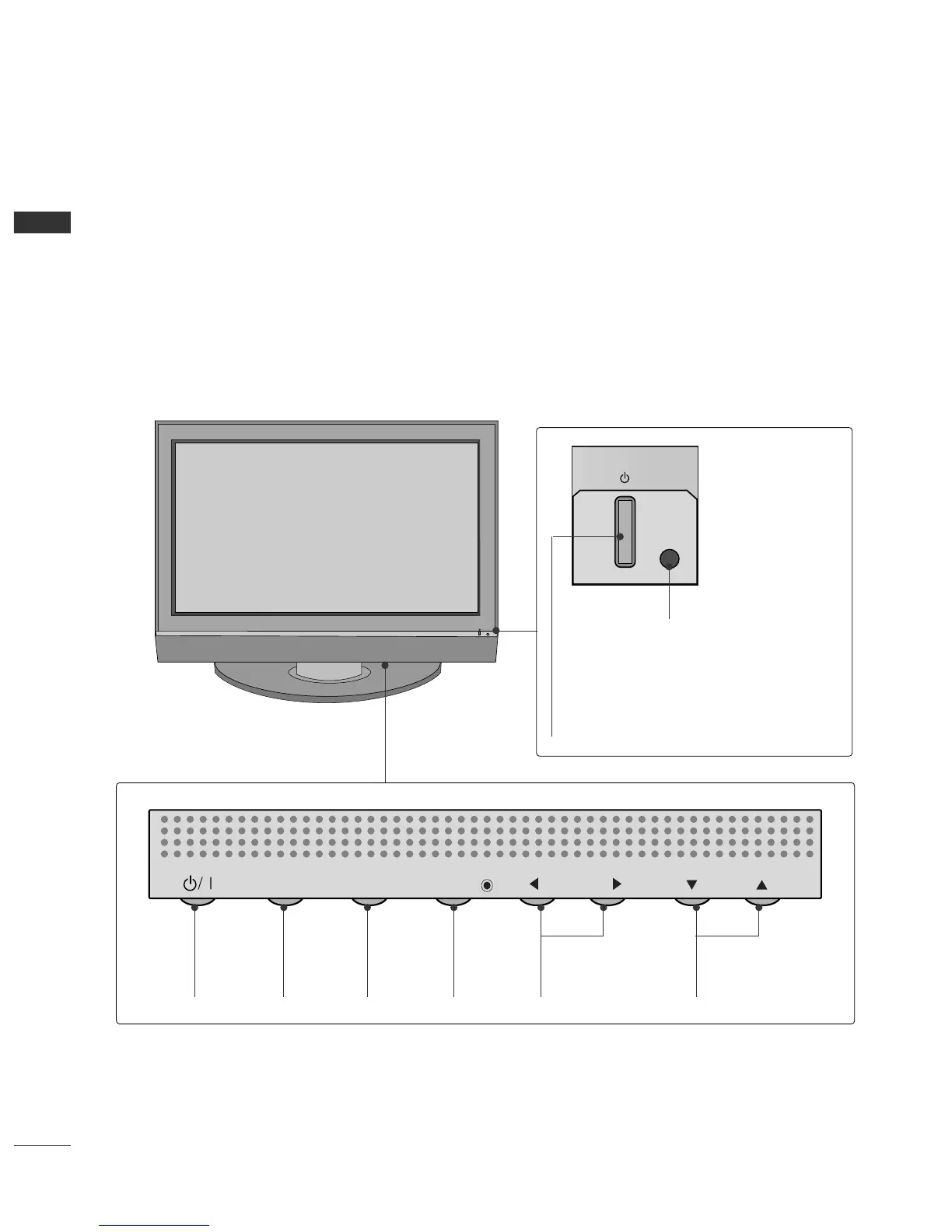
FRONT PANEL INFORMATION
PREPARATION
■
Here shown may be somewhat different from your TV.
■
NOTE: If your product has a protection tape attached, remove the tape.
And then wipe the product with a cloth (If a polishing cloth is included with your product, use it).
Front Panel Controls
CH
VOL
MENU
INPUT
ENTER
CH
VOL
MENU
INPUT
ENTER
Power/Standby Indicator
Illuminates red in standby mode.
When the TV is turned on, the indicator
blinks green and then illuminates green
before the picture is displayed.
Remote Control Sensor
POWER
Button
INPUT
Button
MENU
Button
ENTER
Button
VOLUME
(
FF
,
GG
)Buttons
CHANNEL
(
EE
,
DD
)Buttons
Plasma TV Model

Table of Contents