87
MY MEDIA
The On-Screen Display on your model may be slightly different.
PHOTO LIST
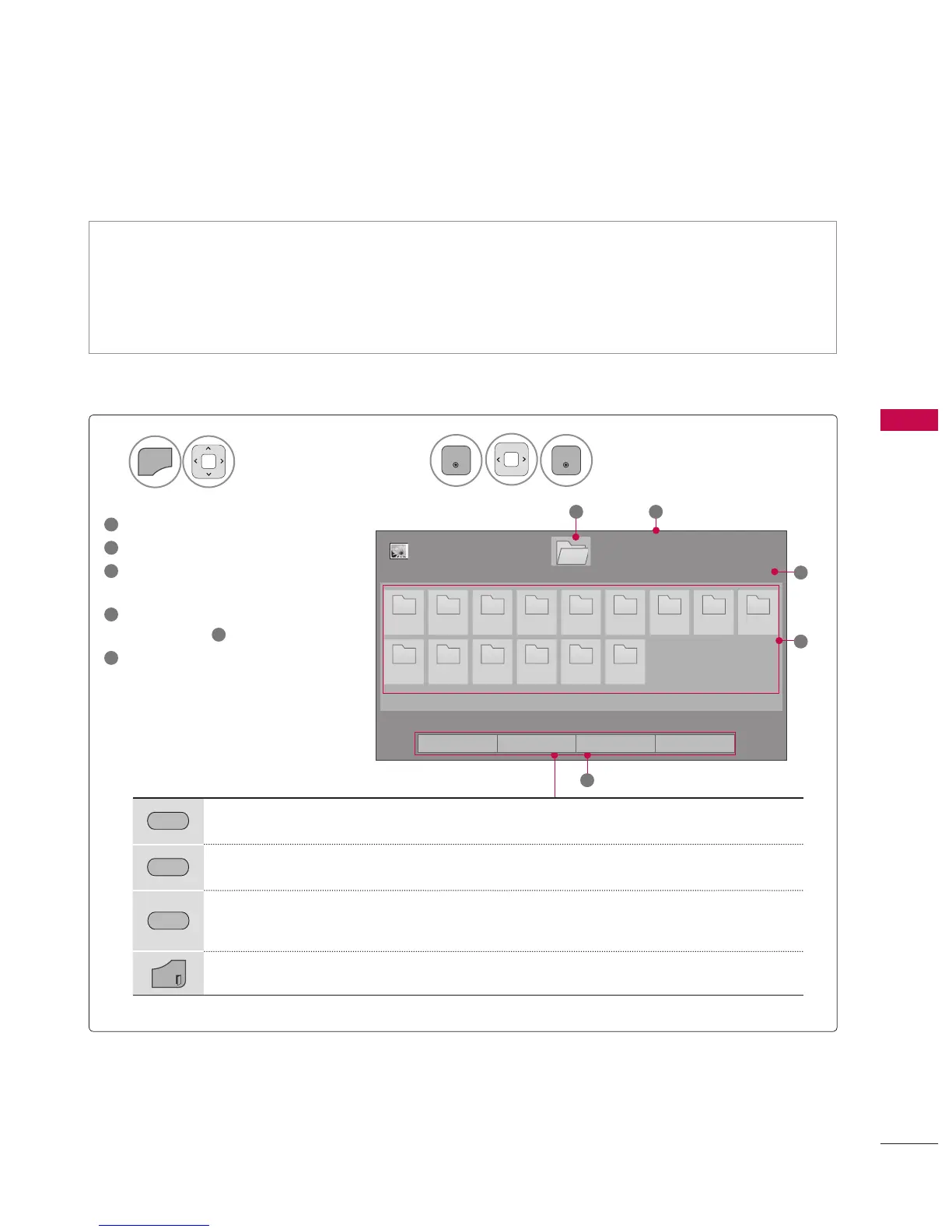
Screen Components
Supported photo file: *.JPG
Baseline: 64 pixel (width) x 64 pixel (height) to 15360 pixel (width) x 8640 pixel (height)
Progressive: 64 pixel (width) x 64 pixel (height) to 1920 pixel (width) x 1440 pixel (height)
You can play JPEG files only.
Non-supported files are displayed in the form of predefined icon.
Select MY MEDIA.
Select Photo List.
2
1
1
Moves to upper level folder
2
Current page/total pages
3
Corresponding buttons on the
remote control
4
Contents under the folder
focused on
1
5
Current page/total pages of
contents
Page 1/1
Photo List
Page 1/1
Drive1
1
5
2
3
1.EMF
10_1_Top 100
20090711 20090810
200942_Top100
20091010 20091011
Basic Test Kit
FHD HD MV Photo TS
4
USB 1 XTICK
Move Mark
Exit
GREEN
Move to Music List or Movie List.
YELLOW
Change Numbers: Changes the number or thumbnails displayed at a time.
BLUE
Allows you to mark certain files.
EXIT
Return to TV viewing.



 To Next Page