12
ASSEMBLY AND PREPARATION
ENGLISH
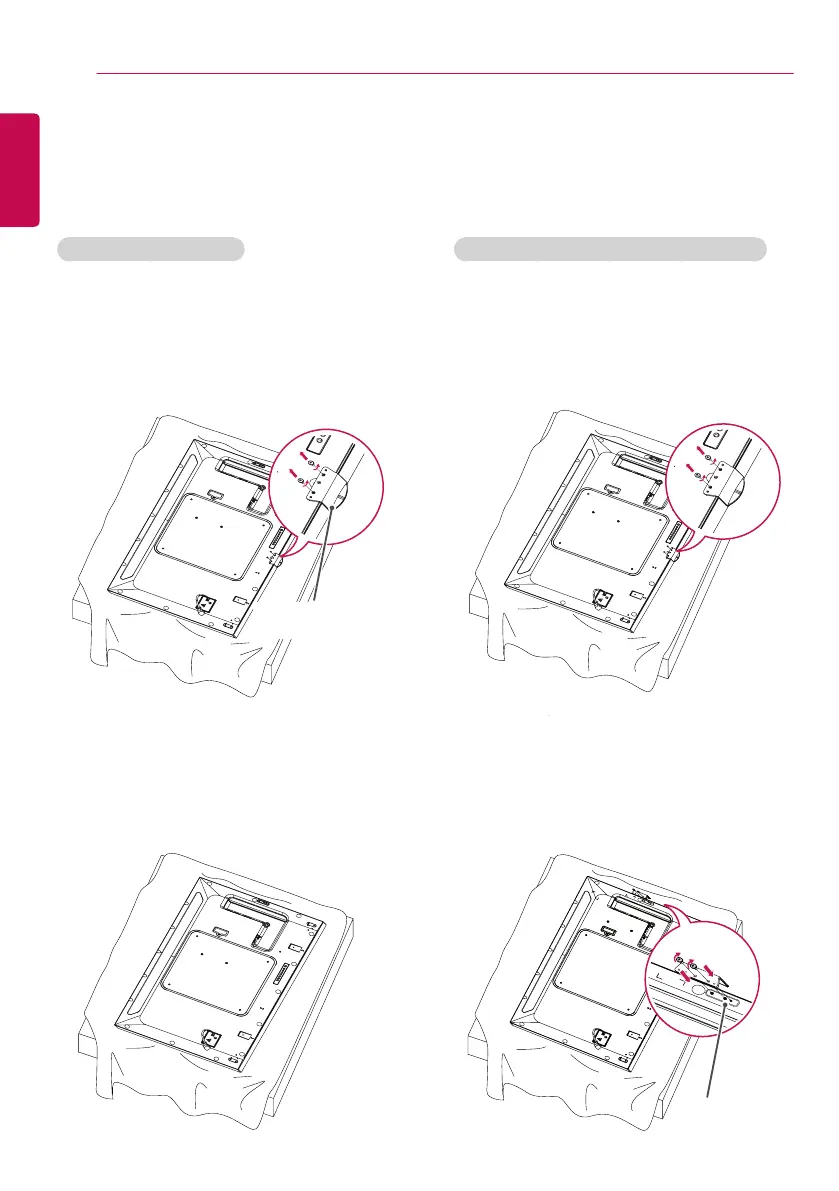
Attaching and Removing the LG Logo Bracket
- For certain models only.
- The image may be different according to the model.
Removing the LG Logo
1 Lay a clean cloth on the floor, and then put
the monitor on it with the screen face down.
Remove the two screws that secure the LG
Logo Bracket to the bottom of the rear side
of the monitor using a screwdriver.
2 After removing the screws, remove the
LG Logo. When re-attaching the LG Logo,
follow the process in reverse order.
Attaching the LG Logo on the right side
1 Lay a clean cloth on the floor, and then put
the monitor on it with the screen face down.
Remove the two screws that secure the LG
Logo Bracket to the bottom of the rear side
of the monitor using a screwdriver.
2 After removing the screws, remove the LG
Logo. Attach the LG Logo Bracket with the
two screws, aligning it with the holes at the
right side.
LG Logo Bracket
Hole


 To Next Page