20
MAKING CONNECTIONS
ENGLISH
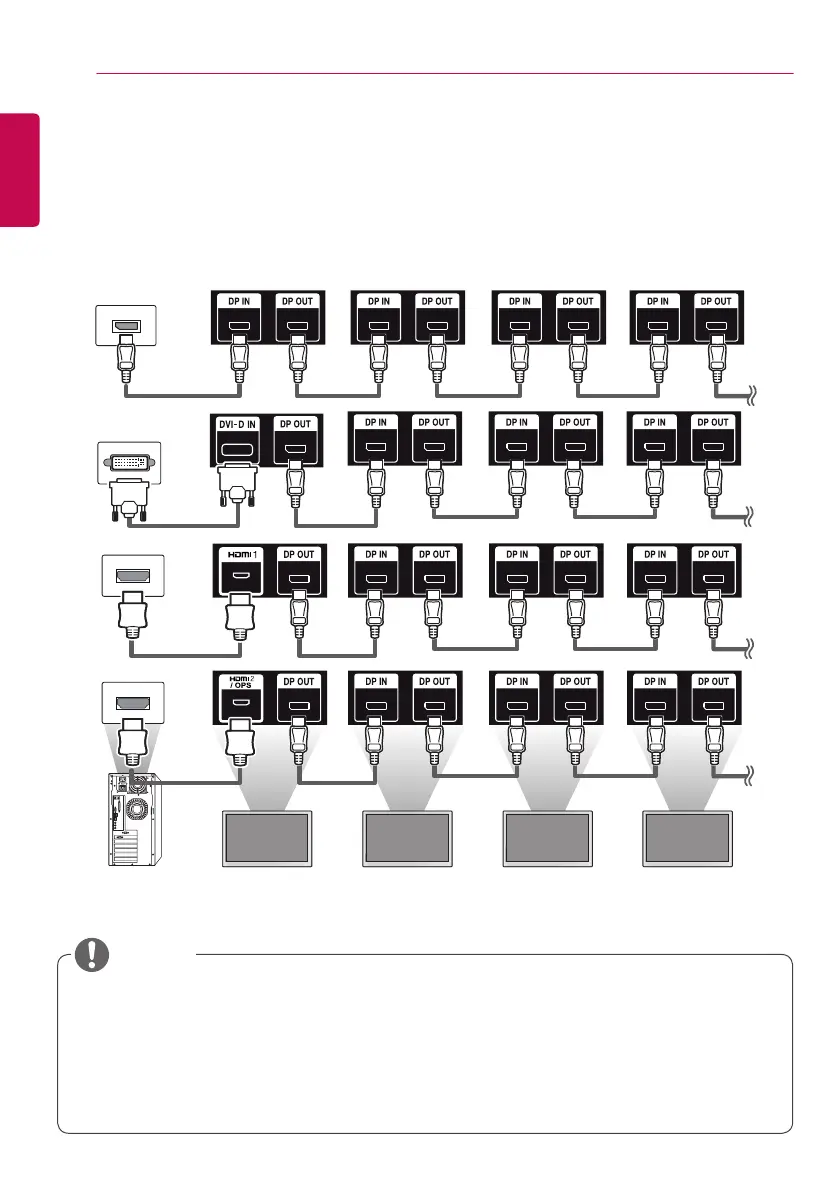
• If the signal is stable and there is no cable loss, in general, up to 100 monitors can be connected via
the DP Out port (at the recommended resolution). If you want to connect more than this number of
monitors, use a booster.
• If you set the tile mode using DVI-D or HDMI, you will not be able to watch HDCP-encrypted content.
• If the signal cable between the product and your PC is too long, make sure to use the Booster or
optical cable.
NOTE
Monitor 1 Monitor 2 Monitor 3 Monitor 4
Daisy Chain Monitors
To use different products connected to each other, connect one end of the signal input cable (DP Cable)
to the DP Out connector of Monitor 1 and connect the other end to the DP In connector of the other
product.
* DP Cable - Use a DP cable that is certified to DP1.1a (SST), DP1.2 (MST) or higher.


 To Next Page