25
ENGLISH
TO CONTROL MULTIPLE PRODUCTS
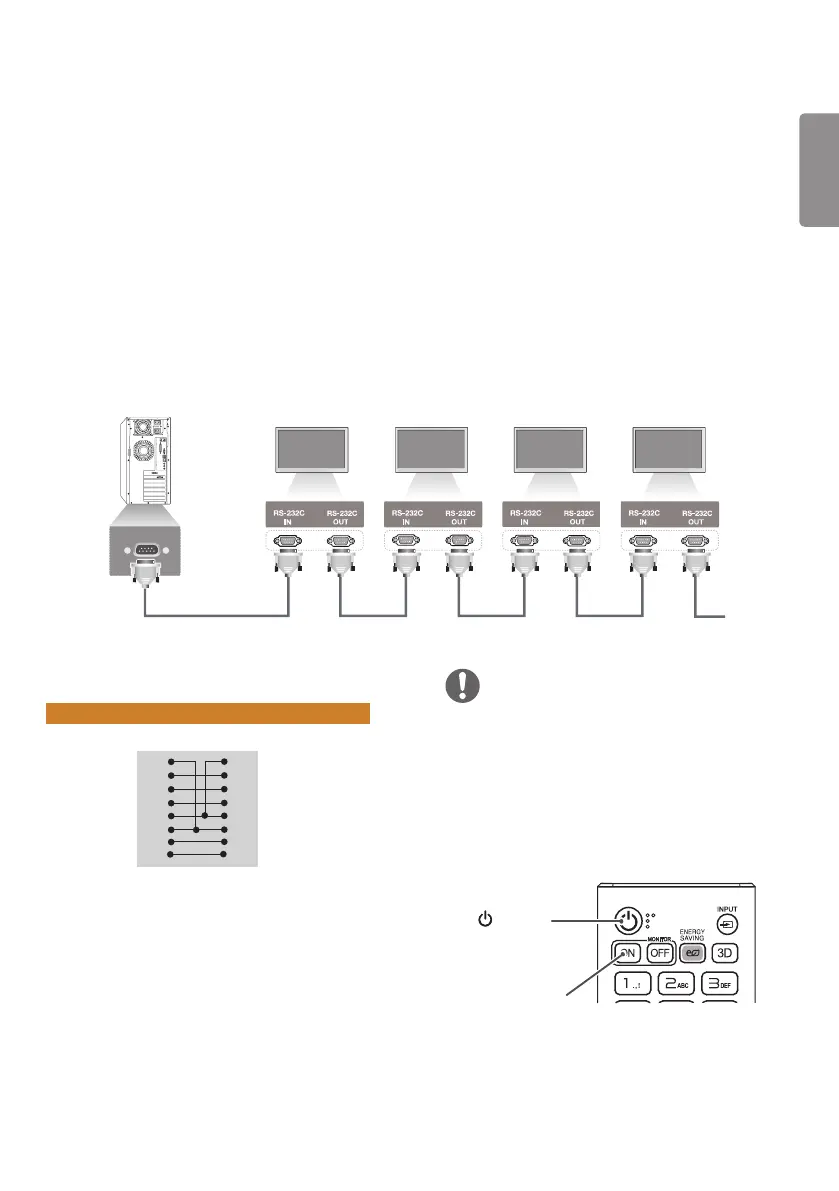
Use this method to connect several products to a single PC. You can control several products at a time by
connecting them to a single PC.
In the Option menu, the Set ID must be between 1 and 1000 without being duplicated.
Connecting the Cable
Connect the RS-232C cable as shown in the picture.
The RS-232C protocol is used for communication between the PC and product. You can turn the product on or
off, select an input source, or adjust the OSD menu from your PC.
Monitor 1 Monitor 2 Monitor 3 Monitor 4
PC
RS-232C Cable (sold separately)
Communication Parameter
Baud Rate: 9600 BPS
Data Length: 8 bit
Parity Bit: None
Stop Bit: 1 bit
Flow Control: None
Communication Code: ASCII code
Use a crossed (reverse) cable
RS-232C Configurations
8-Wire Configurations (Standard RS-232C cable)
DCD
RXD
TXD
GND
DTR
DSR
RTS
CTS
DCD
TXD
RXD
GND
DSR
DTR
CTS
RTS
PC Set
1
2
3
5
4
6
7
8
1
3
2
5
6
4
8
7
D-Sub 9 D-Sub 9
(Female) (Female)
NOTE
• When using three-wire connections (non-
standard), an IR daisy chain cannot be used.
• When monitors connected via Daisy Chain (that
controls multiple monitors) are turned off and
on successively, some monitors may not turn
on. In this case, you can turn those monitors on
by pressing the MONITOR ON button, not the
POWER button.
MONITOR ON
(POWER)


 To Next Page