ENGLISH
51
Connect
On Signage
[LG Presenter]
On PC
1 Go to www.lge.com/LGP to download the Client.
2 Install and run the downloaded Client.
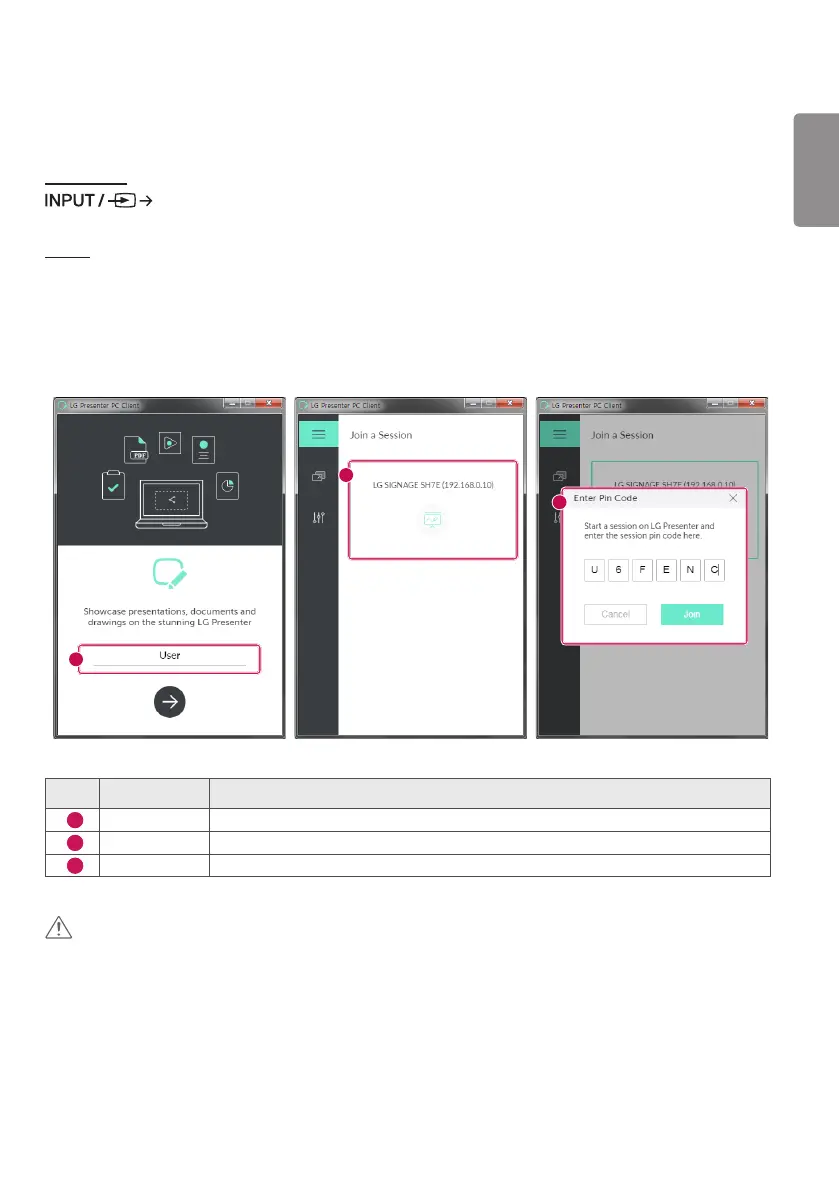
3 Enter the username you want and press the button.
4 When the list of Signage devices found in the network appears, select the one you want to connect to.
5 Enter the PIN code you see on your Signage device into the PIN code field on the Client.
1
2
3
No. Item Description
1
Name User Name
2
List of devices It shows the list of Signage devices available to connect.
3
Pin Code To connect to the Signage device, enter the PIN code shown the Signage device.
CAUTION
• The Signage device and the PC must be on the same network.
• If a specific port (UDP 1900) of your LG Signage is blocked, the LG Presenter feature will not be available.


 To Next Page