ENGLISH
53
Handover
PC1: The PC where the client currently connected to your Signage device is running.
PC2: The PC you want to connect to the Signage device connected to PC1
On PC2
1 Run the Client and search for the Signage device on the same network.
2 From the list of the Signage devices found, select the one connected to PC1.
On PC1
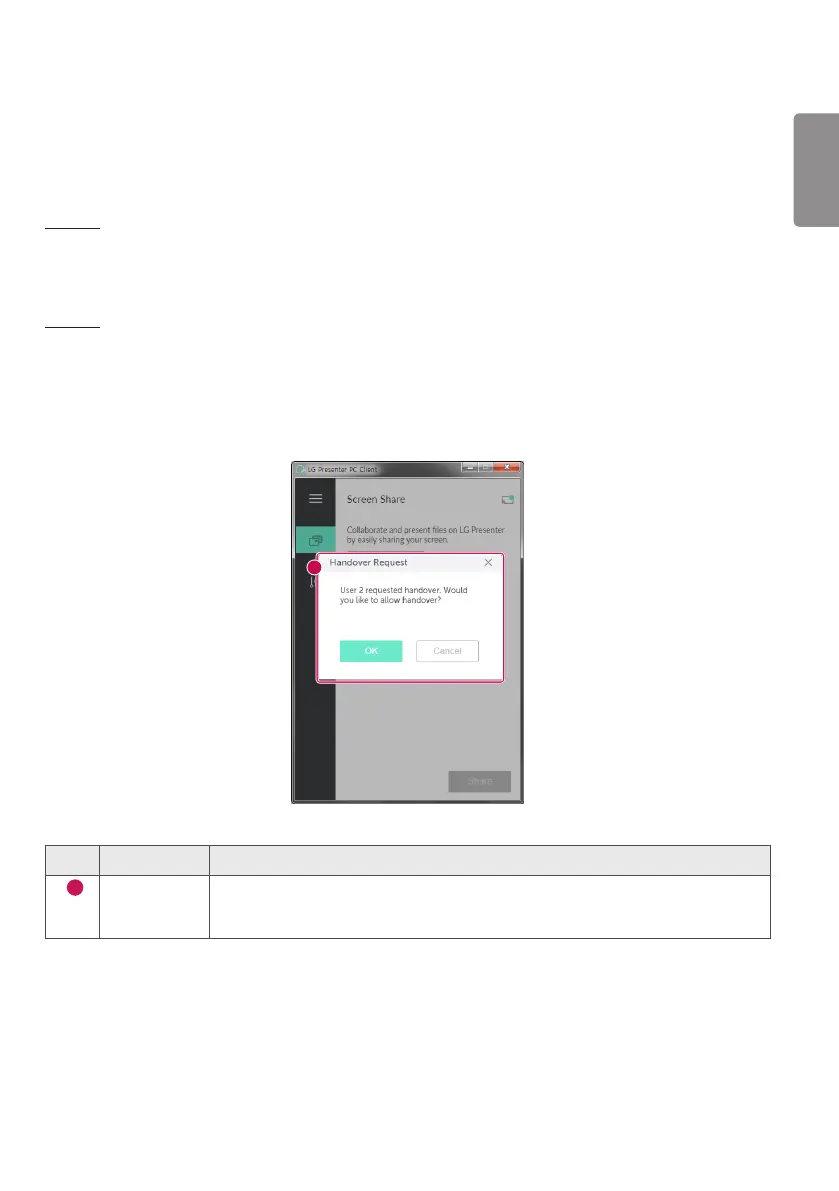
1 When the hand over request pop-up appears on PC2, select whether to approve or deny the request.
2 If you approve the request for hand over, the Signage device will be disconnected, and the Client on PC2 will be
connected to the Signage device.
3 If you deny the request for hand over, the Signage device will remain connected, so you can continue to use the
features of LG Presenter.
1
No. Item Description
1
Request for
Handover
When there is a Client currently connected to your Signage device and the Client from
another PC requests to connect to the same Signage device, you can determine whether
to approve the request.


 To Next Page