15
ENG
ENGLISH
MAKING CONNECTIONS
YourmonitorsupportsthePlug&Play*feature.
*Plug&Play:APCwillhaveabuilt-indriverfor
themonitor,noextrasoftwareisneeded.
NOTE
Connectthesignal
inputcableandtighten
itbyturningthescrews
clockwise.
Usethestandard
Macintoshadaptersince
anincompatibleadapter
isavailableinthemarket.
(Differentsignalingsystem)
Donotpressthescreenwithyourfingerfor
alongtimeasthismayresultintemporary
distortiononthescreen.
Avoiddisplayingafixedimageonthescreen
foralongperiodoftimetopreventimage
burn.Useascreensaverifpossible.
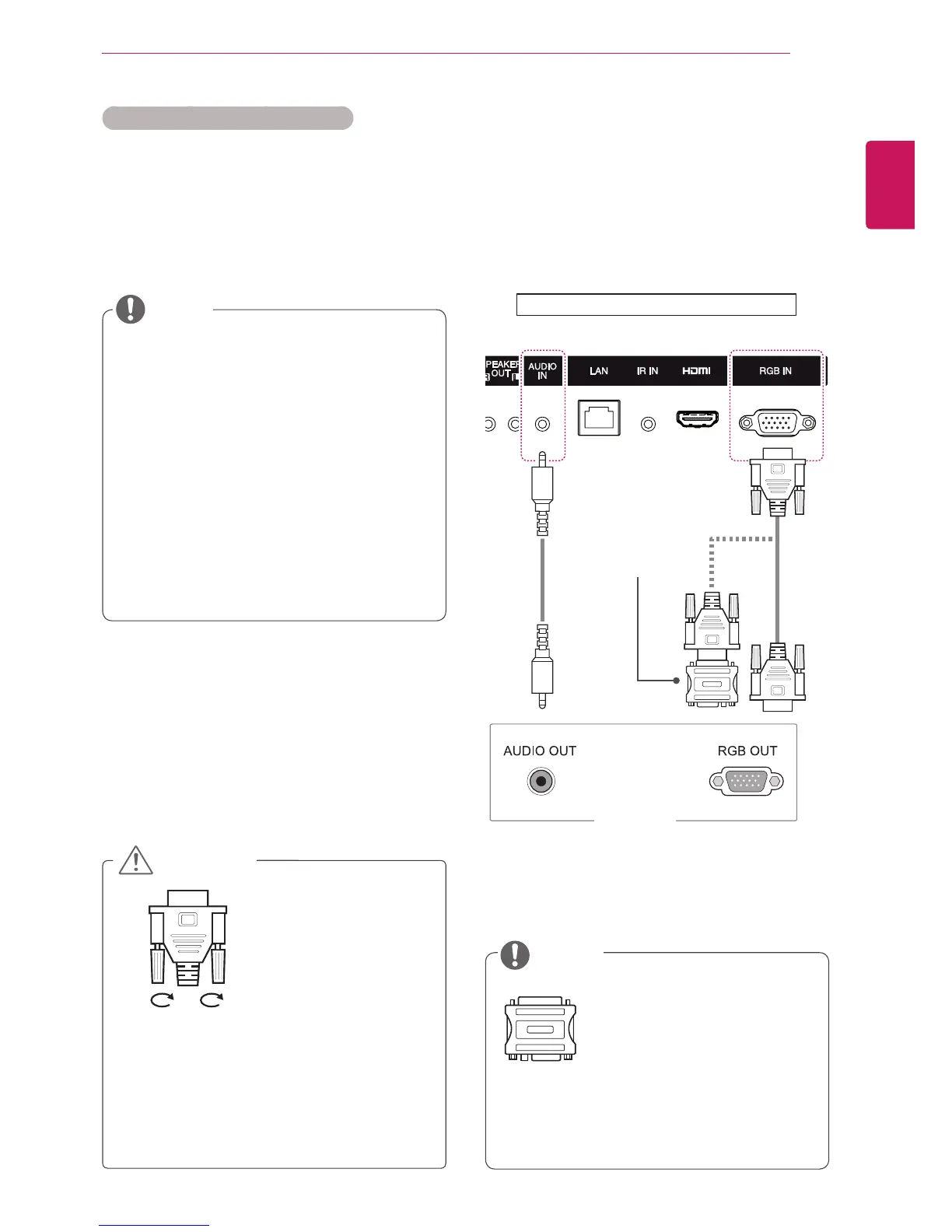
RGB Connection
TransmitsananalogvideosignalfromyourPCto
themonitor.ConnectthePCandthemonitorwith
the15-pinsignalcableasshownanfollowing
illustration.SelectRGBinput.Totransmitanaudio
signal,connectanoptionalaudiocable.
Applecomputersmayrequireanadapterto
connecttothismonitor.Callorvisittheirweb
siteformoreinformation.
ItisrecommendedyouuseanHDMI
connectionforthebestimagequality.
Useashieldedsignalinterfacecable,such
asD-sub15-pinsignalcableandDVI/HDMI
cable,withaferritecoretomaintainstandard
compliancefortheproduct.
Ifyouturnthemonitorsetonwhenthesetis
cold,thescreenmayflicker.Thisisnormal.
Somered,green,orbluespotsmayappear
onthescreen.Thisisnormal.
IfyouuseacablelongerthantheD-sub15-
pinsignalcableprovided,certainimages
mayappearblurry.
CAUTION
NOTE
Instructions for connecting to PC
PC/MAC
MacintoshAdapter
(notincluded)
(not
included)
Backoftheproduct.



 To Next Page