OPTIONAL OPERATION
ENGLISH
19
Installer Setting-Group Setting
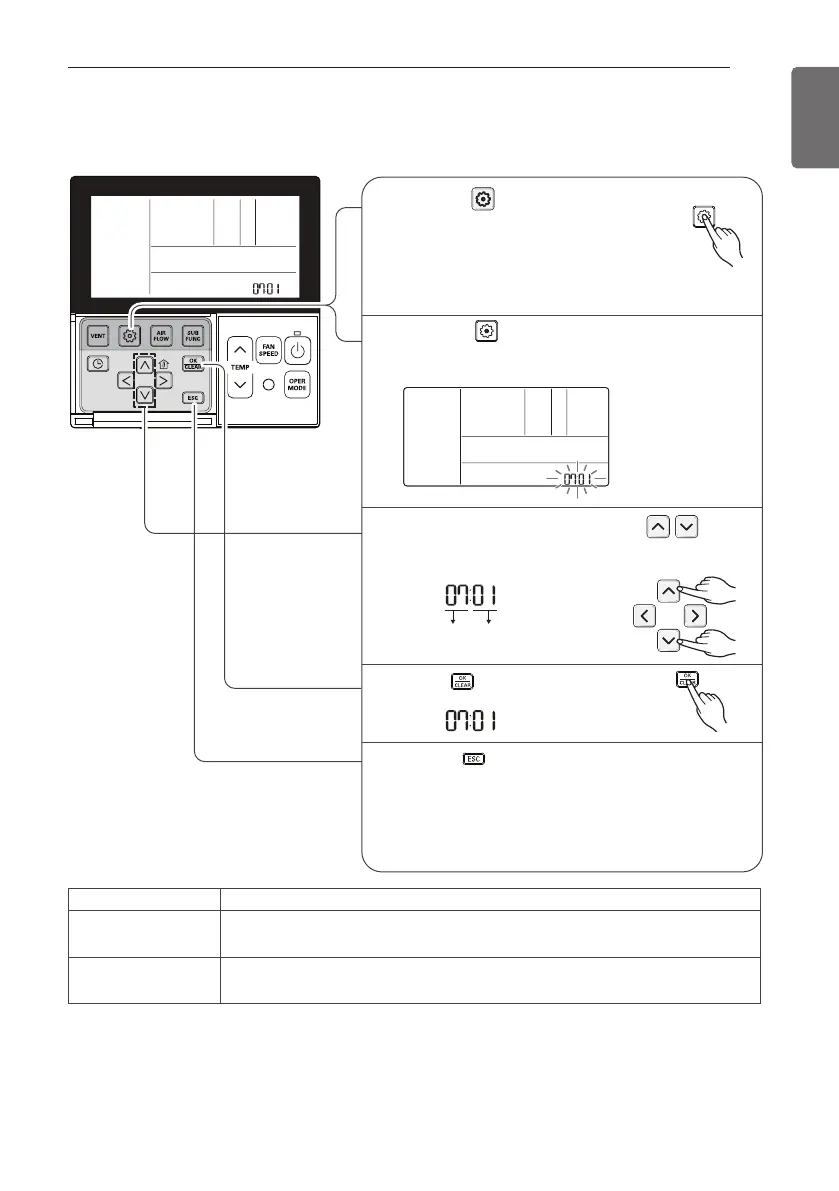
It is a function for settings in group control, or 2-remote controller control.
Function Code Master/Slave value
Select Master/ Slave by pressing
button.
(00: Slave, 01: Master)
3
Press button to save.
4
If pressing button long for 3 seconds, it
enters into remote controller setter setup
mode.
- If pressing once shortly, it enters into
user setup mode. Please press more than
3 seconds for sure.
Pressing button will exit settings mode.
❈ After setup, it automatically gets out of setup mode
if there is no button input for 25 seconds.
❈ When exiting without pressing set button, the
manipulated value is not reflected.
1
If pressing button repeatedly, it moves to
master/slave selection menu as picture below.
2
5
* Refer to the 'group control' part for details
- When controlling in groups, basic operation settings, airflow strength weak/medium/strong,
lock setting of the remote controller, time settings, and other functions may be restricted.
Remote controller Function
Master
Indoor unit operates based on master remote controller at group control.
(Master is set when delivering from the warehouse.)
Slave
Setup all remote controllers except one master remote controller to slave
at group control


 To Next Page