OPTIONAL OPERATION
ENGLISH
21
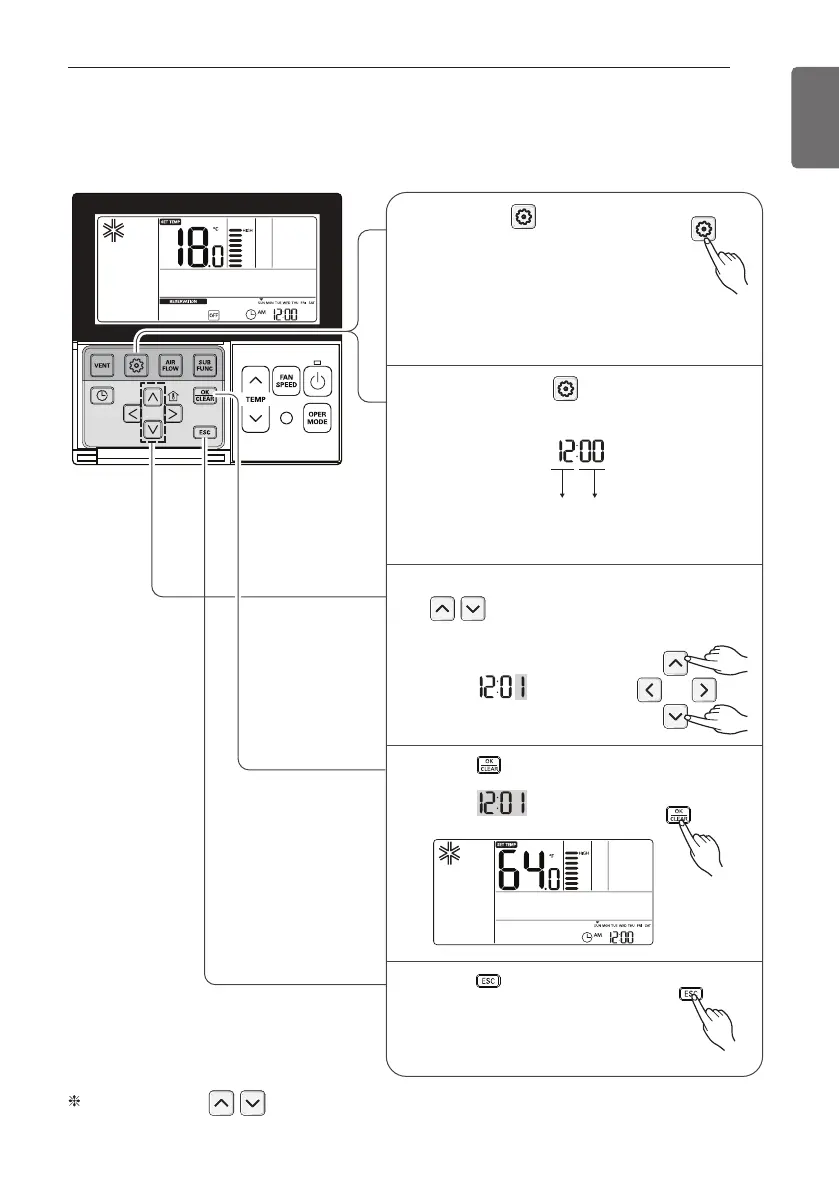
Installer Setting-Celsius / Fahrenheit Switching
This function is used for switching the display between Celsius and Fahrenheit.
(Optimized only for U.S.A)
Function Code
conversion mode value
If pressing button long for 3
seconds, it enters into remote
controller setter setup mode.
- If pressing once shortly, it enters
into user setup mode.
Please press more than 3 seconds for
sure.
1
Press button to exit or system
will automatically exit after 25
seconds without any input.
5
Repeat pressing button to select
Function code 12.
Ex) Fahrenheit Setting
2
Select Temperature unit mode by pressing
button.
(00: Celsius, 01: Fahrenheit)
3
Press button to save or release.
4


 To Next Page