37
Operation
Function
Buttons
RCA/
TUNER/
spdif/
HDMI/
USB/
PC-LINK/
Portable
BYPASS
SURROUND
DSP
ENHANCER
Listening
mode
Signal
Channels
Front L
Front R
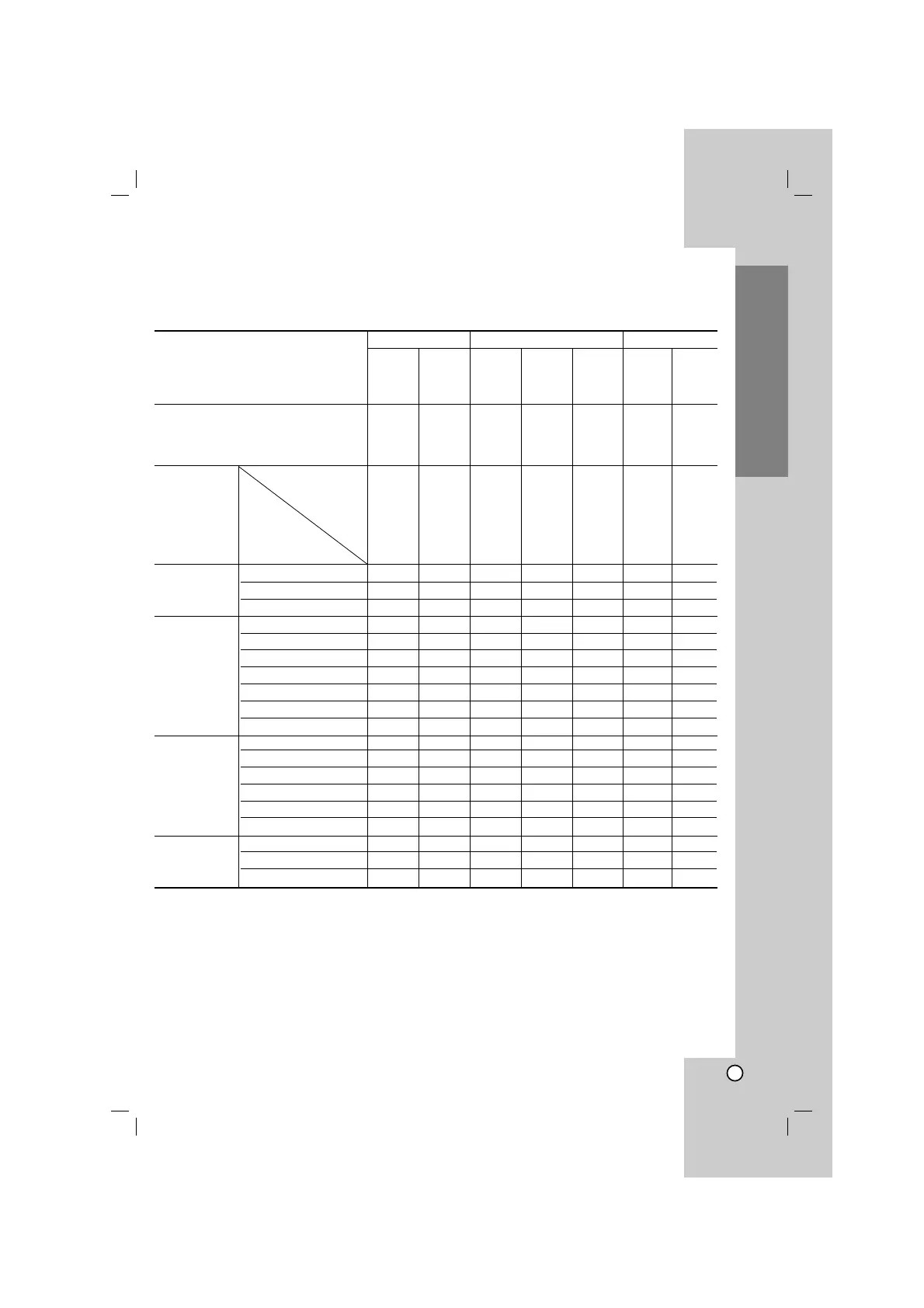
About Listening mode
The following table lists all the listening modes and shows which modes can be selected for each input signal
format.
(O: Active, X: Inactive)
DSP BYPASS O O O O O O O
STEREO O O O O O O O
PURE BYPASS O O O O O O O
PLIIx MOVIE O X O X X X X
PLIIx MUSIC O X O O O O O
PLIIx GAME O X O X X X X
Dolby D EX X X X O O X X
Neo:6 CINEMA O X O X X X X
Neo:6 MUSIC O X O X X X X
MATRIX 6.1 X X X X X O X
CINEMA O O O O O O O
BIG HALL O O O O O O O
CLUB O O O O O O O
JAZZ O O O O O O O
ARENA O O O O O O O
STADIUM O O O O O O O
VSM-3D O X O X X X X
VSM-ES X X X O X O X
MUSIC ENHANCER O X X X X X X
PCM
DTS
Sound Format
Analog/
PCM/
MP3/
WMA
Dolby Digital
Multi
Channel
HDMI
No
surround
Surround
DD-EX
3/3.1
3/2.1
(96/24)
ES6.1
3/3.1
spdif/
HDMI
spdif/
HDMI
spdif/
HDMI
spdif/
HDMI
spdif/
HDMI
Front L
Front R
Front L/R
Center
Rear L/R
Front L/R
Center
Rear L/R
Rear back
Front L/R
Center
Rear L/R
Rear back
Note
•
If you press the SURROUND to select the surround mode when you connect the
headphone, the mode is
changed to bypass mode.
-“HP DOWNMIX” appears in the display window.
•
If you select the PURE BYPASS mode by pressing the BYPASS on the remote control repeatedly during playing
the DD-EX, the “EX” indicator does not appear in the display and outputs the 5.1 ch source except for surround
center speaker.
Front L/R
Center
Rear L/R
Front L/R
Center
Rear L/R
Rear back



 To Next Page