10
DVD Mode
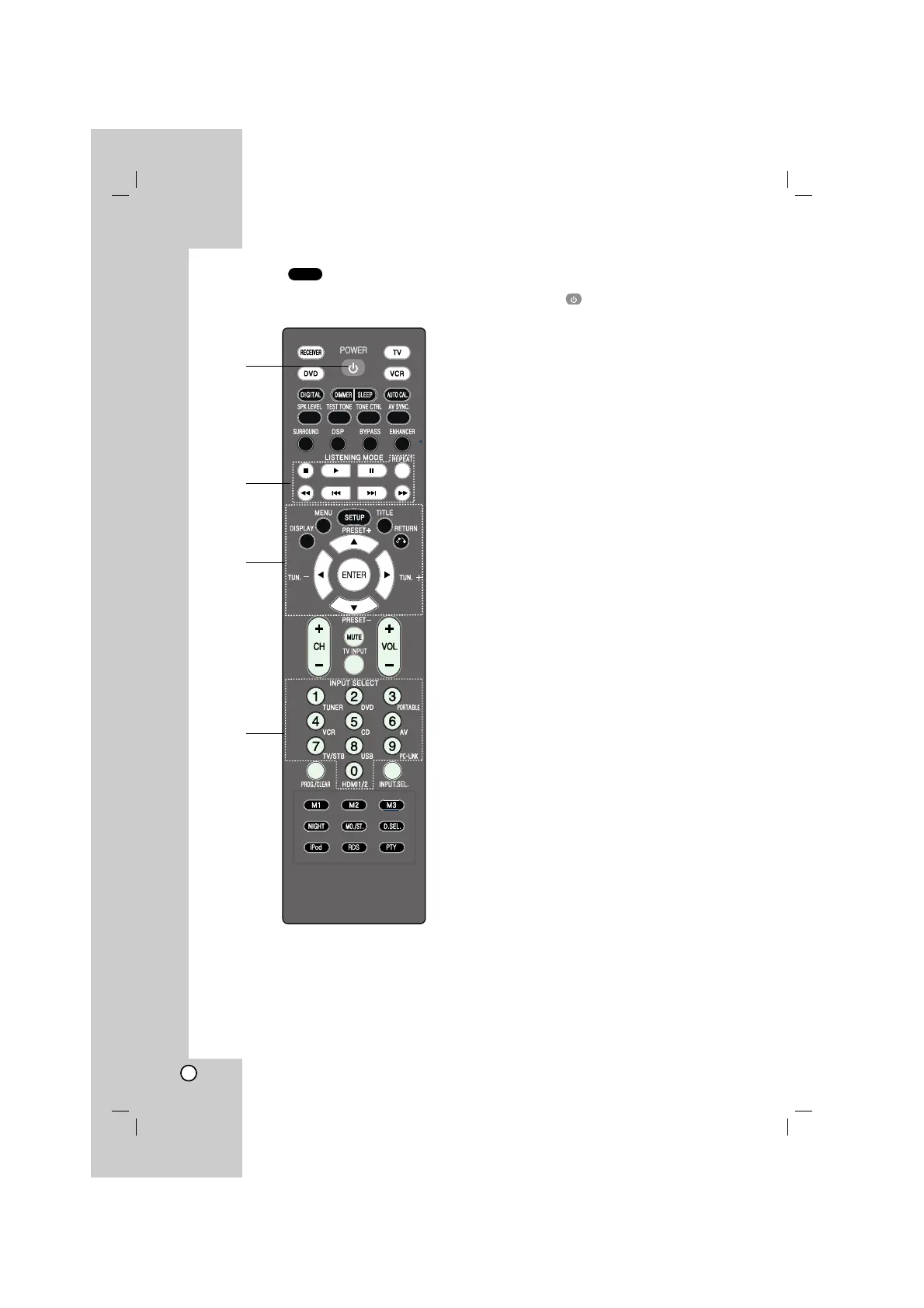
To set the remote control to DVD mode, press
DVD.
1. POWER ( )
Switches the unit ON and OFF.
2. STOP (
xx
)
Stops playback.
PLAY (B)
Starts playback.
PAUSE(
XX
)/STEP
Pauses playback temporarily. Press this button
repeatedly to play Frame-by-Frame.
REPEAT
Repeats chapter, track, title or all.
SCAN(
bbbb
/
BBBB
)
Searches backward or forward.
SKIP (
..
/
>>
)
Moves to the next or previous chapter or track.
3. DISPLAY
Accesses On-Screen display.
MENU
Access the menu on a disc.
SETUP
Accesses or removes setup menu.
TITLE
Displays the disc’s title menu, if available.
RETURN
Returns to the previous menu.
b/B/v/V (left/right/up/ down)
Selects an option in the menu.
ENTER
Acknowledges the menu selection.
4. 0-9 numerical buttons
Selects numbered options in a menu.
DVD
1
2
3
4


 To Next Page