EasyManua.ls Logo

LG AR702TT - Connecting Analog Audio Components; Analog Audio Connections; Composite Video Connections

LG AR702TT
46 pages
Print Icon
To Next Page IconTo Next Page
To Previous Page IconTo Previous Page
Loading...
14
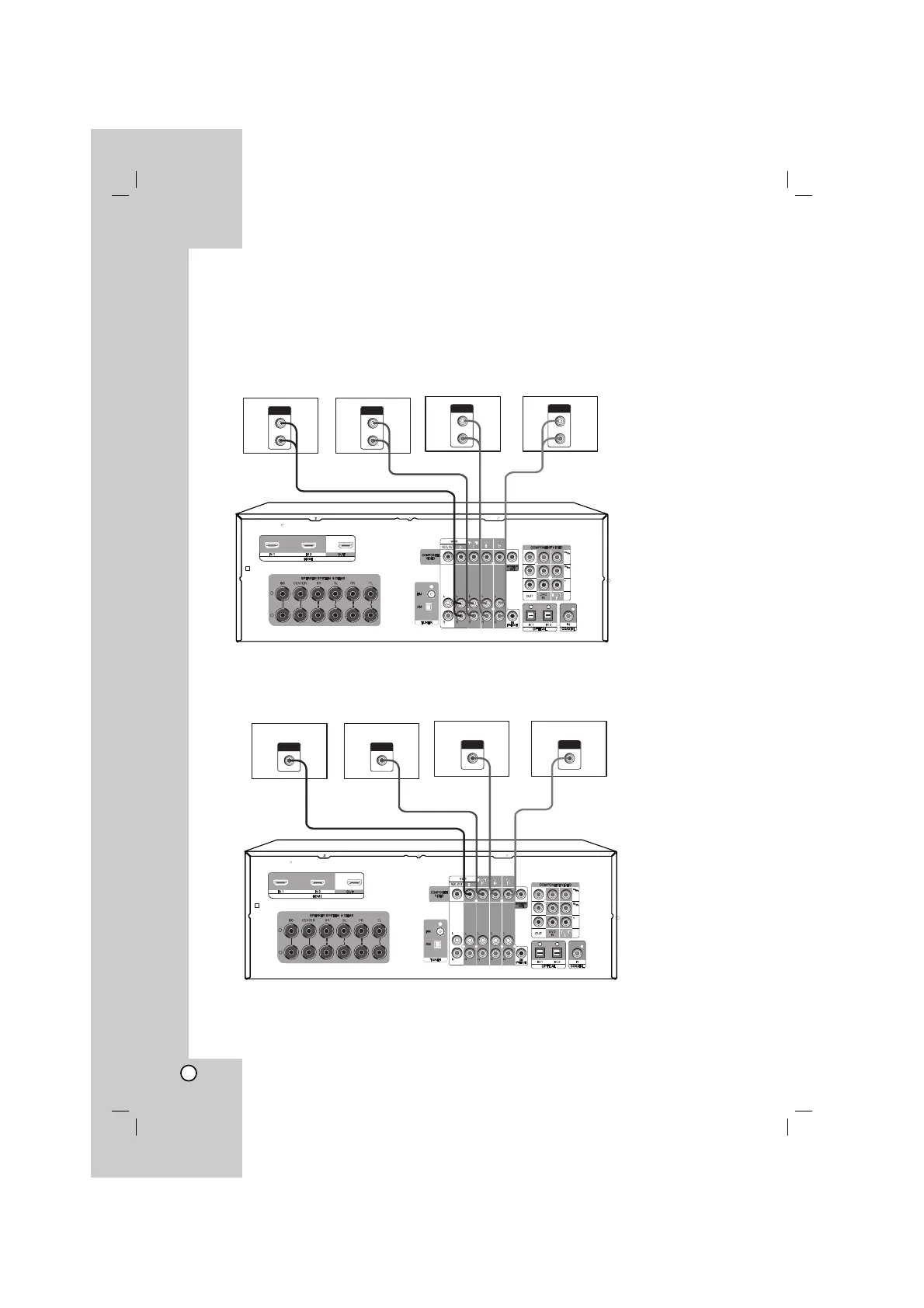
Connecting components with analog audio jacks
Connecting audio components
1. Connect the audio jacks with analog audio cable.
For details of the required cables, see the page 4.
2. Connect the video jacks with composite video cable.
For details of the required cables, see the page 4.
3. Select the input source to play the component.
For details, see the page 25.

AUDIO OUT
L
R
VCR
AUDIO OUT
L
R
DVD player
AUDIO OUT
L
R
CD player
AUDIO OUT
L
R
Satellite tuner (or
Set top box etc.)
+
-
VCR DVD player CD player
Satellite tuner (or
Set top box etc.)
VIDEO INPUT
VIDEO INPUT
VIDEO INPUT
VIDEO INPUT
+
-

Table of Contents