Installation Manual 63
ENGLISH
Electrical Wiring
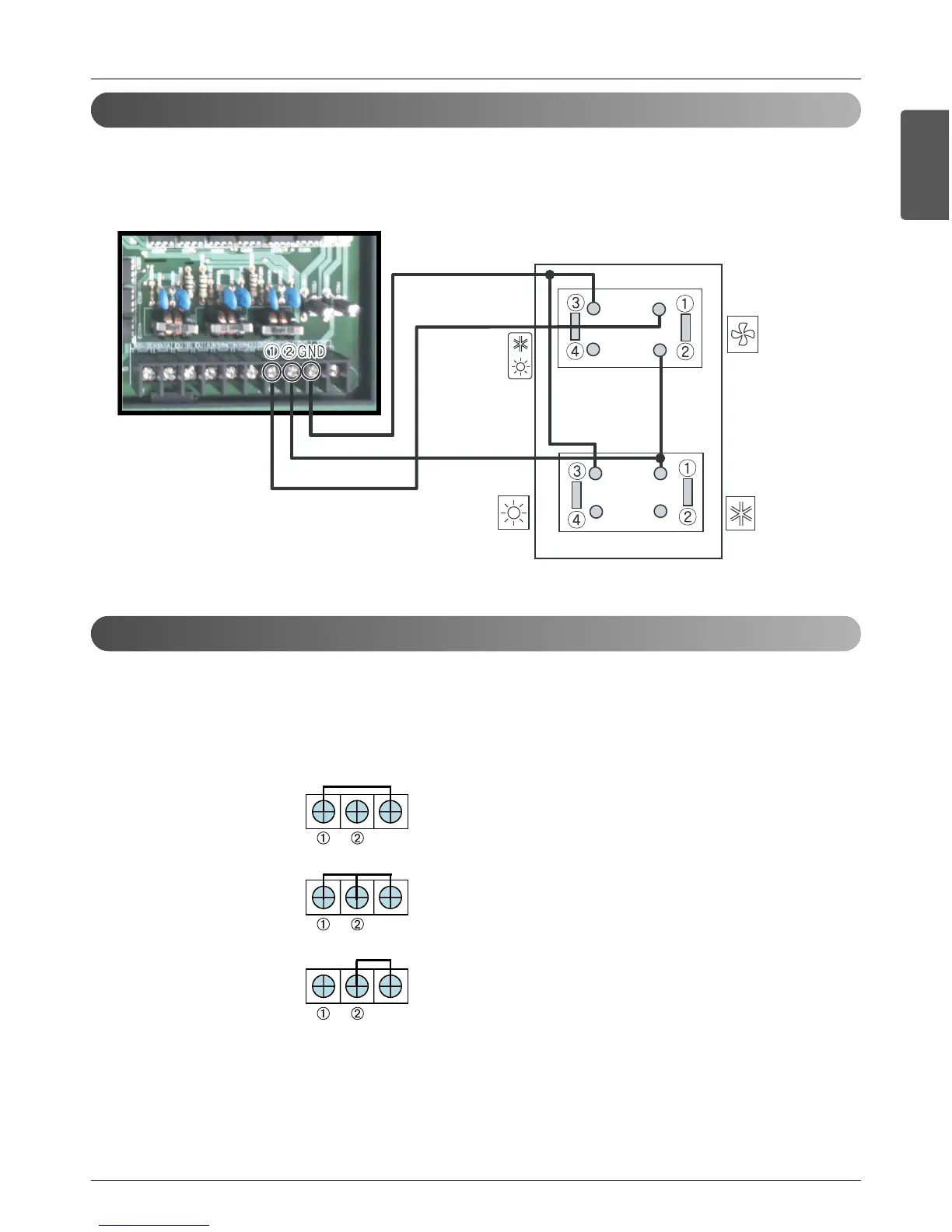
Outside unit Dry Contact installation and connection
Mode setting without Cool/Heat Selector
• Connect wires as below figure at the hole of backside of Outside Unit Dry Contact.
• Insert the wire in the connection hole pushing the "Push" button.
• Setting Main PCB Dip SW of Master Outside Unit.
In case of no Cool/Heat Selector, connect signal terminal block as below figure And description.
Connect signal terminal block as below figure and description.
- How to set mode without Cool/Heat Selector
• Cooling Mode Setting
¿ ‘ GND Connection
¡ ‘ Off (Open)
• Heating Mode Setting
¿ ‘ GND Connection
¡ ‘ GND Connection
• Fan Mode Setting
¿ ‘ Off (Open)
¡ ‘ GND Connection





 To Next Page