41Operation
Operation
4
Playing a movie fi le
and VR disc
You can play DVD-RW discs that are recorded
in Video Recording (VR) format and movie les
contained in a disc/USB device.
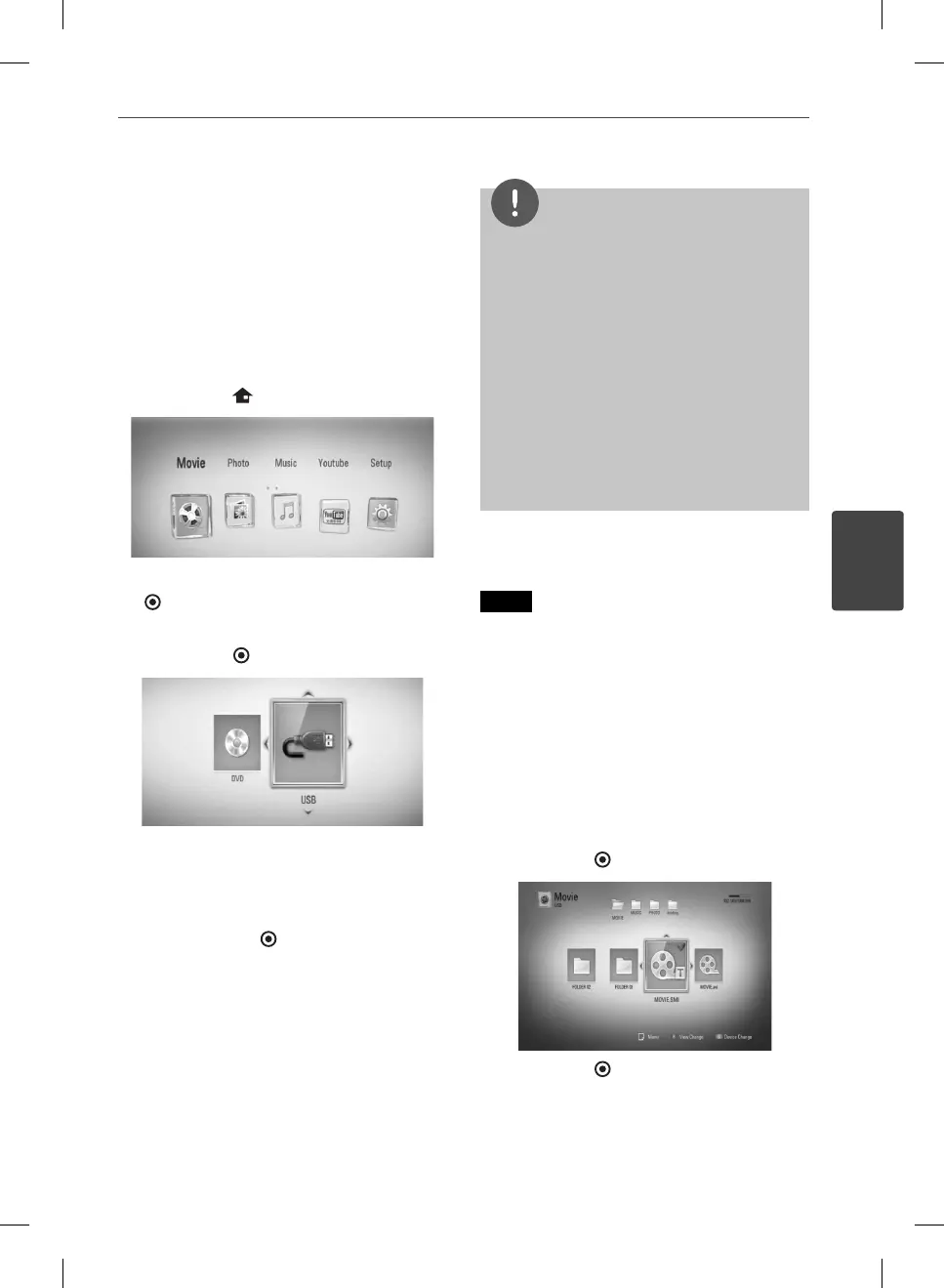
1. Press HOME (
).
2. Select [Movie] using
I
/
i
, and press ENTER
( ).
3. Select [Disc] or [USB] option using
I
/
i
, and
press ENTER (
).
This step is needed only when a disc and a
USB device is connected simultaneously to
this unit.
4. Select a le using
U
/
u
/
I
/
i
, and press
B
(PLAY) or ENTER ( ) to play the le.
NOTE
The le requirements are described on page 10.
You can use various playback functions. Refer to
pages 31-39.
Un nalized DVD VR format discs may not be
played in this player.
Some DVD-VR discs are made with CPRM data
by DVD RECORDER. This unit cannot support
these kinds of discs.
What is CPRM?
CPRM is a copy protection system (with
scramble system) only allowing the recording of
‘copy once’ broadcast programs. CPRM stands
for Content Protection for Recordable Media.
•
•
•
•
Selecting a subtitle fi le
MOVIE
If a movie le name and the subtitle le
name are the same, subtitle le is played
automatically when playing the movie le.
If the subtitle le name is di erent with the
movie le name, you need to select the subtitle
le on the [Movie] menu before playing the
movie.
1. Use
U
/
u
/
I
/
i
to select the subtitle le you
wish to play in the [Movie] menu.
2. Press ENTER (
).
Press ENTER ( ) again to deselect the
subtitle le. Selected subtitle le will be
displayed when you play the movie le.
BD561-P-BGBRLLK-ENG.indd 41BD561-P-BGBRLLK-ENG.indd 41 2010.1.13 6:17:47 PM2010.1.13 6:17:47 PM



 To Next Page