42 Operation
Operation
4
NOTE
If you press
x
(STOP) during playback, the subtitle
selection is cancelled.
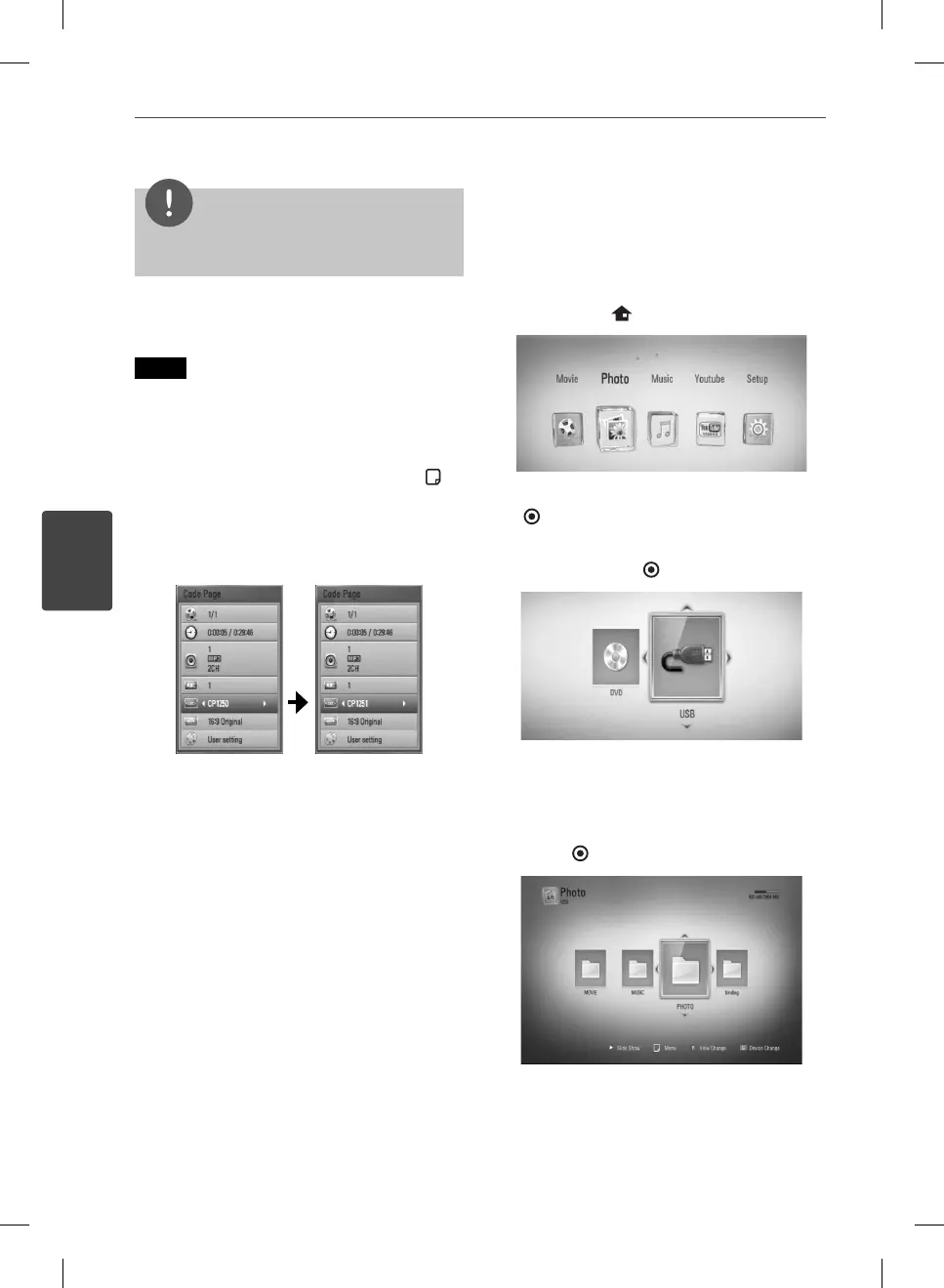
Changing subtitle code page
MOVIE
If the subtitle is not displayed properly, you
can change the subtitle code page to view the
subtitle le properly.
1. During playback, press INFO/DISPLAY (
) to
display the On-Screen display.
2. Use
U
/
u
to select the [Code Page] option.
3. Use
I
/
i
to select desired code option.
4. Press RETURN (
O
) to exit the On-Screen
display.
Viewing a photo
You can view photo les using this player.
1. Press HOME (
).
2. Select [Photo] using
I
/
i
, and press ENTER
( ).
3. Select the [Disc] or [USB] option using
I
/
i
,
and press ENTER (
).
This step is needed only when a disc and a
USB device is connected simultaneously on
this unit.
4. Select a le using
U
/
u
/
I
/
i
, and press
ENTER (
) to view the photo in full screen.
BD561-P-BGBRLLK-ENG.indd 42BD561-P-BGBRLLK-ENG.indd 42 2010.1.13 6:17:48 PM2010.1.13 6:17:48 PM



 To Next Page