Connecting18
Connecting
2
Connecting to an
Amplifier
Make one of the following connections, depending
on the capabilities of your existing equipment.
y
HDMI Audio connection (page 18)
y
Digital Audio connection (page 19)
y
2CH Analog Audio connection (page 19)
Since many factors aect the type of audio output,
see “Audio Output Specications” for details (page
70).
About Digital Multi-channel sound
A digital multi-channel connection provides the
best sound quality. For this, you need a multi-
channel Audio/Video Receiver that supports one
or more of the audio formats supported by your
player. Check the logos on the front of the Audio/
Video receiver and the manual. (PCM Stereo, PCM
Multi-Ch, Dolby Digital, Dolby Digital Plus, Dolby
TrueHD, DTS and/or DTS-HD)
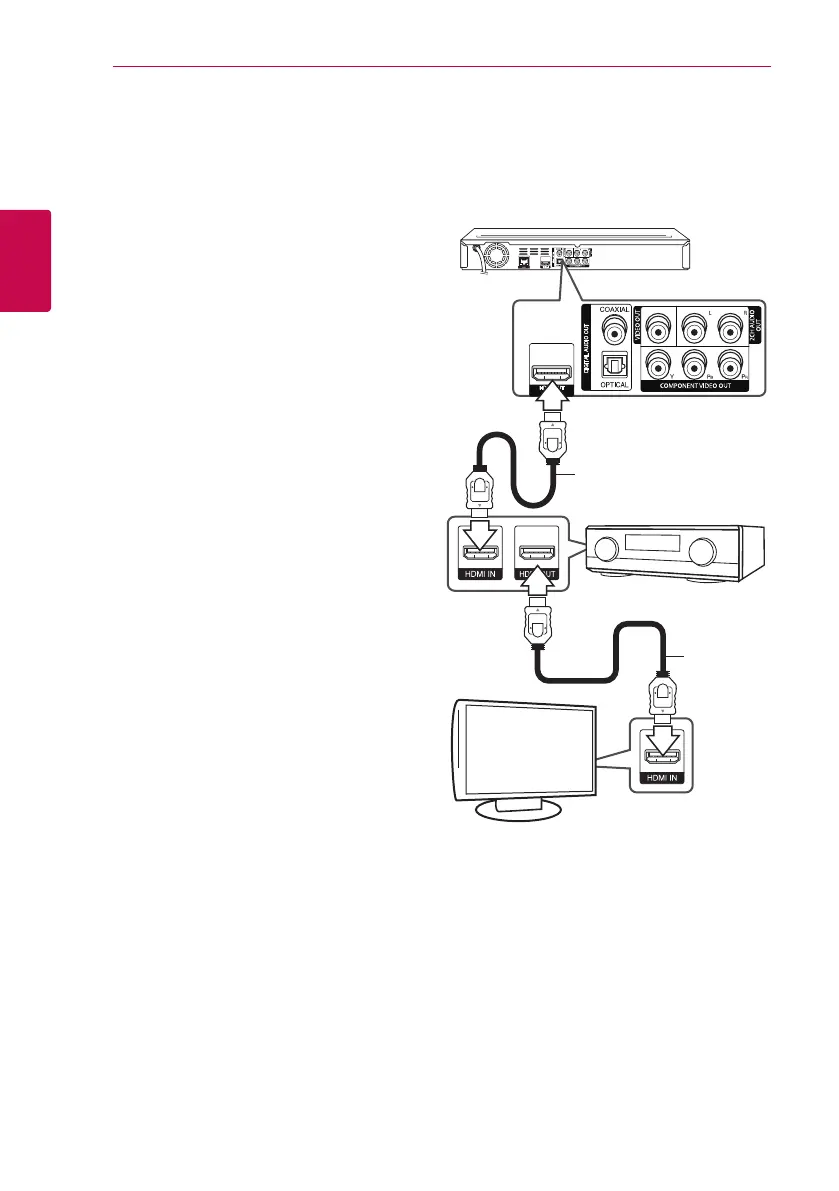
Connecting to an Amplifier via
HDMI Output
Connect the player’s HDMI OUT jack to the
corresponding in jack on your amplier using a
HDMI cable.
HDMI cable
HDMI cable
TV
Receiver/Amplier
Connect the amplier’s HDMI output jack to HDMI
input jack on your TV using a HDMI cable if your
amplier has HDMI output jack.
You will need to activate the player’s digital output.
(See “[AUDIO] Menu” on page 28)
Rear of the unit


 To Next Page