Operating40
Operating
4
Searching content in the hard
disk drive by entering file
name
If you are having diculties nding content in the
hard disk drive, you can search for the content by
entering keyword with the virtual keyboard
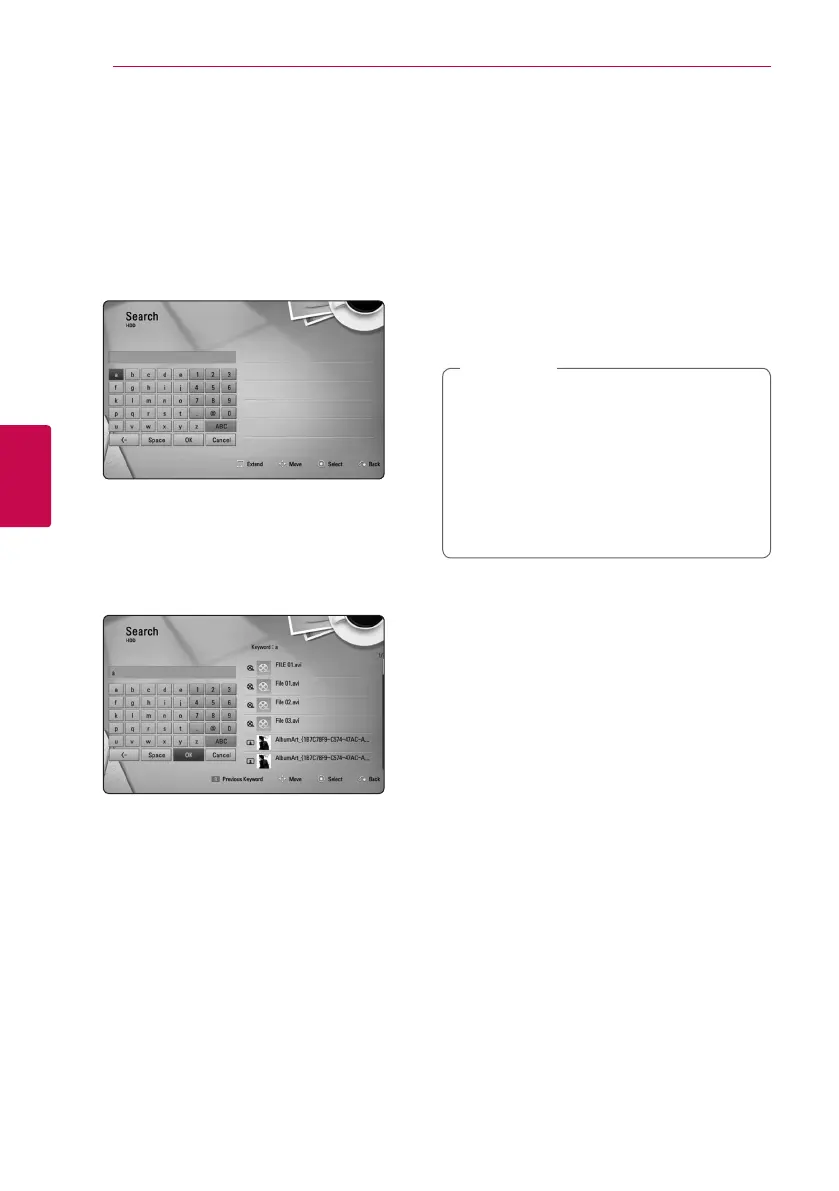
1. On the [Movie], [Photo], [Music] or Home menu,
press SEARCH to display the virtual keyboard.
2. Use
W/S/A/D
to select letters then press
ENTER (
b
) to conrm your selection on the
virtual keyboard.
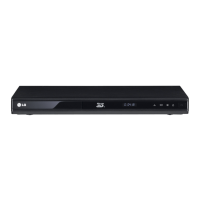
3. When you nish entering the keyword, select
[OK] and press ENTER (
b
) to display search
result.
4. Press
A/D
repeatedly until the search result
is selected, and use
W/S
to select a desired
content.
5. Press ENTER (
b
) to play the content.
Resume playback
eroyt
u
The unit records the point where you pressed the
Z
(STOP) depending on the disc.
If “
MZ
(Resume Stop)” appears on the screen briey,
press
d
(PLAY) to resume playback (from the scene
point).
If you press
Z
(STOP) twice or unload the disc,
“
Z
(Complete Stop)” appears on the screen. The unit
will clear the stopped point.
y
The resume point may be cleared when a
button is pressed (for example;
1
(POWER),
B
(OPEN/CLOSE), etc).
y
On BD-ROM discs with BD-J, the resume
playback function does not work.
y
If you press
Z
(STOP) once during BD-ROM
interactive title playback, the unit will be in
Complete Stop mode .
,
Note


 To Next Page