Operating 47
Operating
4
Using the Photo Library
The player oers Photo Library menu for the photos
stored in the internal hard disk drive.
1. Press HOME (
n
).
2. Select [Photo] using
A/D
, and press ENTER
(
b
).
3. Select the [HDD] using
W/S
, and press ENTER
(
b
).
4. Press INFO/DISPLAY (
m
) to display the option
menu.
5. Use
W/S
to select [Library mode] option, and
press ENTER (
b
) to display the [Library] menu.
If you want to return to the directory mode,
press INFO/DISPLAY (
m
) and select [Directory
mode] and press ENTER (
b
).
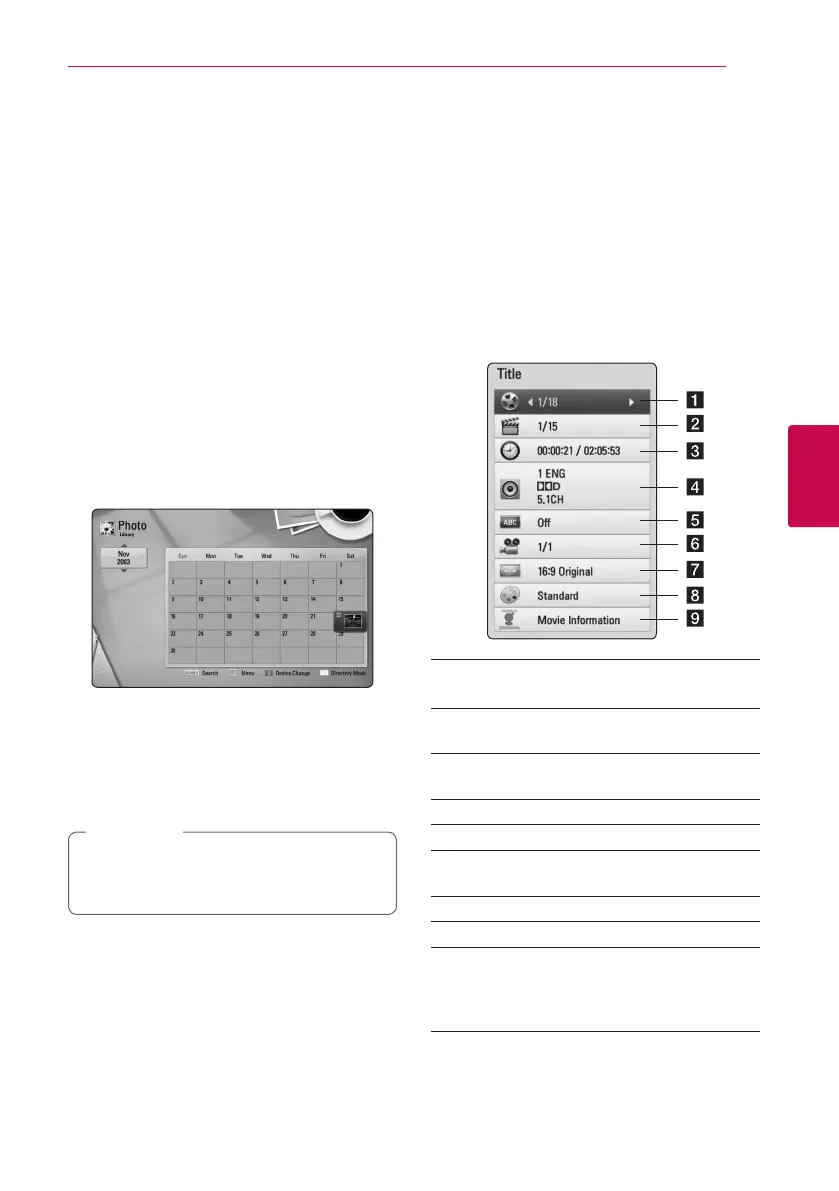
6. Photo les stored in the internal hard disk drive
are sorted by the date when original image was
taken and displayed in the calendar.
7. Use
W/S/A/D
to select a date, and press
ENTER (
b
) to display photos created in that
date.
8. Use
W/S/A/D
to select a photo le, and
press ENTER (
b
) to display the photo in full
screen.
A photo le may not be displayed in photo
library mode, if the photo le does not have
the information of taken date.
,
Note
On-Screen display
You can display and adjust various information and
settings about the content.
Displaying content information
on-screen
eroy
1. While playback, press INFO/DISPLAY (
m
) to
show various playback information.
a Title – current title number/total number of
titles
b Chapter – current chapter number/total
number of chapters
c Time – elapsed playing time/total playback
time
d Audio – selected audio language or channel
e Subtitle – selected subtitle.
f Angle – selected angle/total number of
angles
g TV Aspect Ratio – selected TV aspect Ratio
h Picture Mode – selected picture mode
i Movie Information – Select this option and
press ENTER (
b
) to display movie information
from Gracenote Media Database (BD-ROM/
DVD only).


 To Next Page