30 Installation
Installation
3
Settings for Digital TV
To use DTV functions, this recorder needs some
settings in advance.
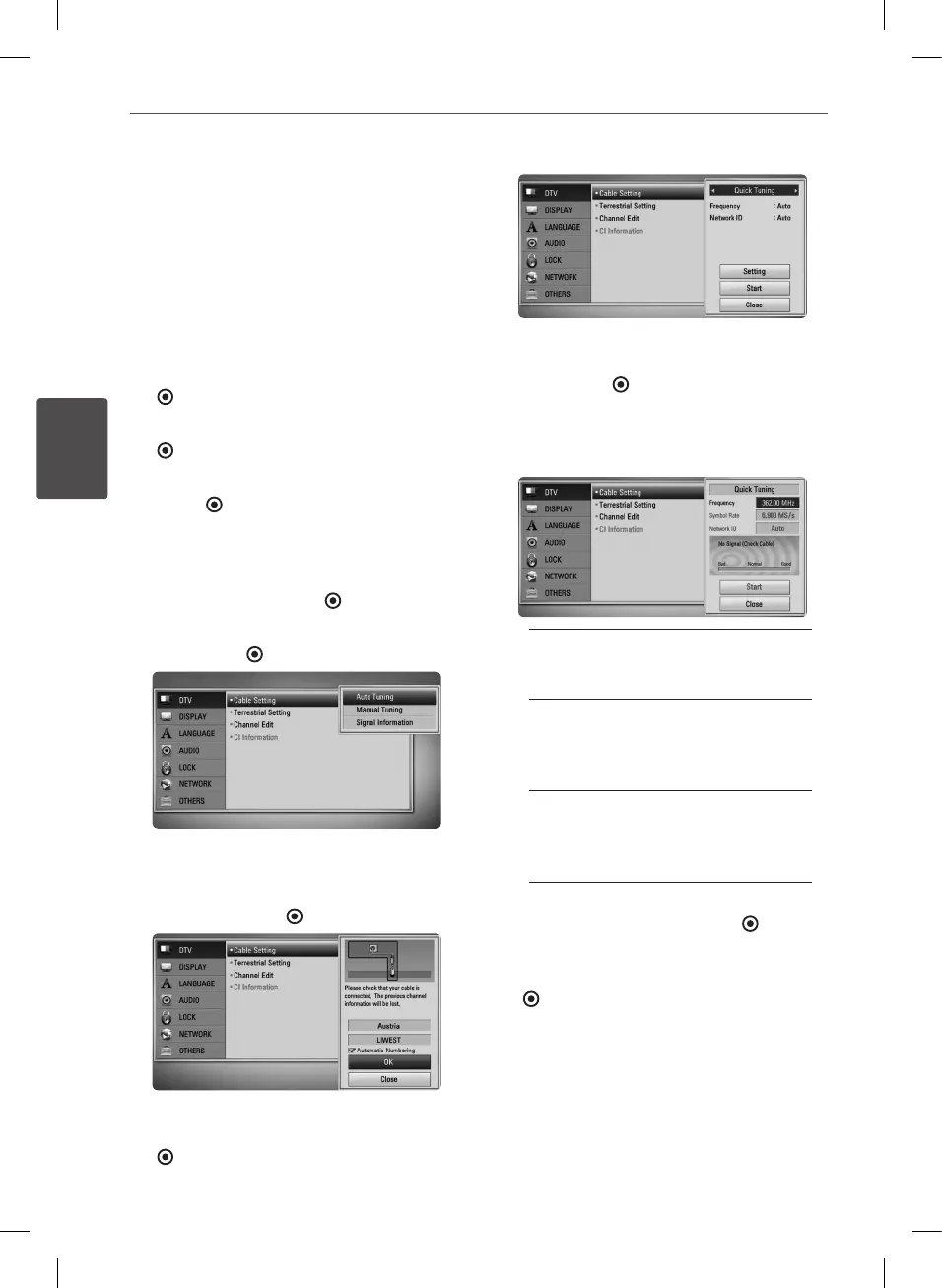
Cable Setting (Auto Tuning)
1. Press HOME.
2. Use
I
/
i
to select [Setup], and press ENTER
( ).
3. Use
U
/
u
to select [DTV], and press ENTER
( ).
4. Use
U
/
u
to select [Cable Setting], and press
ENTER ( ).
5. Input the password using numerical
buttons.
If you have not set your password yet, input
“1234” and press ENTER ( ).
6. Use
U
/
u
to select the [Auto Tuning] and
press ENTER ( ).
7. Use to select a country or automatic
numbering option and then use
U
/
u
/
I
/
i
to select [Automatic Numbering].
Then press ENTER ( ).
8. Use
I
/
i
to select an option among [Quick
Tuning] or [Full Tuning]], and press ENTER
( ).
If you want to set the additional Quick
Tuning, use
U
/
u
to select the [Setting], and
press ENTER ( ).
Unlike typical Tuning, Quick Tuning has
Network ID setup function in Frequency, so
you can search a Channel quickly and easily.
[Frequency] – Frequency including All
of the information channels.
Frequency matches the Network ID.
[Symbol rate] – Function to match
Operator’s service bit rate.
Depending on Demod performance,
This function is unavailable.
[Network ID] – Essential information
to getting entire channel Frequency
and TS ID. Essential information for
comprising entire Cable channel.
Select [Close] and press ENTER ( ) to stop
the scanning programmes.
9. Use
U
/
u
to select [Start], and press ENTER
( ) to begin the channel search.
BD582CC-P.BAUTLLK_MFL65225414_ENG.indd 30 11. 3. 19. �� 5:19


 To Next Page