67Operation
Operation
4
Audio CD Recording
You can record one desired track or all of the
tracks in Audio CD to the USB storage device.
1. Press OPEN/CLOSE(
Z
), and place an Audio
CD on the disc tray.
Press OPEN/CLOSE(
Z
) to close the disc tray.
The playback starts automatically.
2. Press INFO/DISPLAY ( ) to display the
option menu.
3. Use
U
/
u
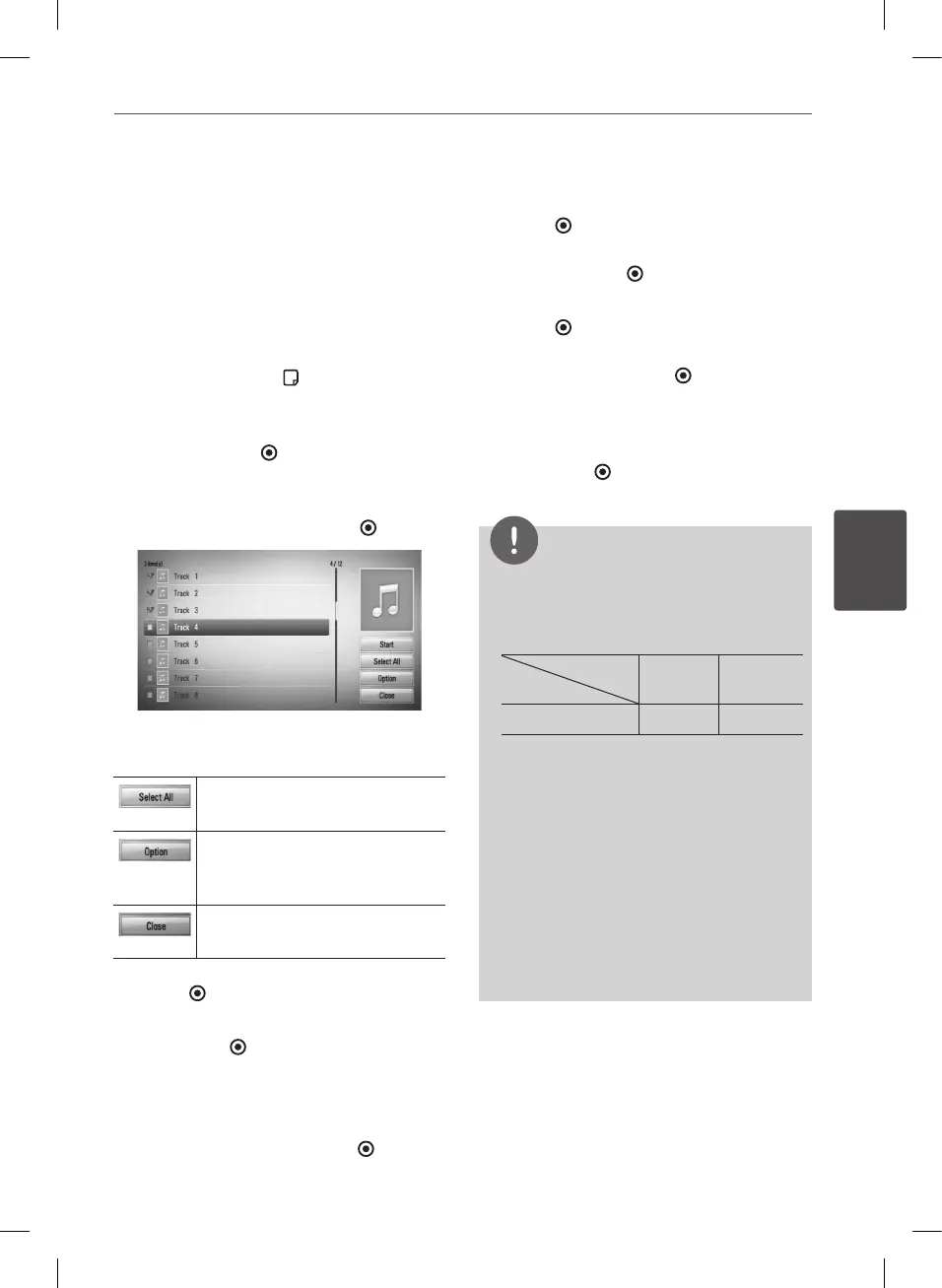
to select [CD Recording] option,
and press ENTER ( ) to display the [CD
Recording] menu.
4. Use
U
/
u
to select a track you wish to copy
on the menu, and press ENTER ( ).
Repeat this step to select tracks as many as
you can.
Select all the tracks on an Audio
CD.
Selects an encoding option from
the pop-up menu (128 kbps,
192 kbps, 320 kbps or Lossless).
Cancels the recording and
returns to the previous screen.
5. Use
U
/
u
/
I
/
i
to select [Start], and press
ENTER ( ).
6. Select the [USB] option using
I
/
i
, and
press ENTER ( ).
This step is needed only when a USB
storage device is connected.
7. Use
U
/
u
/
I
/
i
to select a destination folder
to be copied, and press ENTER ( ).
If you want to create a new folder, use
U
/
u
/
I
/
i
to select [New Folder] and press
ENTER ( ).
Enter folder name using virtual keyboard,
and press ENTER ( ) while [OK] is selected.
8. Use
U
/
u
/
I
/
i
to select [OK], and press
ENTER ( ) to start CD Recording.
If you want to stop in progressing CD
Recording, press ENTER ( ) while [Cancel]
is highlighted.
9. A message appears when CD Recording is
completed.
Press ENTER ( ) to check the audio le
created in the destination folder.
NOTE
• The table below shows the average recording
time from an audio track with 4 minutes of
playback time to an audio le with 192kbps as
an example.
Status
Device
stop
mode
while
playback
USB 1.4 min. 2 min.
• All times in the above table are approximate.
• Actual recording time for USB storage device
varies depending on the USB storage device’s
ability.
• Make sure that there is minimum of 50MB free
space is needed when recording into the USB
storage device.
• The length of the music should be longer than
20 seconds for the proper recording.
• Do not turn o this player or extract the
connected USB storage device during Audio CD
recording.
BD582CC-P.BAUTLLK_MFL65225414_ENG.indd 67 11. 3. 19. �� 5:19


 To Next Page