EasyManua.ls Logo

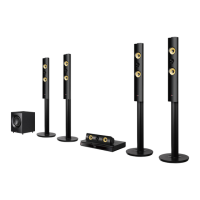
LG BH7440P - User Manual

LG BH7440P
80 pages
Print Icon
To Next Page IconTo Next Page
Loading...
P/NO : SAC35955106
Please read this manual carefully before operating
your set and retain it for future reference.
BH7240B (BH7240B, S74B1-F/S, S74T1-C, S73T1-W)
BH7440P (BH7440P, S74T1-S/C, S74B1-S, S73T1-W)
BH7540T (BH7540T, S74T1-S/C, S73T1-W)
OWNER’S MANUAL
3D Blu-ray™ /
DVD Home
Cinema System

Table of Contents

Other manuals for LG BH7440P

Questions and Answers

  • K
    kfreemanAug 8, 2025
    What to do if my LG BH7440P Home Theater System does not start playback?
    • S
      sthomasAug 8, 2025
      If your LG Home Theater System isn't playing, ensure a playable disc is inserted, checking its type, color system, and regional code. Place the disc with the playback side down, correctly positioned inside the guide on the disc tray. Clean the disc if it's dirty. Also, cancel the Rating function or change the rating level if it's enabled.
  • J
    john33Aug 14, 2025
    Why is my LG Home Theater System remote control not working properly?
    • M
      Mary MorseAug 14, 2025
      If the remote control for your LG Home Theater System isn't working, make sure it's pointed at the unit's remote sensor and is not too far away. Ensure there are no obstacles blocking the path between the remote and the unit. Also, check if the batteries in the remote control are exhausted and replace them if needed.
  • H
    hgarciaAug 20, 2025
    Why is my USB storage device not recognized by my LG BH7440P Home Theater System?
    • P
      Peter SmithAug 20, 2025
      If your LG Home Theater System isn't recognizing the USB storage device, try a different USB cable as some cables may not provide enough current. Avoid using USB extension cables or USB hubs, as they can prevent device recognition. Note that the unit doesn't support USB devices requiring additional program installation on a computer. It supports only USB Flash Drives and USB External HDDs with FAT32 or NTFS format.
  • C
    Carol JohnsonAug 26, 2025
    Why can't I change the angle on my LG Home Theater System?
    • E
      Elizabeth NavarroAug 27, 2025
      The angle cannot be changed because multi-angles are not recorded on the DVD Video being played.
  • K
    klinewendySep 1, 2025
    Why can't my LG BH7440P Home Theater System play video, photo, or audio files?
    • C
      Christopher CooperSep 1, 2025
      Your LG Home Theater System may not play certain video, photo, or audio files if they are not recorded in a supported format or if the unit does not support the codec of the video file.

LG BH7440P Specifications

General IconGeneral
Disc types supportedBD, BD-R, BD-RE, BD-ROM, CD, CD-R, CD-RW, DVD, DVD+R, DVD+RW, DVD-R, DVD-RW
Optical disc player typeBlu-Ray player
MiracastYes
Built-in HDD-
Phono inputs (RCA)1
Image formats supportedGIF, JPEG XR, PNG
Video formats supported3GP, AVCHD, DIVX HD, FLV, H.264, MKV, MPEG2, MPEG4, VC-1, VOB
Audio decodersDolby Digital, Dolby Digital Plus, Dolby TrueHD, DTS, DTS-HD, DTS-HD HR, DTS-HD Master Audio
RMS rated power1200 W
Audio output channels5.1 channels
Audio formats supportedAAC, FLAC, MP3, WMA, WMV
Supported radio bandsFM
Preset stations quantity50
Front speakers RMS power388 W
Center speaker RMS power194 W
Product colorBlack
HDMI in2
USB version2.0
SCART ports quantity0
Weight and Dimensions IconWeight and Dimensions
Main unit dimensions (WxDxH)440 x 298 x 65 mm
Subwoofer dimensions (WxDxH)251 x 310 x 336 mm
Front speaker dimensions (WxDxH)290 x 290 x 1150 mm
Center speaker dimensions (WxDxH)342.5 x 87 x 86 mm

Related product manuals