EasyManua.ls Logo

LG BH7530TB - User Manual

LG BH7530TB
2 pages
Print Icon
To Next Page IconTo Next Page
Loading...
ENGLISH | SIMPLE MANUAL
An extended Owner’s Manual that contains
information on the advanced features is located
on the CD-ROM provided in an electronic version.
To read these files, you will need to use a Personal
Computer (PC) equipped with a CD-ROM drive.
DEUTSCH | KURZANLEITUNG
Eine ausführliche Bedienungsanleitung mit
Hinweisen zu erweiterten Funktionen befindet sich
als elektronisches Dokument auf der enthaltenen
CD-ROM. Zur Anzeige dieser Dateien wird ein
Personal Computer (PC) mit CD-ROM-Laufwerk
benötigt.
FRANÇAIS | MANUEL SIMPLE
Un Manuel d’Utilisation étendu en version
électronique qui contient des informations sur les
fonctionnalités avancées est situé sur le CD-ROM
fourni. Pour lire ces fichiers, vous aurez besoin
d’utiliser un Ordinateur Personnel (PC) avec un
lecteur de CD-ROM.
ESPAÑOL | MANUAL SIMPLE
En el CD-ROM se incluye una versión electrónica
extendida del Manual del Usuario ampliado con
funciones avanzadas. Para poder leerlo debe abrir
dichos archivos desde un ordenador personal (PC)
equipado con una unidad de CD-ROM.
ITALIANO | MANUALE SEMPLIFICATO
Un ampio manuale dell’utente che contiene
le informazioni sulle caratteristiche avanzate è
registrato nel CD-ROM fornito nella versione
elettronica. Per leggere questi file, dovete usare
un personal computer (PC) fornito di drive per
CD-ROM.
http://www.lg.com
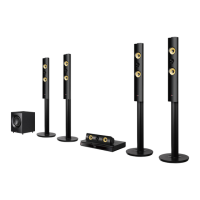
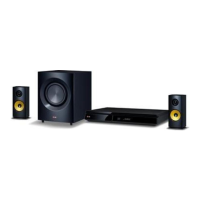
3D Blu-ray™ / DVD Home
Cinema System
BH7230B / BH7230BB
BH7430P / BH7430PB
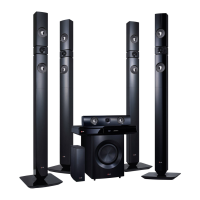
BH7530T / BH7530TB
TV Connection (HDMI OUT) / TV-Verbindung (HDMI
OUT) / Raccordement télé (HDMI OUT) / Conexión de
TV (HDMI OUT) / Collegamento TV (HDMI OUT)
TV Connection (OPTICAL IN) / TV-Verbindung (OPTICAL
IN) / Raccordement télé (OPTICAL IN) / Conexión de TV
(OPTICAL IN) / Collegamento TV (OPTICAL IN)
Wireless Network Connection / Drahtlose
Netzwerkverbindung / Raccordement à un réseau sans
fil / Conexión a red inalámbrica / Connessione di rete
Wireless
Wired Network Connection / Kabel-Netzwerkverbindung
/ Connexion à un réseau filaire / Conexión a red por cable
/ Connessione di rete cablata
+
+
-
-
FM antenna
Speaker
cables
Safety Information / Sicherheitshinweise /
Consignes de sécurité / Información de seguridad /
Informazioni di sicurezza
Speaker Connection / Lautsprecheranschluss /
Raccordement des enceintes / Conexión del altavoz /
Collegamenti agli altoparlanti
Initial Setup / Erst-Setup / Installation initiale / Instalación inicial / Configurazione iniziale
Cable Modem
Kabelmodem
Modem par câble
Módem por cable
Cavo modem
Router
Router
Routeur
Router
Router
Access Point
Access Point
Point d’accès
Punto de acceso
Punto di accesso
Cable Modem
Kabelmodem
Modem par câble
Módem por cable
Cavo modem
BH7230B_BH7430P_BH7530T-RT.BDEULLK_SIMPLE_6302.indd 1 15. 3. 25. �� 12:07


Questions and Answers

  • G
    Gerald PattersonAug 19, 2025
    Why is my LG BH7530TB Home Theater System remote control not working?
    • K
      Kayla ReyesAug 19, 2025
      The remote control might not be pointed at the remote sensor on the unit, or it might be too far away. There could also be an obstacle blocking the path between the remote and the unit. Finally, the batteries in the remote control might be exhausted.
  • S
    Stephanie MillerAug 21, 2025
    What to do if my LG Home Theater System is plugged in, but the power will not turn on or off?
    • M
      Melissa PatelAug 21, 2025
      You can reset the unit by unplugging the power cord, waiting at least five seconds, and then plugging it in again.
  • D
    David ChaseAug 23, 2025
    Why is there no sound or distorted sound from my LG BH7530TB Home Theater System?
    • A
      Anna LittleAug 23, 2025
      The unit may be in scan, slow motion, or pause mode. Also, the sound volume might be too low. Ensure that the speaker cable is securely connected.
  • J
    jaredvillarrealAug 26, 2025
    Why won't my LG Home Theater System start playback?
    • J
      Judy MitchellAug 26, 2025
      Make sure you have inserted a playable disc, checking its type, color system, and regional code. Ensure the disc is placed with the playback side down and is clean. Also, cancel the Rating function or change the rating level.
  • C
    cindy97Aug 28, 2025
    What to do if my LG Home Theater System is not displaying a picture?
    • T
      Tyler SmithAug 28, 2025
      Select the correct video input mode on your TV, ensuring it matches the unit's output. Verify that the video connections are secure. Also, check the [HDMI Color Setting] in the [Settings] menu to ensure it is appropriate for your video connection. Your TV might not support the resolution set on the player, so try changing it. If the player’s HDMI OUT jack is connected to a DVI device that does not support copyright protection, this could also be the cause.
  • J
    Juan GrossAug 30, 2025
    Why is my LG BH7530TB Home Theater System not recognizing the USB storage device?
    • S
      Sandra RivasAug 30, 2025
      Try a different USB cable, as some cables may not provide enough current. Avoid using USB extension cables or USB hubs. Note that USB devices requiring additional program installation on a computer are not supported. This unit only supports USB Flash Drives and USB External HDDs with FAT32 or NTFS format.
  • B
    butlerclaireSep 1, 2025
    What to do if media servers are not displayed on LG Home Theater System device list?
    • M
      mharrisonSep 1, 2025
      The firewall or anti-virus software on your media server may be running. Try turning off the firewall or anti-virus software running on your media server. Also, ensure that the player is connected to the same local area network as your media server.
  • E
    Elizabeth ChristensenSep 4, 2025
    Why does my LG BH7530TB Home Theater System have picture noise?
    • B
      Brian MccarthySep 4, 2025
      The disc may be recorded in a color system different from your TV's. Try setting the resolution to one that your TV accepts.
  • J
    Jessica MartinSep 6, 2025
    Why is my LG Home Theater System's BD-Live feature not working?
    • R
      Richard FernandezSep 6, 2025
      The connected USB storage might not have enough space; connect a USB storage device with at least 1GB of free space. Ensure the unit is correctly connected to your local area network and can access the internet. Your broadband speed might not be fast enough; consider contacting your ISP to increase it. Also, check that the [BD-LIVE connection] option in the [Settings] menu is set to [Permitted].
  • K
    katiepetersSep 8, 2025
    Why Blu-ray 3D disc playback does not output 3D views on my LG Home Theater System?
    • E
      Edwin GreenSep 8, 2025
      Connect the player to your TV with an HDMI cable (Type A, High Speed HDMI™ Cable). Your TV may not support “HDMI 3D mandatory format.” Check that the [3D Mode] option in the [Settings] menu is set to [On].

LG BH7530TB Specifications

General IconGeneral
TypeHome Theater System
Total Power Output1000W
Number of Channels5.1
Blu-ray PlaybackYes
3D PlaybackYes
Smart TV FeaturesYes
Wi-FiYes
USB Ports1
EthernetYes
HDMI Output1
Audio InputYes
BluetoothYes
3D Pass-throughYes
4K Pass-throughNo
Wireless Rear SpeakersYes
SubwooferYes
Audio Formats SupportedDolby Digital, DTS

Related product manuals