3-10
ONE POINT REPAIR GUIDE
NO BOOTING IN CD/USB FUNCTION
After you turn on power key and displayed message in the following order (HELLO VOL XX
CD or USB) on VFD, it will not display other message on VFD, and it will not boot-up normally.
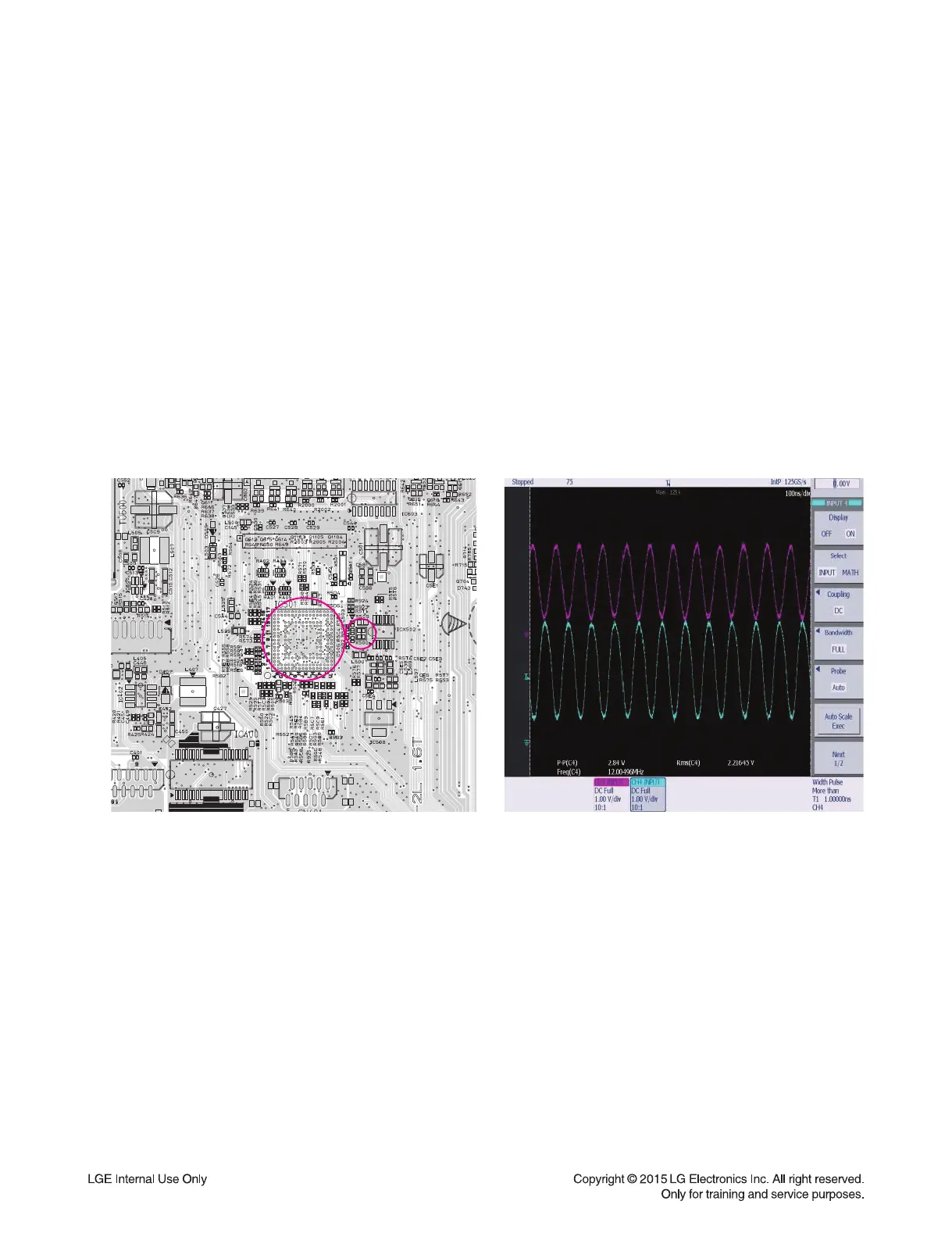
8-2. CRYSTAL (X500)
8-2-1. Solution
Replace X500 on MAIN board.
8-2-2. How to troubleshoot (Countermeasure)
1) If 3.3 V & 1.2 V is normal, Check the CHIP_RESET of IC501 pin T12 on MAIN board.
If CHIP_RESET isn’t high, Check MICOM(IC101) pin40.
2) If CHIP_RESET is high, Check the soldering status of 24 MHz crystal (X500).
3) If the crystal (X500) doesn’t oscillate, Check R508, R509, C502, C503 around crystal (X500).
If there’s no defective component, then replace X500.
8-2-3. Service hint (Any picture / Remark)
XX
I
X
O
X500
< Signal waveform >
< MAIN board top view >
IC501
X500


 To Next Page