Due to our policy of continuous product innovation, some specifications may change without notification.
LG Electronics U.S.A., Inc., Englewood Cliffs, NJ. All rights reserved. “LG Life’s Good” is a registered trademark of LG Corp.
29
Start-Up
START-UP
Web System Interface
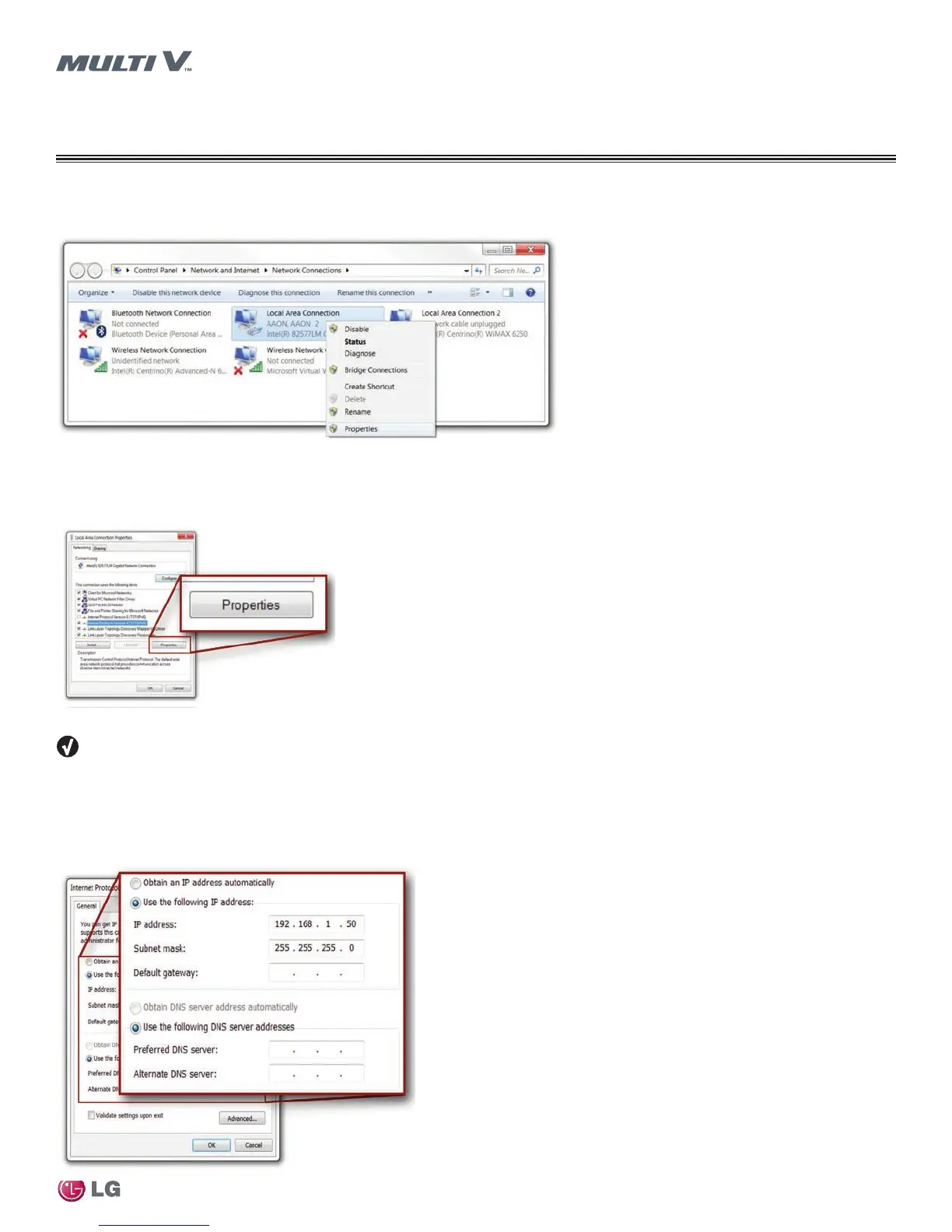
4. Click the Properties button.
Figure 18: Local Area Connection Properties Window
The internet protocol version 4 properties allow you to change the IPv4 address of the PC you are working on.
5. Enter an appropriate IPv4 address to connect the JENEsys controller.
Figure 19: Local Area Connection Properties
6. Enter 255.255.255.0 in the Subnet Mask field.
Note the current settings so you can return the network adapter to its previous address after the JENEsys controller is connected.
7. Leave the remaining fields blank if you are connecting directly to the controller via a crossover cable.
8. Click the OK button. The computer’s network address will be set-up correctly in order to directly access the JENEsys controller with a
crossover cable.
Figure 20: Internet Protocol


 To Next Page