Due to our policy of continuous product innovation, some specifications may change without notification.
LG Electronics U.S.A., Inc., Englewood Cliffs, NJ. All rights reserved. “LG Life’s Good” is a registered trademark of LG Corp.
35
Start-Up
START-UP
Web System Interface
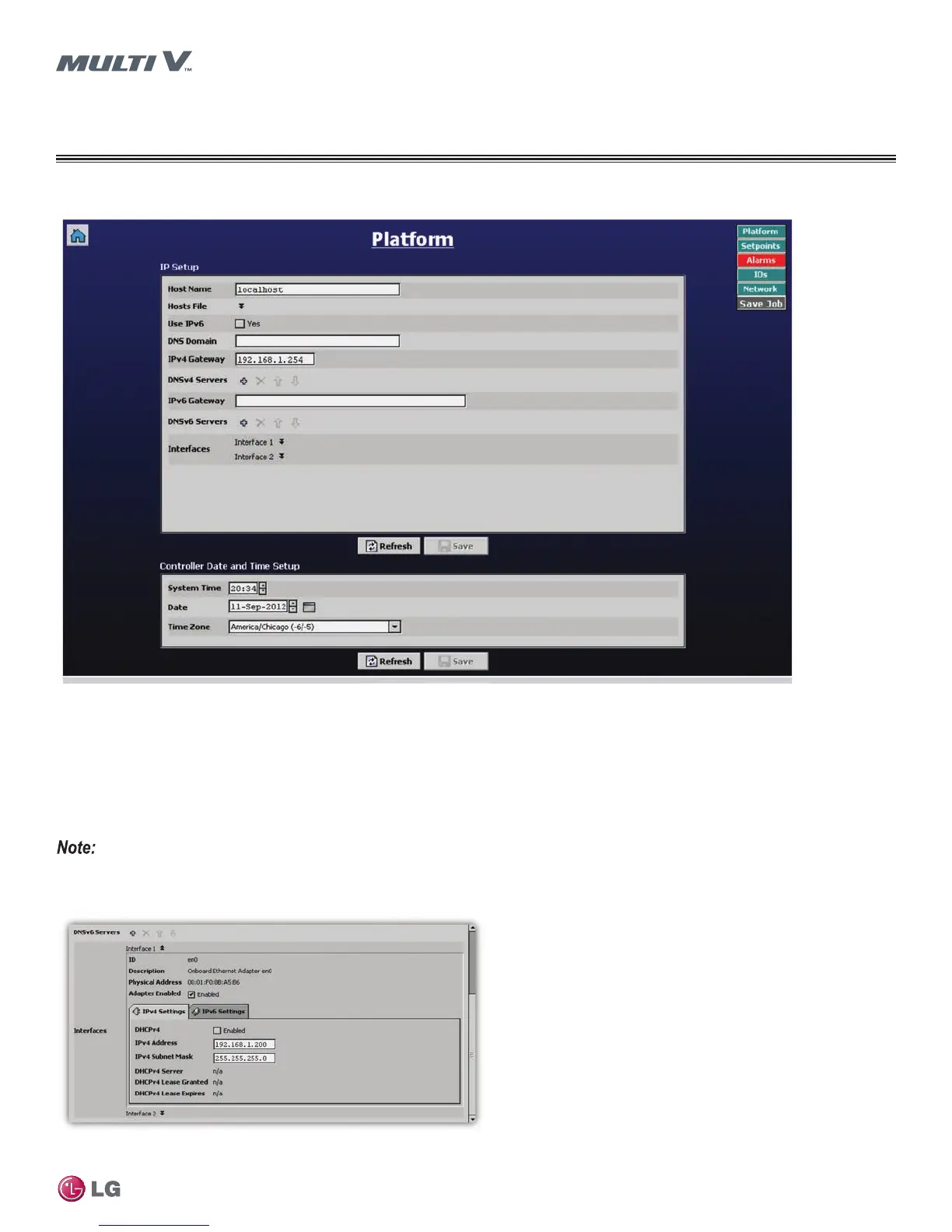
Figure 39: Web User Interface Platform Page
Web User Interface Platform Page
The Web User Interface Platform page allows you to alter the hardware platform.
• Displays LAN port settings for both primary and secondary ethernet adapters. Users can change the IP address information for both
ethernet adapters. Interface 1 corresponds to the settings of the primary ethernet adapter and Interface 2 corresponds to the
secondary adapter settings.
• From this page, users can set the system date and time to the unit’s geographical time zone.
• Click the Save button to save any changes made.
Changing the adapter settings will cause the JENEsys controller to reboot.
Figure 40: IP Address Settings
Platform Page


 To Next Page