4
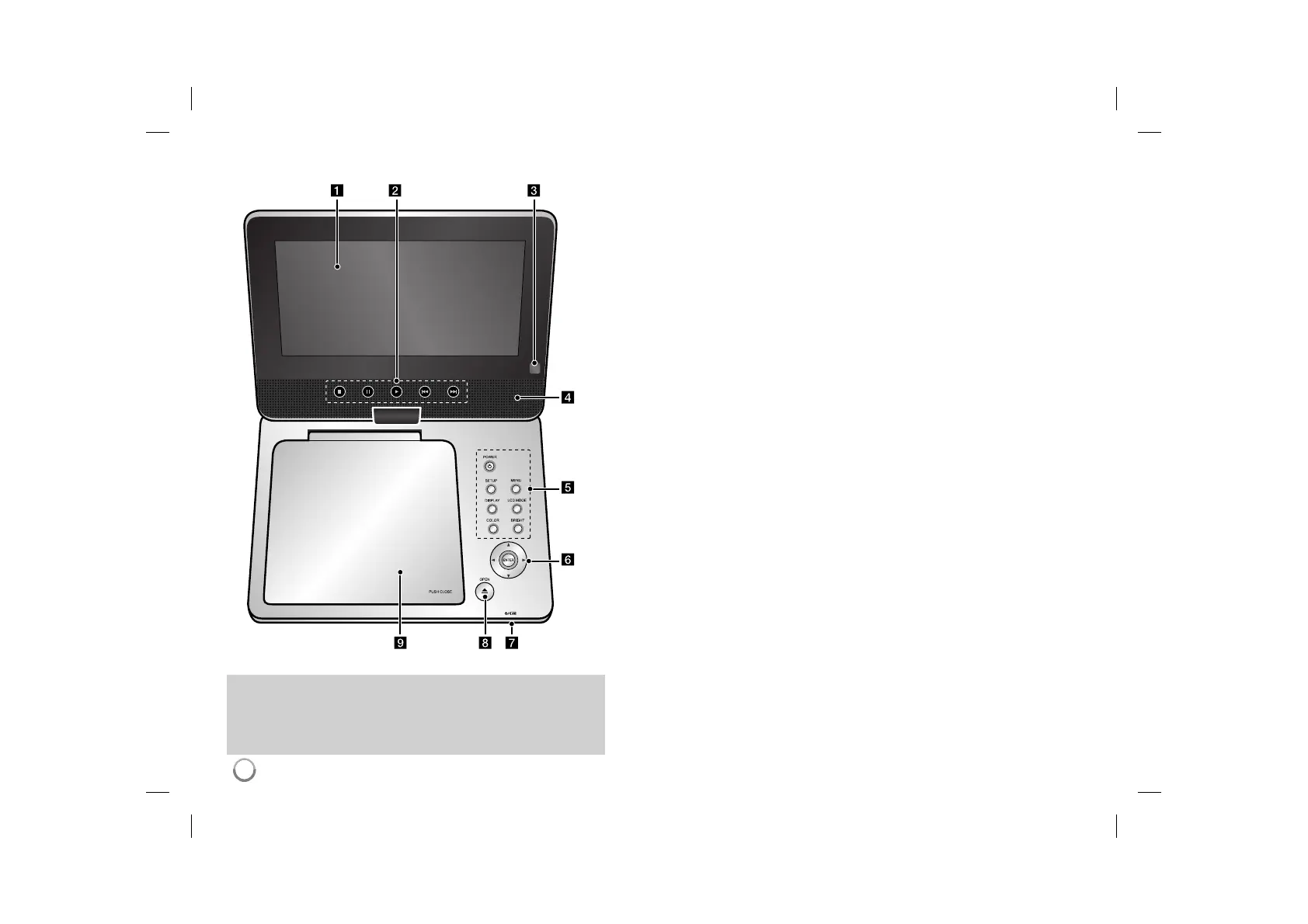
Main Unit
a LCD screen
b Playback Control Buttons
• N (Play): Starts playback.
• x (Stop): Stops playback.
• X (PAUSE/STEP): Pauses playback temporarily/ press repeatedly for
frame-by-frame playback.
• . (Skip): Search backward* or returns to the beginning of current chapter or
track or go to the previous chapter or track.
• > (Skip): Search forward* or Go to next chapter or track.
* Press and hold button for about two seconds.
c Remote sensor: Point the remote control here. To control the unit using the remote
control, do not fold the LCD panel down.
d Speakers
e Function Buttons
• POWER (1): Turn the unit ON or OFF.
• SETUP: Accesses or exits the setup menu.
• MENU: Accesses the DVD menu.
• DISPLAY: Accesses On-Screen Display.
• LCD MODE: Selects the LCD mode. (16:9, 4:3 or Off)
• COLOR*: Displays the Color menu for LCD display.
• BRIGHT*: Displays the Brightness menu for LCD display.
* To adjust the color or brightness of the LCD display, press COLOR or BRIGHT on
the main unit to display the Brightness or Color menu then use b / B to adjust the
value. Press ENTER to confirm the adjustment.
f Menu Control Buttons
• b B v V (left/right/up/down): Selects an item in the menu.
• ENTER: Confirms menu selection.
g Battery charge and power indicator
• The indicator turns red in charging and changes to green color when the charging
is complete. (Refer to page 3 for details.)
• The indicator turns green for a few seconds when the unit is turned on.
h OPEN (Z): Opens the disc lid.
i Disc Lid
Volume: You can adjust the volume level using the volume controller
on the right side.
Earphones: Connect a earphones to the earphones jack on the right
side to enjoy the sound individually.
DP351-P_ASYRELK_ENG_MFL47350144.4 4DP351-P_ASYRELK_ENG_MFL47350144.4 4 9/2/08 10:17:49 AM9/2/08 10:17:49 AM



 To Next Page