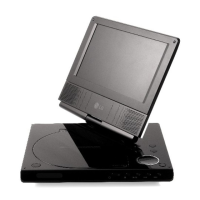
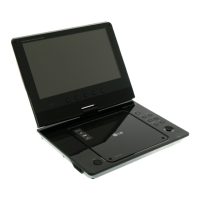
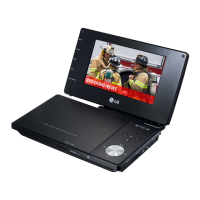
This document describes the LG Portable DVD Player, models DP271B and DP273B, a versatile multimedia device designed for on-the-go entertainment. It supports various disc formats and offers several connectivity options, making it suitable for a range of uses, from personal viewing to in-car entertainment.
Function Description
The LG Portable DVD Player primarily functions as a portable device for playing DVDs, CDs, and other digital media. It features a built-in LCD screen for direct viewing and can also connect to external displays like TVs. Key functionalities include:
- DVD/CD Playback: Supports DVD Video, Video CD (VCD), and Audio CD formats.
- Digital Media Playback: Capable of playing MP3, WMA, JPEG, and DivX files from compatible discs and USB flash drives.
- FM Transmitter (DP273B only): Allows audio to be transmitted wirelessly to a car's radio tuner, enhancing in-car entertainment.
- AV Input/Output: Enables connection to external audio/video sources (e.g., camcorders) and output to a TV or amplifier.
- USB Connectivity: Supports playback of compatible media files from USB flash drives.
- Battery Operation: Designed for portability with a rechargeable battery pack, offering extended usage away from a power outlet.
- Parental Control: Includes features for setting ratings and passwords to restrict content access.
Important Technical Specifications
- General:
- Power Supply: DC 9.5V (AC adapter terminal), DC 7.4V (Battery).
- Power Consumption: 12W with battery.
- Net Weight: 1.60 lbs (0.73 kg) (without battery pack).
- External Dimensions (W x H x D): 7.8 x 1.5 x 6.7 inches (19.5 x 3.85 x 17.26 cm).
- Signal System: NTSC.
- Laser: DVD Laser wavelength 662+/-25 / 662-15 nm; CD Laser wavelength 785+/-25 / 785-15 nm.
- Frequency Range (audio): DVD linear sound: 48kHz sampling 8 Hz to 20 kHz; 96kHz sampling 8 Hz to 44 kHz.
- Signal-to-noise Ratio (audio): More than 80 dB.
- Dynamic Range (audio): More than 80 dB.
- Harmonic Distortion (audio): 0.02 %.
- Operating Conditions: Temperature: 5°C to 35°C; Operation status: Horizontal.
- Liquid Crystal Display:
- Panel Size: 7 inches wide (diagonal).
- Projection System: R.G.B. stripe.
- Driving System: TFT active matrix.
- Resolution: 234 x 480 x 3 (effective pixel rate: more than 99.99%).
- Connectors:
- Video Input/Output (VIDEO In/Out): 1.0 V (p-p), 75 Ω, negative sync., ø3.5mm mini jack x 1.
- Audio Input/Output (AUDIO In/Out, analog audio): 2.0 Vrms(1kHz, 0 dB), ø3.5mm mini jack x 1.
- Earphone Terminal: ø3.5mm stereo mini jack x 2.
- Coaxial Jack: Digital audio output.
- DC IN: For connecting the AC adapter or automotive adapter.
- USB: For connecting a USB Flash Drive.
Usage Features
- LCD Screen Rotation: The LCD screen can be rotated clockwise an angle of 180 degrees and then folded flat against the unit, allowing for flexible viewing angles or a compact form factor.
- Mode Selection: Users can select between DISC, AV IN, or USB modes to choose the desired media source.
- On-Screen Display: Provides information about the disc loaded, including title, track, chapter, time, audio language, subtitle, and angle.
- Initial Settings: Customizable settings for language (Menu Language, Disc Audio/Subtitle/Menu), display (TV Aspect, Display Mode), audio (Bitstream, DTS, MPEG, Sample Freq., DRC, Vocal), and parental control (Rating, Password, Area Code).
- Playback Controls: Comprehensive controls for play, pause, stop, skip, search, slow motion, repeat, zoom, and marker functions.
- Programmed Playback: Allows users to create a playlist of favorite tracks from an audio CD or MP3/WMA disc.
- JPEG File Viewing: Supports viewing JPEG image files with features like slide show, zoom, and rotation.
- DivX Movie Playback: Capable of playing DivX files with support for subtitles and various audio formats. DivX VOD (Video On Demand) registration is available for renting and purchasing DivX content.
- USB Flash Drive Playback: Enables playback of MP3/WMA, JPEG, and DivX files stored on a USB flash drive.
- Remote Control: A full-function remote control provides convenient operation from a distance.
- Battery Status Display: The unit can display the current battery charge level on the screen.
- Screen Saver/Auto Power Off: A screen saver activates after five minutes of inactivity, and the unit automatically turns off after five minutes of the screen saver being displayed.
Maintenance Features
- General Maintenance:
- Cleaning the Unit: Use a soft, dry cloth. For extremely dirty surfaces, a soft cloth lightly moistened with a mild detergent solution can be used. Avoid strong solvents like alcohol, benzene, or thinner.
- Keeping Exterior Surfaces Clean: Do not use volatile liquids such as insecticide spray near the unit. Avoid leaving rubber or plastic products in contact with the unit for long periods to prevent marks on the surface.
- Disc Handling:
- Do not touch the playback side of the disc. Hold the disc by the edges.
- Store discs in their cases, away from direct sunlight or sources of heat.
- Clean discs with a soft, clean cloth, wiping from the center out.
- Battery Maintenance:
- The battery is rechargeable. Dispose of it according to local laws and regulations.
- Replace the remote control battery with a 3V micro lithium cell (CR 2025 or equivalent).
- Do not expose the battery to excessive heat or fire.
- Product Longevity: The DVD player is a high-tech, precision device. Regular inspection and maintenance are recommended every 1,000 hours of use. For detailed service, contact an authorized service center.
- Safety Precautions: The manual emphasizes important safety instructions, including warnings about laser radiation, electric shock, and proper power cord usage to ensure safe operation and prolong the device's lifespan.

 Need help?
 General

 To Next Page