D
D
D
L
L
L
P
P
P
P
P
P
r
r
r
o
o
o
j
j
j
e
e
e
c
c
c
t
t
t
o
o
o
r
r
r
—
—
—
U
U
U
s
s
s
e
e
e
r
r
r
’
’
’
s
s
s
M
M
M
a
a
a
n
n
n
u
u
u
a
a
a
l
l
l
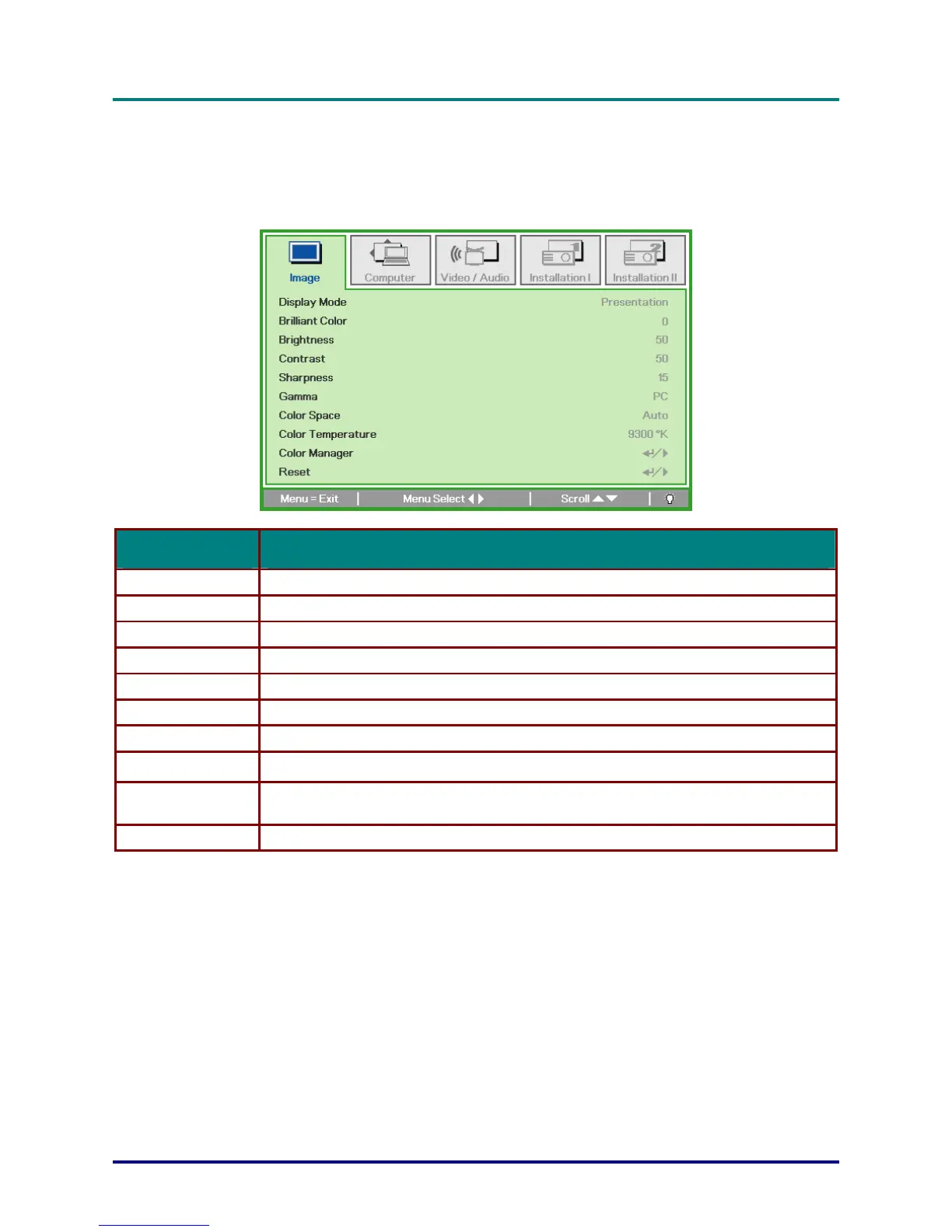
Image Menu
Press the MENU button to open the OSD menu. Press the cursor ◄► button to move to the Image
Menu. Press the cursor ▲▼ button to move up and down in the Image menu. Press ◄► to change
values for settings.
ITEM DESCRIPTION
Display Mode Press the cursor ◄► button to set the display mode.
Brilliant Color Press the cursor ◄► button to adjust the Brilliant Color value.
Brightness Press the cursor ◄► button to adjust the display brightness.
Contrast Press the cursor ◄► button to adjust the display contrast.
Sharpness Press the cursor ◄► button to adjust the display sharpness level.
Gamma Press the cursor ◄► button to adjust the gamma correction of the display.
Color Space Press the cursor ◄► button to adjust the color space.
Color Temperature Press the cursor ◄► button to select different color temperature.
Press Enter / ► to enter the color manager menu.
See
Color Manager
Color Manager on page 23 for more information.
Reset Press Enter / ► to reset all settings to default values.
– 22 –


 To Next Page