D
D
D
L
L
L
P
P
P
P
P
P
r
r
r
o
o
o
j
j
j
e
e
e
c
c
c
t
t
t
o
o
o
r
r
r
–
–
–
U
U
U
s
s
s
e
e
e
r
r
r
’
’
’
s
s
s
M
M
M
a
a
a
n
n
n
u
u
u
a
a
a
l
l
l
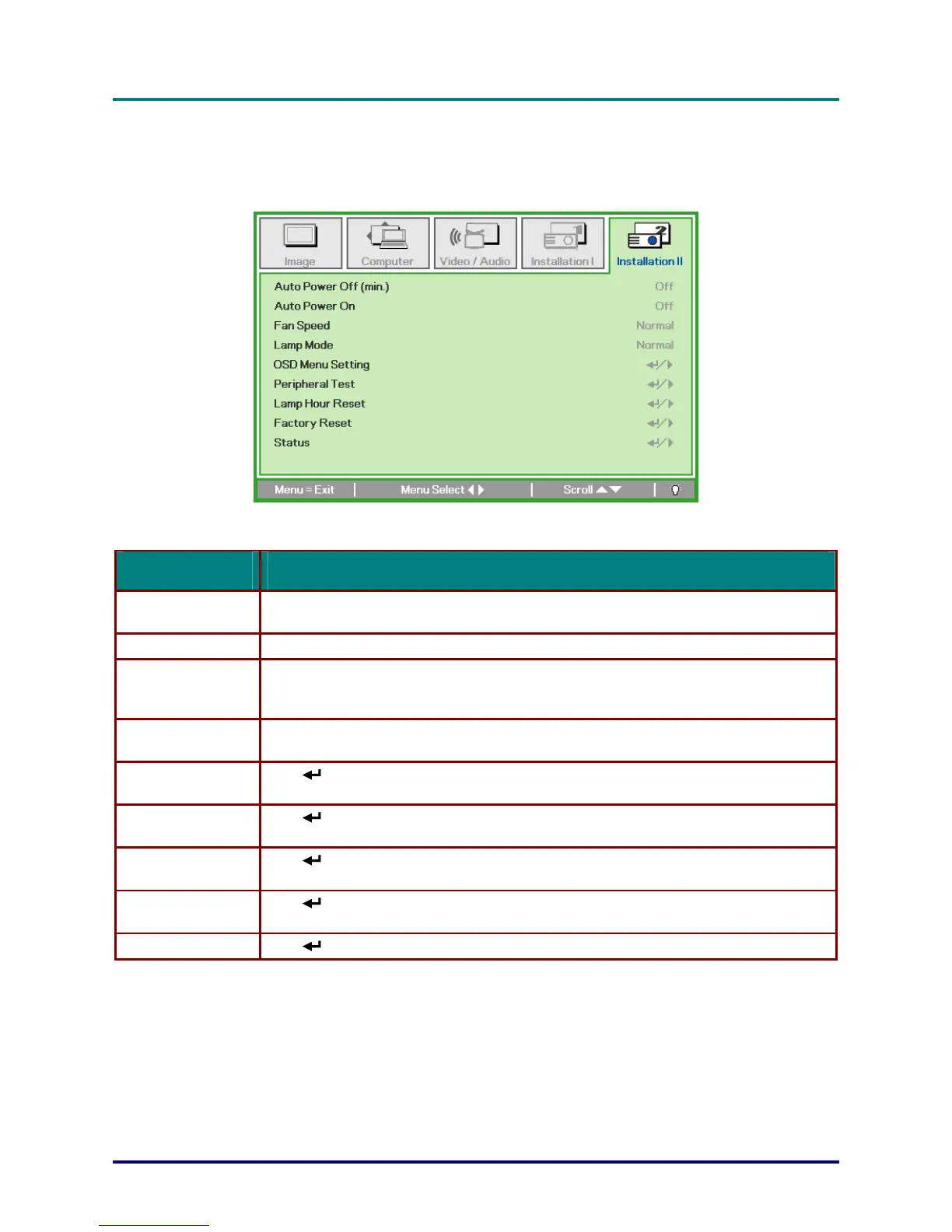
Installation II Menu
Press the MENU button to open the OSD menu. Press the cursor ◄► button to move to the Installa-
tion II menu. Press the cursor ▲▼ button to move up and down in the Installation II menu.
ITEM DESCRIPTION
Auto Power Off
(min.)
Press the cursor ◄► button to enable or disable automatic shutdown of lamp when no signal.
Auto Power On Press the cursor ◄► button to enable or disable automatic power On when AC power is supplied.
Press the cursor ◄► button to toggle between Normal and High fan speeds.
Note: We recommend selecting high speed in high temperatures, high humidity, or high
altitude areas.
Fan Speed
Press the cursor ◄► button to select the lamp mode for higher brightness or lower brightness
to save lamp life.
Lamp Mode
(Enter) / ►
to enter the OSD setting menu. See page 18
Press
for more information on
OSD setting menu.
OSD Menu Setting
Press
(Enter) / ►
to enter the Peripheral Test menu. See page 29 for more information on
Peripheral Test.
Peripheral Test
(Enter) / ►
to confirm lamp hour reset. Press Menu to cancel. See page
Press
29 for more
information on Lamp Hour Reset.
Lamp Hour Reset
Press
(Enter) / ►
to reset the entire item to default value. See page 30 for more information
on Factory Reset.
Factory Reset
– 27 –
Status Press (Enter) / ►
to enter the Status menu. See page 30 for more information on Status.


 To Next Page