D
D
D
L
L
L
P
P
P
P
P
P
r
r
r
o
o
o
j
j
j
e
e
e
c
c
c
t
t
t
o
o
o
r
r
r
—
—
—
U
U
U
s
s
s
e
e
e
r
r
r
’
’
’
s
s
s
M
M
M
a
a
a
n
n
n
u
u
u
a
a
a
l
l
l
– 26 –
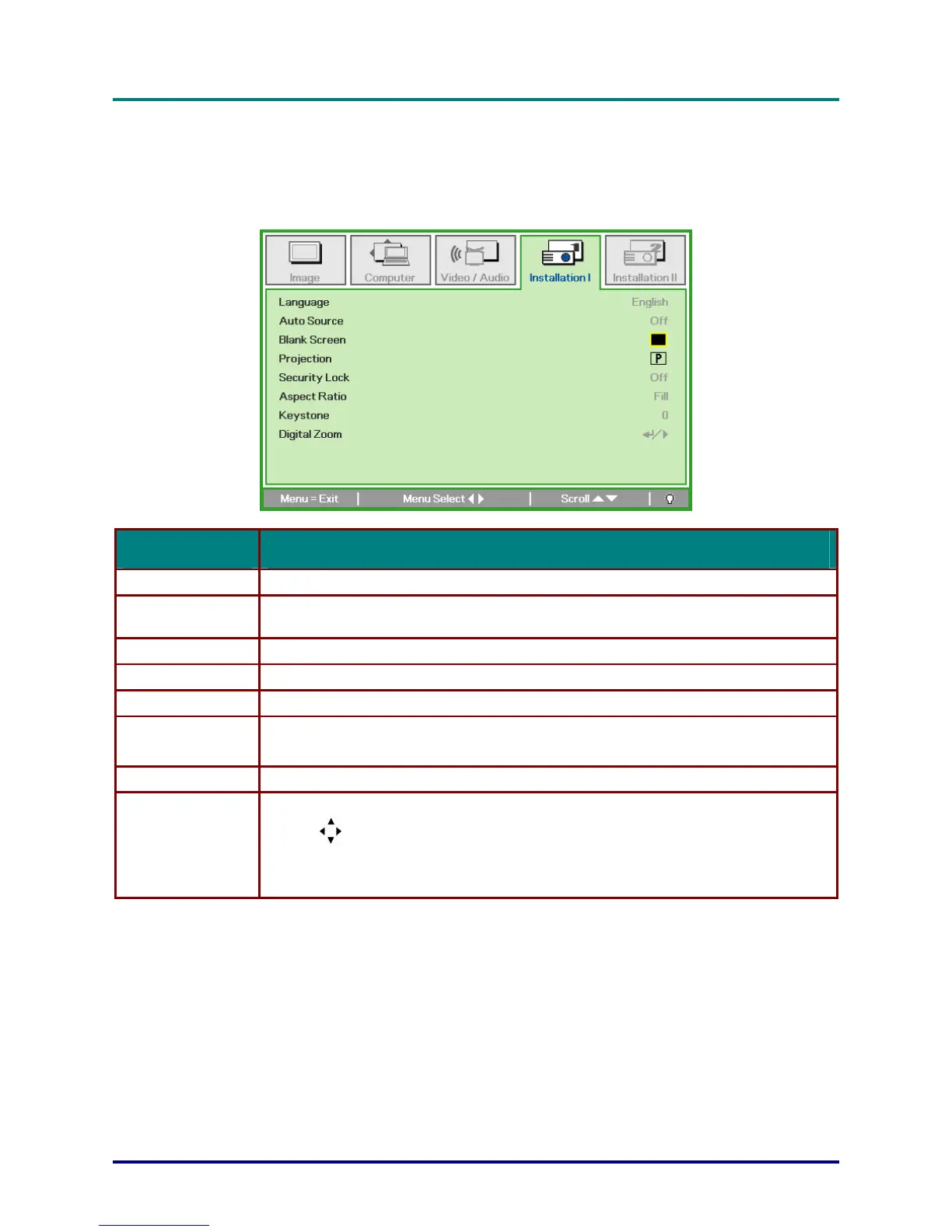
Installation I Menu
Press the MENU button to open the OSD menu. Press the cursor ◄► button to move to the Installa-
tion I menu. Press the cursor ▲▼ button to move up and down in the Installation I menu. Press
◄► to change values for settings.
ITEM DESCRIPTION
Language Press the cursor ◄► button to select a different localization Menu.
Auto Source
Press the cursor ◄► button to enable or disable the automatically searching of all input port
to find out the valid source.
Blank Screen Press the cursor ◄► button to select different color to blank the screen.
Projection Press the cursor ◄► button to choose from two projection methods:
Security Lock Press the cursor ◄► button to enable or disable security lock function.
Aspect Ratio
Press the cursor ◄► button to adjust the video aspect ratio.
Note: The Aspect Ratio function is only accessible when the Digital Zoom is not active.
Keystone Press the cursor ◄► button to adjust the display keystone.
Digital Zoom
Press Enter / ► to enter the Digital Zoom menu. Press ▲ to zoom in; press ▼ to zoom out.
Use the
buttons to employ the Pan function.
Note: You must zoom in before the Pan menu is accessible.
Note: Digital zoom is disabled in SXGA/SXGA+/UXGA resolutions.


 To Next Page