7
INTRODUCTION
Remote Control
Remote Control Operation Range
Point the remote control at the remote sensor and press
the buttons.
Distance: About 23 ft (7 m) from the front of the
remote sensor
Angle: About 30° in each direction of the front of the
remote sensor
Remote control battery installation
Detach the battery cover on the rear of
the remote control, and insert two R03
(size AAA) batteries with and
aligned correctly.
Caution
Do not mix old and new batteries. Never mix different
types of batteries (standard, alkaline, etc.).
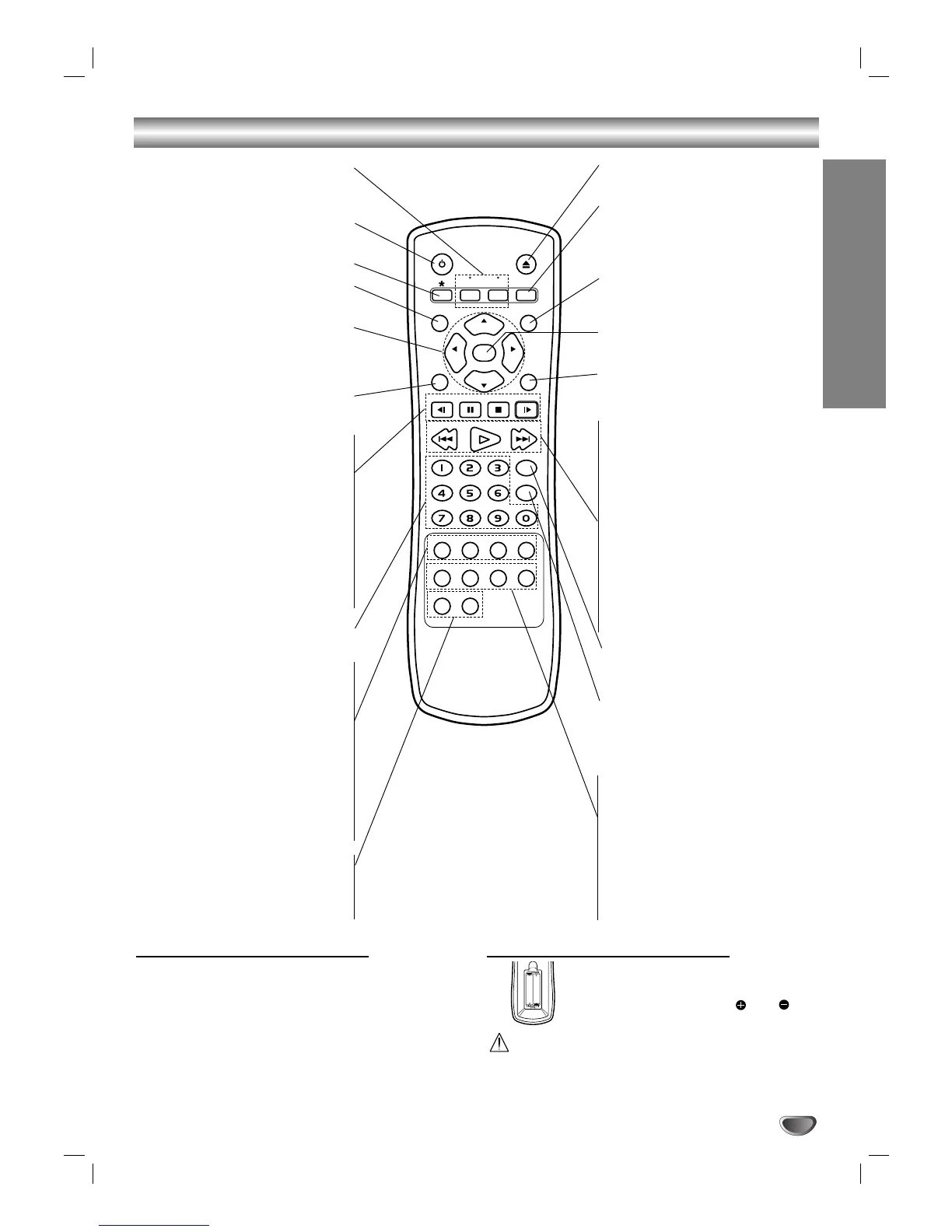
DVD/TV select buttons
Selects operational mode of remote
control (see page 11).
POWER
Switches DVD Player ON and OFF.
This button is not available.
DISPLAY
Accesses on-screen Display
11 22 33 44
(left/right/up/down)
- Select an item in the menu
- Select channel of TV and changes
volume of TV.
MENU
Accesses menu on a DVD disc.
Reverse SLOW (
,,
) •
Reverse slow playback.
PAUSE/STEP (
;;
) •
Pause playback temporarily / press
repeatedly for frame-by-frame
playback.
STOP (
99
) •
Stops playback.
Forward SLOW (
..
) •
Forward slow playback.
0-9 numerical buttons
Selects numbered items in a menu.
AUDIO •
Selects an audio language (DVD) or
an audio channel (CD).
SUBTITLE •
Selects a subtitle language.
ANGLE •
Selects a DVD camera angle if
available
SETUP •
Accesses or removes setup menu.
MARKER •
Mark any point during playback.
SEARCH •
Display MARKER SEARCH menu.
OPEN/CLOSE
Open and close the disc tray.
SOUND/MUTE
- Selects 3D SURROUND during
disc playback.
- turn off TV sound.
RETURN/TV AV
- Remove the setup menu.
- Selects AUX A/V input channel.
SELECT/ENTER
Acknowledges menu selection.
TITLE
Displays the Title menu of the disc
if available.
• Forward SKIP/SCAN (
TT
)
Search forward* / go to next
chapter or track.
• PLAY (
HH
)
Starts playback.
• Reverse SKIP/SCAN (
SS
)
Search backward* / go to
beginning of current chapter or
track or go to previous chapter or
track.
* Press and hold button for about
two seconds.
PROGRAM
Accesses or removes Program
menu.
CLEAR
Remove a track number on the
program menu or a mark on the
MARKER SEARCH menu.
• REPEAT
Repeat chapter, track, title, all.
• A-B
Repeat sequence.
• RANDOM
Play tracks in random order.
• ZOOM
Enlarge video image.


 To Next Page