5
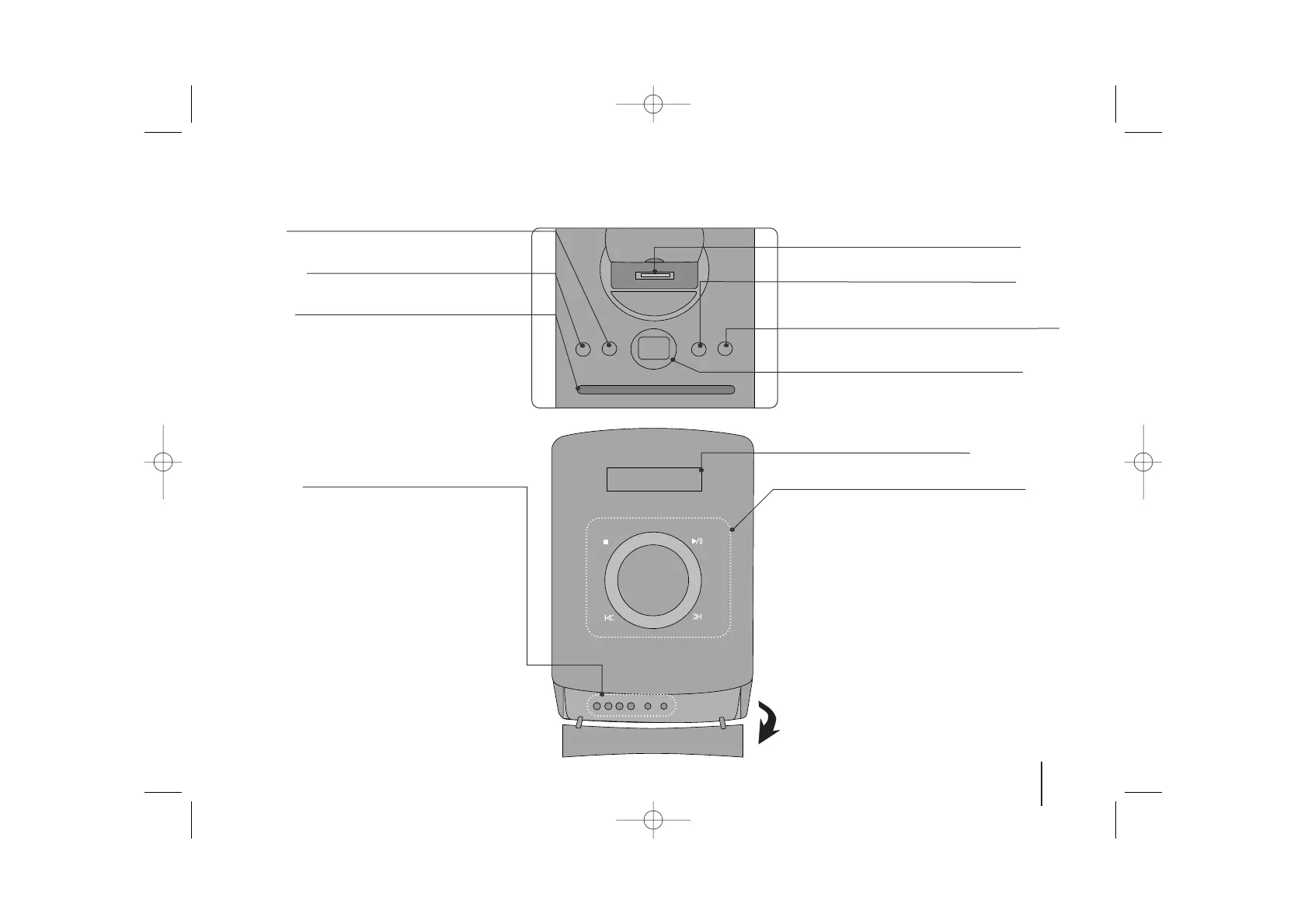
Main Unit
USB REC.
Recording to USB.
11
/
]]
(Power)
Turn the unit on and off.
USB Port
iPod Dock
Display Window
EQ/ DEMO
You can choose fixed sound impression.
Press DEMO in power off state to demonstrate the
function on display window.
CLOCK
(See “Setting the Clock” )
TIMER
(See the “Using your player as an alarm clock”)
SET
Confirms the settings.
PORTABLE IN
For connecting a portable device and listening to
sound of it through this system’s speakers.
PHONES
Headphone jack
xx
STOP
Stop
]] IIII
/
iiii ]]
Scanning/ Tuning/ Searching
BB // XX
Play/ Pause
VOL +/-
Volume control
FUNC.
(Function) Selects the function.
Disc Slot
• Do not push a disc forcibly into the CD slot.
• Do not pull or push a disc while a disc is ejected.
• Press
ZZ
again to reinsert the disc after ejecting it.
• pick it to the CD slot with the label side toward
ZZ
Ejects or insert the disc from slot loader.
TOP
FRONT



 To Next Page