To Next Page
S
susan03Aug 7, 2025
Why is my LG FiRST MEDIA SH960C-LN remote control not working?
- Aanna04Aug 7, 2025
If your LG Set-top box remote control isn't working properly, the batteries may be exhausted. Replace the batteries with new ones.

Why is my LG FiRST MEDIA SH960C-LN remote control not working?
If your LG Set-top box remote control isn't working properly, the batteries may be exhausted. Replace the batteries with new ones.
Why can't my LG FiRST MEDIA SH960C-LN Set-top boxes connect to the access point?
If your LG Set-top box cannot connect to the access point or wireless LAN router, wireless communication may be interrupted by household devices using radio frequencies. Try moving the unit away from these devices.
What to do if my LG Set-top box does not operate normally?
If your LG Set-top box is not operating normally, try resetting it. Unplug the power cord from the outlet, wait for at least five seconds, and then plug it back in.
Why is there no sound from my LG FiRST MEDIA SH960C-LN or the sound is distorted?
If there is no sound or the sound is distorted on your LG Set-top box, here are a few things to check: 1. Verify the input source setting on your amplifier is correct. 2. Increase the sound volume if it is low or muted. 3. If you're using a DVI device, switch to one that supports audio signals. 4. Ensure that the connected amplifier is compatible with the audio format output from the unit.
How to fix picture noise on LG Set-top boxes?
If you are experiencing picture noise on your LG Set-top box, try these solutions: * Set the resolution to one that your TV accepts. * Check the signal strength and quality.
What to do if there is no picture on my LG FiRST MEDIA SH960C-LN?
If there is no picture on your LG Set-top box, it could be due to the following reasons: * Your TV may not support the current resolution. Change the resolution to one that your TV accepts. * The unit’s HDMI jack is connected to a DVI device that does not support copyright protection. Use a compatible device that supports copyright protection.
Why is the access point not displayed on the list of my LG FiRST MEDIA SH960C-LN Set-top boxes?
To display the access point on the 'Access point name' list of your LG Set-top box: 1. Set your access point to broadcast its SSID through your computer, as the access point or wireless LAN router may not be broadcasting it. 2. Try setting the frequency range and channel on the network device setting, as your network device such as access point may not be set with available frequency range and channel that this unit can support.
 General
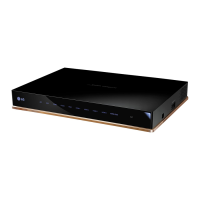
| Model | SH960C-LN |
|---|---|
| Brand | LG |
| Category | Set-top boxes |
| USB Port | Yes |
| HDMI Output | Yes |
| Scart Output | Yes |
| Ethernet Port | Yes |
| Wi-Fi | No |
| CI Slot | Yes |
| EPG | Yes |
| Teletext | Yes |
| Parental Control | Yes |
| Audio Output | Digital Audio (S/PDIF) |