20 Installation
Installation
3
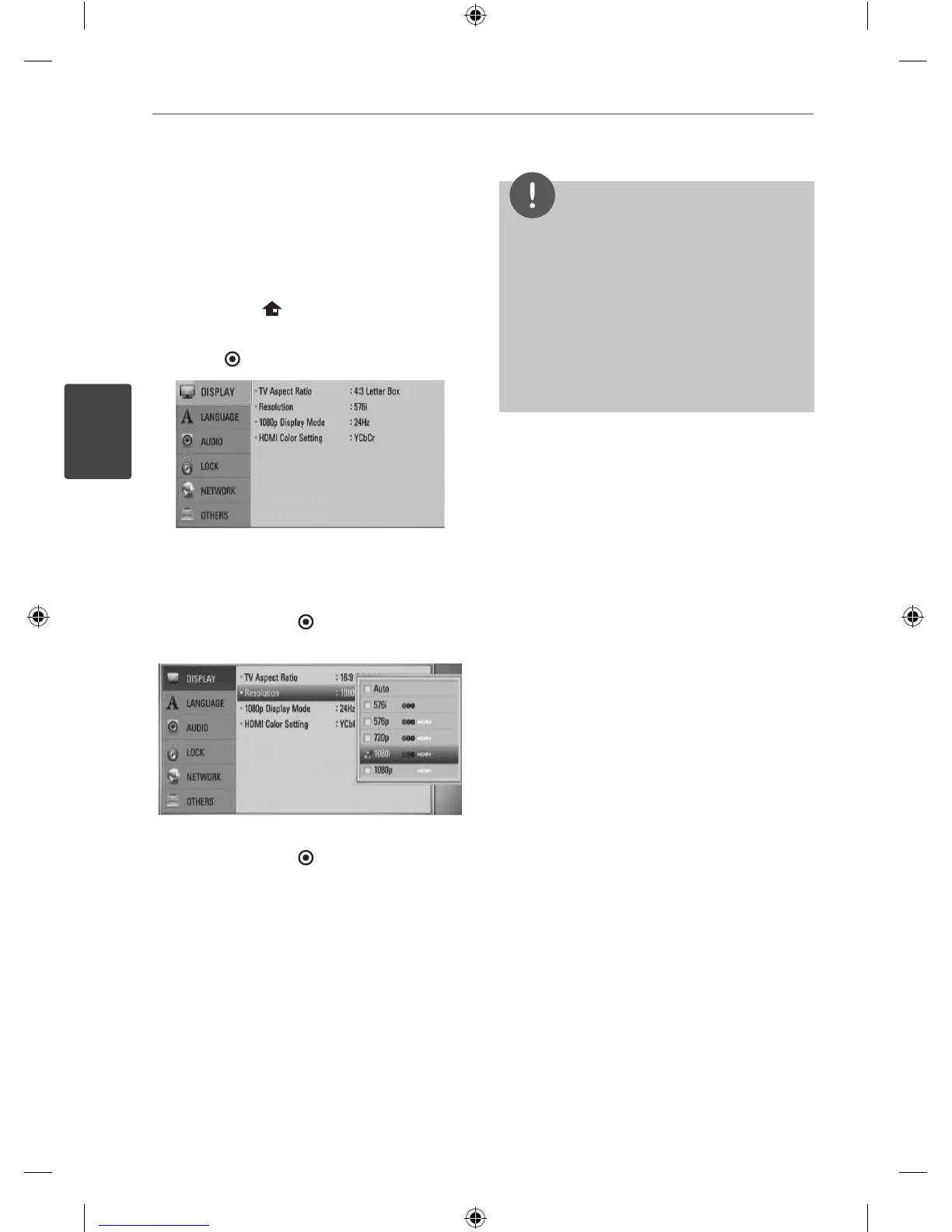
Resolution Setting
The player provides several output resolutions
for HDMI OUT and COMPONENT VIDEO OUT
jacks. You can change the resolution using
[Setup] menu.
1. Press HOME ( ).
2. Use
I
/
i
to select the [Setup] and press
ENTER (
). The [Setup] menu appears.
3. Use
U
/
u
to select [DISPLAY] option then
press
i
to move to the second level.
4. Use
U
/
u
to select the [Resolution] option
then press ENTER ( ) or
i
to move to the
third level.
5. Use
U
/
u
to select the desired resolution
then press ENTER (
) to con rm your
selection.
NOTE
If your TV does not accept the resolution you
have set on the player, you can set resolution to
576p as follows:
1. Press
Z
to open the disc tray.
2 Press
x
for more than 5 seconds.
Since several factors a ect the resolution of
video output, see “Video Output Resolution” on
page 76.
•
•
HB44A(HB44A, SB45A-FW) DG ENG 0020 20HB44A(HB44A, SB45A-FW) DG ENG 0020 20 2010-04-29 ¿ÀÀü 10:44:582010-04-29 ¿ÀÀü 10:44:58


 To Next Page