27
ENGLISH
How to Install the Projector On a Tripod
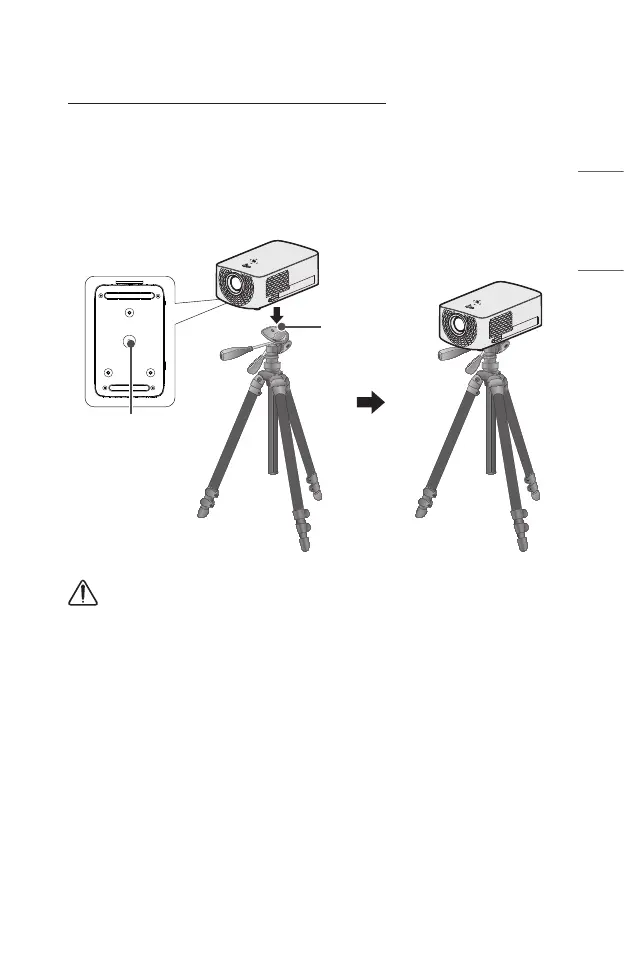
• You can install the projector using a camera tripod.
• As shown below, you can mount the projector instead of a camera on the tripod.
• When stabilizing the tripod, we recommend using a locking bolt of standard size
4.5 mm or less. The maximum size allowed for the locking bolt is 5.5 mm. (If it is
longer than the maximum allowed size, it may damage the projector.)
Bottom of the
Projector
The projector is
connected to this part.
Tripod
Bolt used to attach
the projector to
the tripod
CAUTION
• If you are using a tripod, be careful not to apply external force to the tripod.
Doing so may damage the projector.
• Do not place the tripod on an unstable surface.
• Be sure to use a tripod with a maximum load capacity of 3 kg or more.
• To use the projector safely, position the tripod legs so that they are as wide and
stable as possible and be sure to securely attach the projector to the tripod.



 To Next Page