33
ENGLISH
USING THE PROJECTOR
Focus and Position of the Screen Image
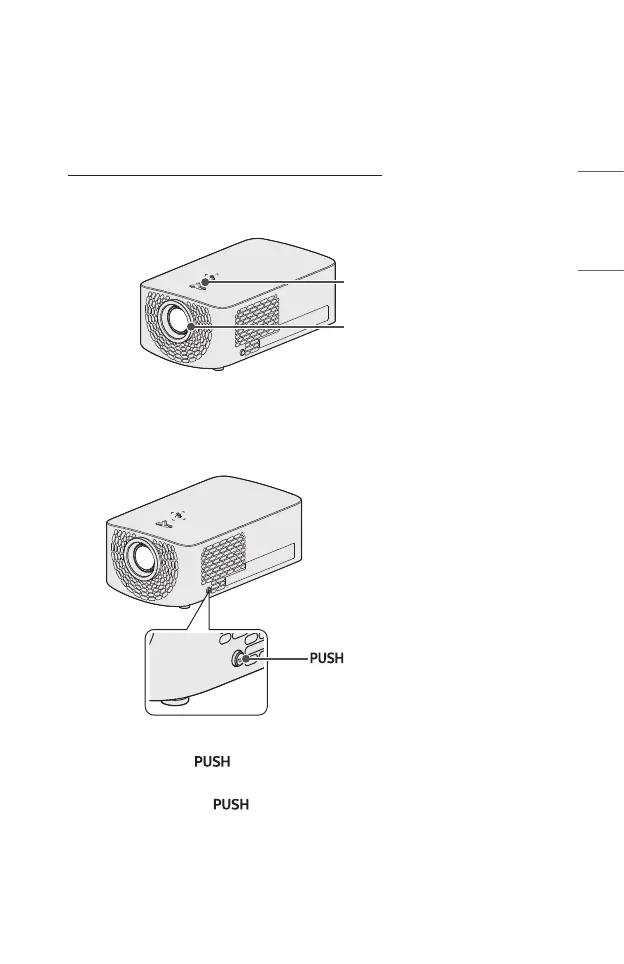
When an image appears on the screen, check if it is in focus and ts the screen
properly.
Focus Ring
Zoom Ring
• To adjust the focus of the image, rotate the focus ring.
• To adjust the size of the image, rotate the zoom ring. To move the screen image
upward/downward, adjust the height of the foot at the bottom of the projector.
: Front foot adjustment button
• While pressing the button, adjust the projector upward/downward until
the screen image is in the desired position.
• When you release the button, the front foot becomes fixed at the current
position.



 To Next Page