Need help?
Do you have a question about the LG HF85LA and is the answer not in the manual?
Key safety-related characteristics of electrical and mechanical parts identified in this manual.
Guidelines for using isolation transformers and handling components during service.
Procedures for performing cold and hot checks of AC leakage current.
Defines the scope of application and conditions for testing projector parts.
Outlines test methodologies and required specifications for performance, safety, and EMC.
Provides general specifications for projector models including input, power, and environmental conditions.
Lists supported video resolutions for HDMI input, detailing frequencies and pixel clocks.
Identifies poor connections on the Main and LED Board assembly and their associated circuit numbers.
Identifies poor connections on the LD Driver and Jack Board assembly and their associated circuit numbers.
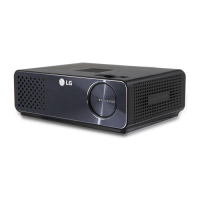
This document is a service manual for the LG DLP Projector, models HF85LA and HF85LA-NA, with chassis FZ91A. It provides comprehensive information for servicing and maintaining the projector, ensuring safe and effective repairs.
The LG DLP Projector is a digital light processing (DLP) device designed to project high-definition video and images onto a screen or surface. It supports a wide range of video input systems, including ATSC/NTSC for broadcast television and various HDMI resolutions for both PC and DTV sources, up to Full HD (1920 x 1080) at 60Hz. The projector is equipped with a main control unit (IC100) that manages various functionalities, including video processing, audio output, and peripheral connectivity. It features a DLP chip (0.47" DMD) for image generation, a phosphor wheel for color processing, and a laser diode (LD) light source for illumination. The projector also includes a Keystone correction module (IC800) for image geometry adjustment and a MICOM (IC600) for system control, including keypad input and infrared (IR) remote control. Audio is handled by an audio amplifier (IC700) with 3W speakers and a headphone jack. Connectivity options include multiple HDMI ports, USB 2.0 (Type-A) ports, SPDIF OUT, RJ45 for wired network, and integrated Wi-Fi and Bluetooth for wireless communication.
The projector is designed for ease of use with various input sources. Users can connect multiple devices via HDMI, including PCs, gaming consoles, and set-top boxes, supporting resolutions from standard definition (480P) up to Full HD (1080P). The USB 2.0 ports allow for direct playback of media files or for firmware updates. The integrated Wi-Fi and Bluetooth capabilities enable wireless content sharing and connectivity with other smart devices. The projector's control interface includes a local keypad and an infrared remote controller for convenient operation. An accelerometer is integrated, potentially for automatic image orientation or other motion-sensing features. The device also supports software updates, which can be performed via USB or automatically if connected to the internet, ensuring the projector always runs on the latest firmware with improved features and bug fixes. The update process is guided by on-screen prompts, making it user-friendly.
This service manual emphasizes safety precautions for technicians, highlighting critical components identified with a triangle symbol in the exploded view. These safety-related parts must be replaced with identical components to prevent hazards such as electric shock or fire. Technicians are advised to use an isolation transformer during servicing to protect themselves and the device. Before returning the projector to a customer, a thorough AC leakage current check is mandatory to ensure electrical safety. The manual provides detailed instructions for both cold and hot leakage current checks, specifying acceptable resistance and voltage limits.
The manual includes a comprehensive disassembly and assembly guide, detailing the steps to access internal components. This includes removing the bottom case, rear case, top case, and separating the engine from the middle case. The guide specifies the number and type of screws for each step, aiding in efficient and correct reassembly. A block diagram illustrates the interconnections between various integrated circuits and modules, which is crucial for troubleshooting.
A dedicated troubleshooting guide helps diagnose common issues based on symptoms and provides corresponding solutions. For instance, if there is no image, the guide directs the technician to check connections to the DMD Board (P1000) and the P/W Index/Motor (P1003, P1002). Issues with the remote controller, sound output, wired LAN, or DTV tuner are linked to the Jack Board (P602) and Main Board (P50). Problems with local keys are attributed to the Local Key connection (P601), while fan malfunctions (P300) and Wi-Fi/Bluetooth issues (P100) are also covered. A flow chart for major symptoms further assists technicians in systematically identifying and resolving problems, such as power-on failures, automatic shutdowns, broken images, fan errors, and high-temperature errors. This systematic approach ensures efficient and accurate repairs, minimizing downtime and enhancing the longevity of the projector.
 General
| Display Technology | DLP |
|---|---|
| Brightness | 1500 ANSI Lumens |
| Contrast Ratio | 150, 000:1 |
| Light Source | Laser |
| Light Source Life | 20, 000 hours |
| HDR Support | Yes |
| Smart TV | Yes (webOS) |
| Wireless | Yes (Wi-Fi, Bluetooth) |
| 3D | Yes |
| Native Resolution | 1920 x 1080 |
| Noise Level | 30 dB |
| Power Consumption | 100W |
| Ports | HDMI, USB, Ethernet, Audio Out |
| Screen Size | 40 - 120 inches |


 To Next Page