Function
18
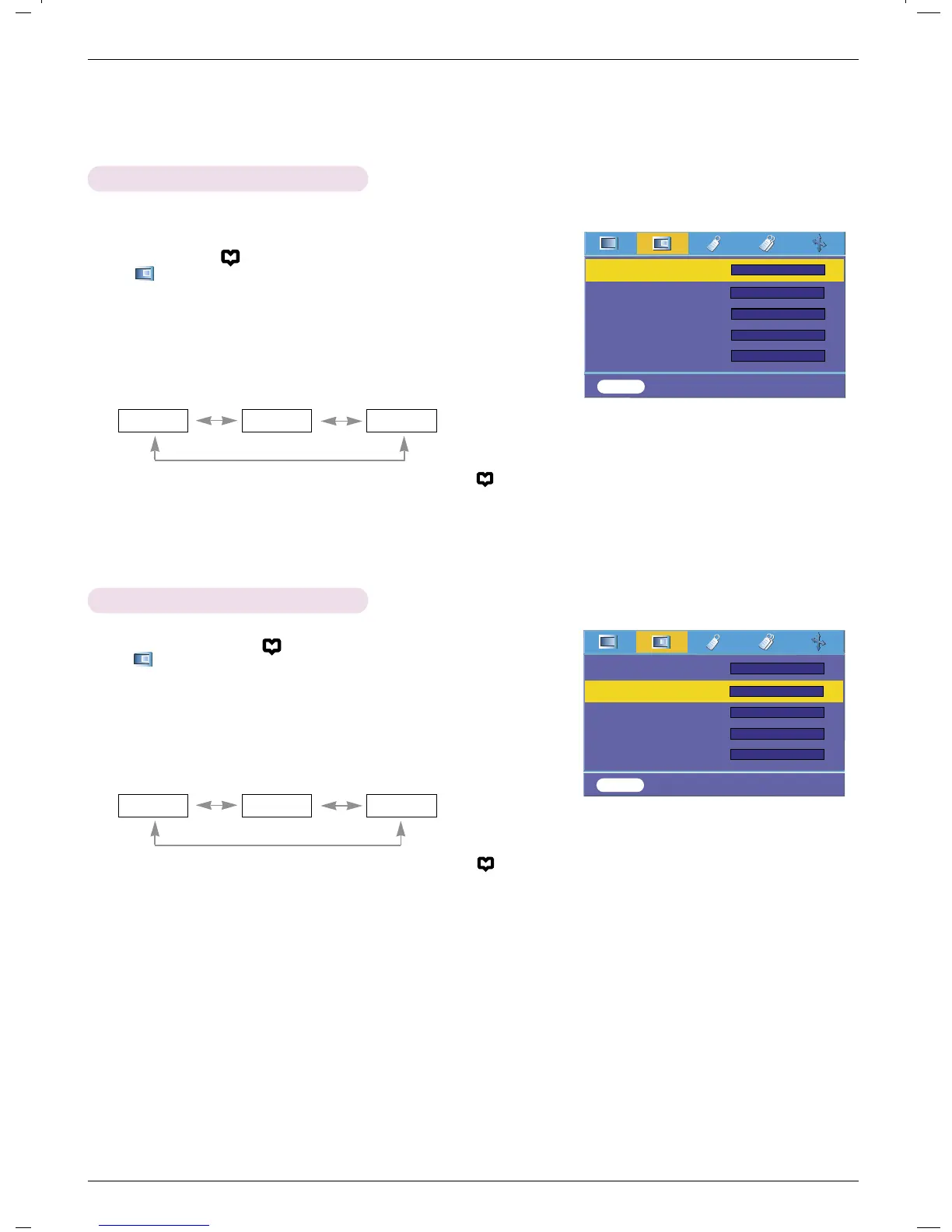
1. Press the MENU( ) button and then use F, G button to select
the menu.
2. Press the D , E button to select ACC item.
3. Press the
F, G button to make desired adjustments.
Auto Color Temperature Control
●
Each press of the F, G button changes the screen as shown below.
●
To exit the menu display, repeatedly press the MENU button( ).
Normal Cool Warm
- To initialize values (reset to default settings), select the Normal option.
1. Press the MENU button( ) and then use F, G button to select
the menu.
2. Press the D , E button to select Gamma item.
3. Press the
F, G button to adjust the screen condition as required.
Gamma Function
●
Each press of the D, E button changes the screen as shown below.
●
To exit the menu display, repeatedly press the MENU button( ).
Normal Film Sports
ACC
Gamma
Black Level
Keypad Sound
Keypad LED
FG
Film
FG
High
MENU Prev. Move Select
D
E
FG
FG
On
FG
Normal
FG
On
ACC
Gamma
Black Level
Keypad Sound
Keypad LED
FG
Film
FG
High
MENU Prev. Move Select
D
E
FG
FG
On
FG
Normal
FG
On



 To Next Page