Getting Started 11
Getting Started
1
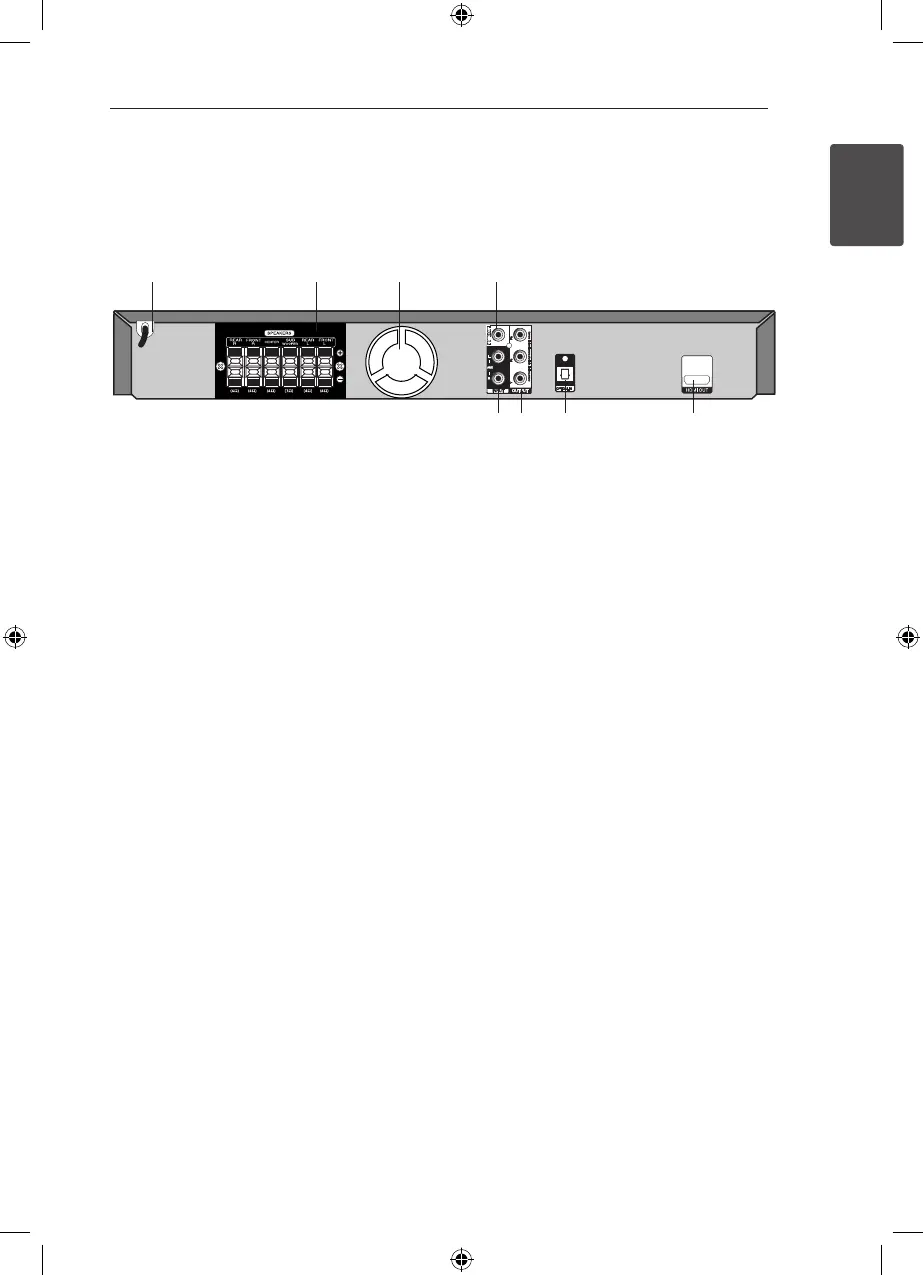
a
Power cord
b
Speakers connectors
Connects the speaker cables.
c
Cooling Fan
d
VIDEO OUT
Connects to a TV with video inputs.
e
HDMI OUT
Connects to TV with HDMI inputs.
(Interface for digital audio and video)
f
OPTICAL IN
Connects to optical audio equipment.
g
COMPONENT VIDEO (Y P
B
P
R
)OUTPUT
(PROGRESSIVE SCAN)
Connects to a TV with Y P
B
P
R
inputs.
h
AUX (L/R) INPUT
Connects to an external source with 2 channel
audio outputs.
Rear panel
a b c d
h g f e
HT906TA-N0_BTURLLK_ENG_6156.indd 11 2011-12-13 �� 5:17:03



 To Next Page