Getting Started8
Getting Started
1
• • • • • •
a
• • • • •
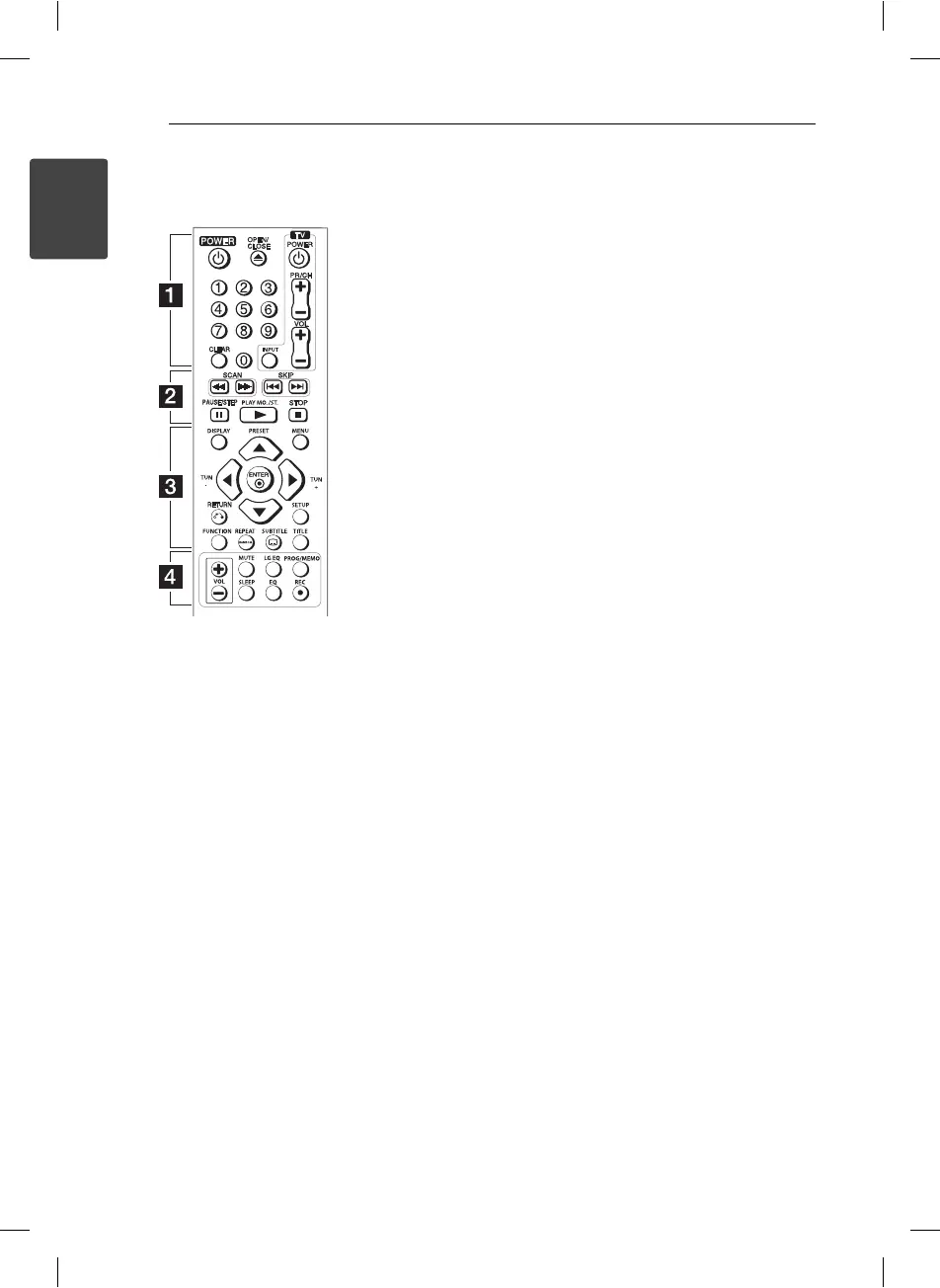
POWER (
1
): Switches the unit
ON or OFF.
OPEN/CLOSE (
B
): Opens and
closes the disc tray.
Numerical buttons: Selects
numbered items in a menu.
CLEAR: Removes a track number
on the Program List.
TV Control Buttons: Control the
sound volume, channel, sources,
and power On/O on TV.
(LG TV Only)
• • • • • •
b
• • • • •
SCAN (
c/v
): Searches
backward or forward.
SKIP (
C/V
): Goes to the
next or previous chapter / track /
le.
PAUSE/STEP (
M
): Pauses
playback.
PLAY (
d
) MO./ST. : Starts
playback. Selects Mono/ Stereo.
STOP (
Z
): Stops playback.
• • • • • •
c
• • • • •
DISPLAY: Accesses or exits On-
Screen Display.
PRESET (
WS
) : Selects
programme of Radio.
MENU: Accesses or exits the DVD
menu.
TUN (-/+) : Tunes in the desired
radio station.
w/s/a/d
: Navigates the
menus.
ENTER (
b
): Con rms menu
selection.
RETURN (
x
): Moves backward
or exits the menu.
SETUP: Accesses or exits the
setup menu.
FUNCTION : Selects the function
and input source.
REPEAT/RANDOM : Selects a play
mode.
SUBTITLE (
]
): Selects a subtitle
language.
TITLE: Accesses the disc’s title
menu, if available.
• • • • • •
d
• • • • •
VOL (
Volume) (+/-) : Adjusts
speaker volume.
MUTE : Mutes the sound.
LG EQ (
9
) : Selects a Natural or
Local Specialization equalizer
e ect by using LG EQ.
PROG/MEMO : Accesses or
removes Program menu.
SLEEP : Sets the system to turn o
automatically at a speci ed time.
(Dimmer : The display window will
be darken by half.)
EQ
$
(EQUALIZER e ect) :
Chooses sound impressions.
REC (
X
) : USB Direct Recording.
Battery Installation
Remove the battery cover on the
rear of the Remote Control, and
insert R03 (size AAA) battery with
4
and
5
matched correctly.
Code number to control
TVs:
While holding down TV POWER
button, press the number buttons
to select the Maker code for your
TV (see the table below). Release
TV POWER button.
Remote control
HT156DD-F0-AMARLLK-ENG.indd 8HT156DD-F0-AMARLLK-ENG.indd 8 11. 07. 28 9:1311. 07. 28 9:13



 To Next Page