Getting Started 9
Getting Started
1
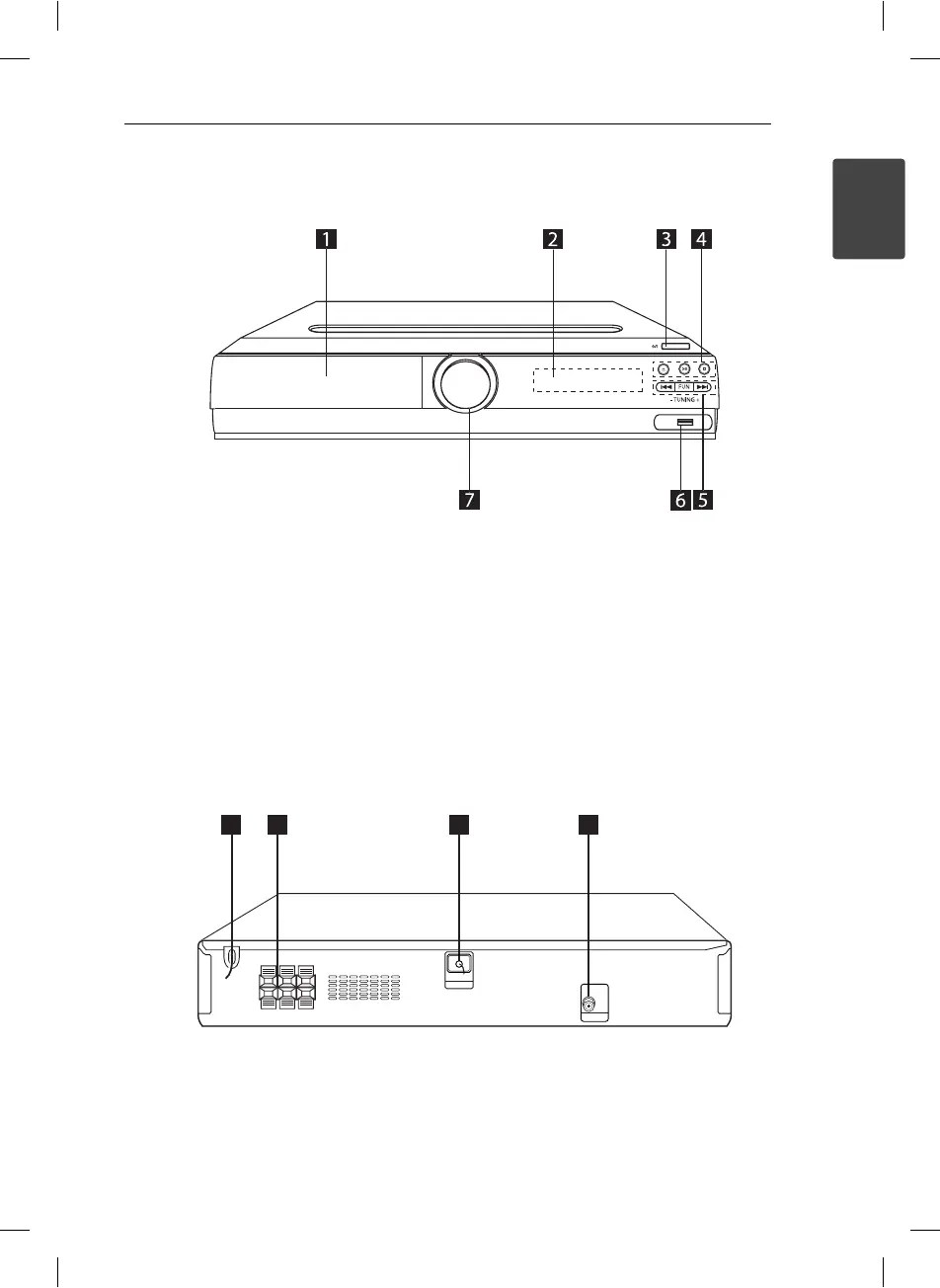
Front panel
a
DVD/CD Disc Drawer
b
Display Window
c
1
(Power)
d
B
(Open/Close)
D
!!
(Play/Pause)
Z
(Stop)
e
FUN
Selects the function or input source.
C/V
(Skip)
TUNING (-/+) : Tunes in the desired radio
station.
f
USB port
You can play video, image and sound les by
connecting the USB device.
g
Volume (VOL.)
Rear panel
1
3
2
4
MONITOR
ANTENNA
FM
a
Power cord
b
Speaker terminal
c
ANTENNA connector (FM)
The reception will be at its best when the end
of the aerial is stretched to be in a straight line
and horizontal.
d
MONITOR (VIDEO OUT) connector
Connects to a TV with video inputs
HT156DD-F0-AMARLLK-ENG.indd 9HT156DD-F0-AMARLLK-ENG.indd 9 11. 07. 28 9:1311. 07. 28 9:13



 To Next Page