EasyManua.ls Logo

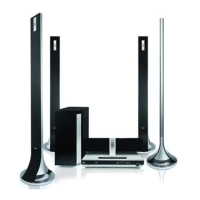
LG HT762TZ-D2 - User Manual

LG HT762TZ-D2
28 pages
Print Icon
To Next Page IconTo Next Page
Loading...
DVD RECEIVER
OWNER’S MANUAL
MODEL: HT762TZ
HT762TZ-D2
SH72TZ-S
SH72TZ-C
SH72TZ-W
Before connecting, operating or adjusting this product,
please read this instruction booklet carefully and completely.
HT762TZ-D2_DLVALLK_ENG_1122
R

Questions and Answers

  • D
    Debbie BryanAug 30, 2025
    What to do if there is no sound from LG Receiver?
    • T
      Teresa McintoshAug 31, 2025
      If you are experiencing no sound or very low sound from your LG Receiver, consider the following: * Ensure the equipment connected with the audio cable is set to receive DVD audio signal output by selecting the correct input mode on the audio receiver. * Check that the audio cables are securely connected to the jacks. * Confirm that the equipment connected with the audio cable is turned on. * If the audio connecting cable is damaged, replace it with a new one.
  • T
    theresa33Sep 8, 2025
    How to eliminate loud hum or noise from LG HT762TZ-D2 Receiver?
    • J
      Jennifer JoyceSep 8, 2025
      To address loud humming or noise from your LG Receiver: * Clean the disc, as it may be dirty. * Ensure the speakers and components are securely connected. * Move the TV away from the audio components, as the DVD/CD Receiver might be located too close to the TV.
  • J
    jesus84Aug 29, 2025
    What to do if a DVD/CD will not play on LG Home Theater System?
    • S
      schroederjeffreyAug 29, 2025
      If your LG Home Theater System DVD or CD won't play, first insert a disc if none is currently inserted. Ensure that the disc is playable by checking the disc type, color system, and regional code. Make sure the disc is inserted correctly with the label side facing upwards. If a menu is open on the screen, press SETUP to close it. Lastly, check if a parental lock is enabled, and if so, enter the password or adjust the rating level.
  • J
    James YangSep 23, 2025
    Why is my LG Karaoke System making a humming noise?
    • J
      Jackie YuSep 23, 2025
      If you hear a loud hum or noise from your LG Karaoke System, check these: * Clean the disc. * Ensure the speakers and components are securely connected. * Move the TV away from the audio components, as the DVD/CD Receiver might be too close to the TV.
  • L
    Leah SinghSep 9, 2025
    What to do if the LG Receiver power is on, but the DVD/CD Receiver audio CD indicator does not work?
    • B
      Brittany CamposSep 9, 2025
      If the power is on but the DVD/CD Receiver audio CD indicator isn't working on your LG Receiver, it might be because no disc is inserted. Insert a disc and check that the DVD or audio CD indicator in the DVD display lights up.
  • J
    John MorrisSep 13, 2025
    How to brighten the front panel display on my LG HT762TZ-D2?
    • A
      Anthony NobleSep 13, 2025
      Press DIMMER on the remote control of your LG Receiver.
  • A
    Austin WagnerSep 18, 2025
    What to do if there is no picture on my LG Karaoke System?
    • S
      Shannon MorganSep 18, 2025
      If you're not getting a picture on your LG Karaoke System, here are a few things to check: * Make sure your TV is set to the correct video input mode to receive the DVD signal. * Verify that the video cable is securely connected to the jacks. * Ensure your TV is turned on.
  • S
    sarah31Aug 27, 2025
    Why is there little or no sound on my LG Home Theater System?
    • K
      kimberly01Aug 27, 2025
      If you experience little or no sound with your LG Home Theater System, ensure that the equipment connected via the audio cable is set to receive the DVD signal output. Check that the audio cables are securely connected to both the speakers and the receiver. If the issue persists, the audio cables may be damaged and need replacement.
  • J
    John DawsonAug 26, 2025
    Why is there no sound from my LG HT762TZ-D2?
    • A
      Austin WilliamsAug 26, 2025
      If you experience little or no sound from your LG Receiver, verify that the equipment connected via the audio cable is set to receive the DVD signal output by selecting the correct input mode on the audio receiver. Ensure the audio cables are securely connected to the speakers or receiver. If the issue persists, the audio cables may be damaged and need replacement.
  • J
    Jeremy EdwardsAug 25, 2025
    What to do if there is no sound from my LG HT762TZ-D2?
    • J
      Jessica SmithAug 26, 2025
      If there is no sound or very low sound from your LG Receiver, consider the following: * Ensure that the equipment connected with the audio cable is set to the correct input mode to receive the audio signal from the DVD/CD Receiver. * Check that the audio cables are securely connected. * Make sure that the connected equipment is turned on. * If the audio connecting cable is damaged, replace it.

LG HT762TZ-D2 Specifications

General IconGeneral
BrandLG
ModelHT762TZ-D2
CategoryReceiver
LanguageEnglish

Related product manuals