EasyManua.ls Logo

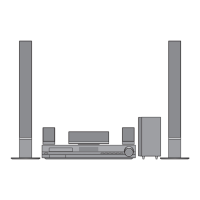
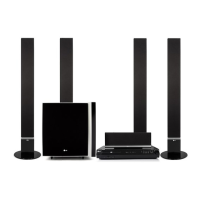
LG HT502SH - User Manual

LG HT502SH
26 pages
Print Icon
To Next Page IconTo Next Page
Loading...
DVD RECEIVER
OWNER’S MANUAL
MODEL: HT502SH
Main Unit - HT502SH-D0
Speakers - SH52SH-S
SH52SH-C
SH52SH-W
Before connecting, operating or adjusting this product,
please read this instruction booklet carefully and
completely.
HT502SH-D0.NA4ULLK_ENG_MFL38637174
R
USB
FOR THE WARRANTY TERMS & CONDITIONS,
PLEASE REFER TO BACK COVER OF THIS MANUAL.

Questions and Answers

Summary

LG DVD Receiver Manual - Front Page

Safety Warnings and Precautions

Electrical Safety and Unit Access

General warnings regarding electrical shock, opening the unit, and servicing.

Preventing Fire and Shock Hazards

Instructions to prevent fire or electric shock hazards by avoiding exposure to rain or moisture.

Power Cord Safe Handling

Guidelines for safe use of the power cord, including avoiding overloading and physical abuse.

Maintenance, Service, and Disposal

Unit Handling and Cleaning

Instructions on how to handle the unit, including shipping and cleaning procedures.

Appliance Disposal Guidelines

Guidance on the proper disposal of the old appliance according to European directives.

User Manual Introduction and Disc Types

Important Information Before Use

Advice to read the manual carefully and retain for future reference before operating the unit.

Supported Disc Formats

Details the various types of discs that this unit can play, including DVD, VCD, and Audio CDs.

DVD Regional Code Explained

Explanation of the regional code system for DVD discs and how it affects playback.

DVD Receiver Panel Layout

Front Panel Controls and Display

Description of the controls and indicators located on the front panel of the DVD receiver.

Rear Panel Connectivity Options

Details the various input and output connectors found on the rear panel of the unit.

Remote Control Operation Guide

Remote Control Button Functions

Detailed explanation of each button on the remote control and its function.

Remote Range and Battery Installation

Information on the operational range and battery installation for the remote control.

System Installation: TV Connections

Connecting via Video and Component Cables

Instructions for connecting the DVD receiver to a TV using video or component video cables.

Connecting via SCART Cable

Guide for connecting the unit to a TV using a SCART cable for video output.

Video Output Selector Function

How to select the video output mode (Component or SCART) based on TV connection.

Connecting External Devices and Antennas

Optional Equipment Connections (USB, AUX, Optical)

Instructions for connecting USB devices, AUX, and Optical audio inputs.

FM and AM Antenna Setup

Guide for connecting FM and AM antennas for radio reception.

Speaker System Setup and Connection

Connecting Your Speakers

Detailed instructions and diagrams for connecting the speaker system to the DVD receiver.

Speaker Connection Best Practices

Important notes on matching speaker cables and adjusting volume for optimal sound.

On-Screen Display and Initial Setup

Displaying Disc Information

How to display information about the loaded disc on the TV screen.

Accessing the Initial Settings Menu

Guide to accessing and using the setup menu for various adjustments.

Setting On-Screen Language Preferences

Instructions for setting the language for the setup menu and on-screen display.

Display Settings and Progressive Scan

TV Aspect Ratio and Display Modes

Settings for TV aspect ratio (4:3, 16:9) and display modes (Letterbox, Panscan).

Enabling Progressive Scan Output

How to enable progressive scan for higher quality video output and its precautions.

Audio Configuration and 5.1 Speaker Setup

Configuring Audio Options (DRC, Vocal)

Configuration of audio options like Dynamic Range Control (DRC) and Vocal for DVD playback.

Setting Up 5.1 Surround Sound System

Detailed setup for 5.1 channel surround sound, including speaker selection, volume, and distance.

Advanced Settings: Parental Controls and DivX

Parental Control (Rating, Password, Area Code)

Setting up parental controls, password, and rating restrictions for DVD playback.

PBC and DivX VOD Registration

Configuring PBC for VCDs and obtaining the DivX registration code for VOD services.

Disc Playback Operations

Basic Playback Control Functions

Explanation of buttons like OPEN/CLOSE, PAUSE, SKIP, SCAN, REPEAT for disc playback.

Playback Navigation, Zoom, and Menu Access

Features for navigating menus, titles, and zooming into video content.

Selecting Audio Tracks and Subtitles

How to select audio languages, audio channels, and subtitle languages during playback.

Additional Playback Features and TV Control

Advanced Playback Functions (Speed, Search)

Details on 1.5x speed playback, time search, and marker search functions.

System Select and Screen Saver

Information on system selection (PAL/NTSC) and screen saver activation.

Operating LG TV with Receiver Remote

How to use the remote control to operate basic functions of an LG TV.

Playing Audio CDs and MP3;WMA Files

Audio CD, MP3;WMA File Playback

Instructions for playing audio CDs and MP3/WMA files, including ID3 TAG support.

Creating Programmed Playback Lists

How to create and manage programmed playback lists for tracks.

Viewing JPEG Image Files

How to View JPEG Files on Disc

Guide to viewing JPEG image files from discs, including folder navigation and slide show.

JPEG File Compatibility Notes

Notes on JPEG file resolution, compatibility, and file naming conventions.

Playing DivX Movie Files

DivX Movie Playback Guide

Instructions for playing DivX movie files from discs, including subtitle support.

DivX File and Subtitle Compatibility

Information on DivX file resolution, subtitle formats, codec, and audio compatibility.

Radio Tuning and Listening

Storing and Selecting Radio Stations

Steps to store up to 50 FM and AM radio stations for easy access.

Listening to Radio Broadcasts

How to select preset stations, tune manually, and improve reception.

RDS Radio Features

Understanding RDS Data Display

Explanation of RDS features like PS, PTY, RT, and CT for FM radio.

Searching Radio by Programme Type (PTY)

How to search for radio stations based on programme type using PTY codes.

System Operation and Sound Modes

Sleep Timer, Dimmer, and Mute Functions

Settings for sleep timer, display brightness (dimmer), and muting the sound.

Input Source Selection and Sound Enhancements

Selecting input sources and adjusting sound modes like XTS, VIRTUAL, and Surround.

Reference Information: Codes

Language Code Directory

A list of codes for various languages used in disc settings.

Geographical Area Code Directory

A list of area codes used for DVD disc rating compatibility.

Troubleshooting Common Issues

Resolving Power, Picture, and Sound Problems

Solutions for problems related to no power, unit not working, or no picture.

Troubleshooting Playback and Disc Errors

Troubleshooting steps for no sound, poor playback, and playback not starting.

Advanced Troubleshooting

Radio Tuning and Remote Control Fixes

Solutions for radio tuning problems and remote control malfunctions.

Display and Battery Related Issues

Troubleshooting steps for a dim front panel display or flat remote control batteries.

Product Technical Specifications

General, Tuner, and Video Specifications

Technical details on power, dimensions, operating conditions, and tuner performance.

Amplifier and Speaker System Specs

Specifications for disc playback, amplifier output, and speaker systems.

LG Product Guarantee Details

Warranty Terms and Service Requirements

Details on the warranty coverage, duration, and requirements for service claims.

Product Registration and Support Info

Information on registering the product for future assistance and support.

Summary

LG DVD Receiver Manual - Front Page

Safety Warnings and Precautions

Electrical Safety and Unit Access

General warnings regarding electrical shock, opening the unit, and servicing.

Preventing Fire and Shock Hazards

Instructions to prevent fire or electric shock hazards by avoiding exposure to rain or moisture.

Power Cord Safe Handling

Guidelines for safe use of the power cord, including avoiding overloading and physical abuse.

Maintenance, Service, and Disposal

Unit Handling and Cleaning

Instructions on how to handle the unit, including shipping and cleaning procedures.

Appliance Disposal Guidelines

Guidance on the proper disposal of the old appliance according to European directives.

User Manual Introduction and Disc Types

Important Information Before Use

Advice to read the manual carefully and retain for future reference before operating the unit.

Supported Disc Formats

Details the various types of discs that this unit can play, including DVD, VCD, and Audio CDs.

DVD Regional Code Explained

Explanation of the regional code system for DVD discs and how it affects playback.

DVD Receiver Panel Layout

Front Panel Controls and Display

Description of the controls and indicators located on the front panel of the DVD receiver.

Rear Panel Connectivity Options

Details the various input and output connectors found on the rear panel of the unit.

Remote Control Operation Guide

Remote Control Button Functions

Detailed explanation of each button on the remote control and its function.

Remote Range and Battery Installation

Information on the operational range and battery installation for the remote control.

System Installation: TV Connections

Connecting via Video and Component Cables

Instructions for connecting the DVD receiver to a TV using video or component video cables.

Connecting via SCART Cable

Guide for connecting the unit to a TV using a SCART cable for video output.

Video Output Selector Function

How to select the video output mode (Component or SCART) based on TV connection.

Connecting External Devices and Antennas

Optional Equipment Connections (USB, AUX, Optical)

Instructions for connecting USB devices, AUX, and Optical audio inputs.

FM and AM Antenna Setup

Guide for connecting FM and AM antennas for radio reception.

Speaker System Setup and Connection

Connecting Your Speakers

Detailed instructions and diagrams for connecting the speaker system to the DVD receiver.

Speaker Connection Best Practices

Important notes on matching speaker cables and adjusting volume for optimal sound.

On-Screen Display and Initial Setup

Displaying Disc Information

How to display information about the loaded disc on the TV screen.

Accessing the Initial Settings Menu

Guide to accessing and using the setup menu for various adjustments.

Setting On-Screen Language Preferences

Instructions for setting the language for the setup menu and on-screen display.

Display Settings and Progressive Scan

TV Aspect Ratio and Display Modes

Settings for TV aspect ratio (4:3, 16:9) and display modes (Letterbox, Panscan).

Enabling Progressive Scan Output

How to enable progressive scan for higher quality video output and its precautions.

Audio Configuration and 5.1 Speaker Setup

Configuring Audio Options (DRC, Vocal)

Configuration of audio options like Dynamic Range Control (DRC) and Vocal for DVD playback.

Setting Up 5.1 Surround Sound System

Detailed setup for 5.1 channel surround sound, including speaker selection, volume, and distance.

Advanced Settings: Parental Controls and DivX

Parental Control (Rating, Password, Area Code)

Setting up parental controls, password, and rating restrictions for DVD playback.

PBC and DivX VOD Registration

Configuring PBC for VCDs and obtaining the DivX registration code for VOD services.

Disc Playback Operations

Basic Playback Control Functions

Explanation of buttons like OPEN/CLOSE, PAUSE, SKIP, SCAN, REPEAT for disc playback.

Playback Navigation, Zoom, and Menu Access

Features for navigating menus, titles, and zooming into video content.

Selecting Audio Tracks and Subtitles

How to select audio languages, audio channels, and subtitle languages during playback.

Additional Playback Features and TV Control

Advanced Playback Functions (Speed, Search)

Details on 1.5x speed playback, time search, and marker search functions.

System Select and Screen Saver

Information on system selection (PAL/NTSC) and screen saver activation.

Operating LG TV with Receiver Remote

How to use the remote control to operate basic functions of an LG TV.

Playing Audio CDs and MP3;WMA Files

Audio CD, MP3;WMA File Playback

Instructions for playing audio CDs and MP3/WMA files, including ID3 TAG support.

Creating Programmed Playback Lists

How to create and manage programmed playback lists for tracks.

Viewing JPEG Image Files

How to View JPEG Files on Disc

Guide to viewing JPEG image files from discs, including folder navigation and slide show.

JPEG File Compatibility Notes

Notes on JPEG file resolution, compatibility, and file naming conventions.

Playing DivX Movie Files

DivX Movie Playback Guide

Instructions for playing DivX movie files from discs, including subtitle support.

DivX File and Subtitle Compatibility

Information on DivX file resolution, subtitle formats, codec, and audio compatibility.

Radio Tuning and Listening

Storing and Selecting Radio Stations

Steps to store up to 50 FM and AM radio stations for easy access.

Listening to Radio Broadcasts

How to select preset stations, tune manually, and improve reception.

RDS Radio Features

Understanding RDS Data Display

Explanation of RDS features like PS, PTY, RT, and CT for FM radio.

Searching Radio by Programme Type (PTY)

How to search for radio stations based on programme type using PTY codes.

System Operation and Sound Modes

Sleep Timer, Dimmer, and Mute Functions

Settings for sleep timer, display brightness (dimmer), and muting the sound.

Input Source Selection and Sound Enhancements

Selecting input sources and adjusting sound modes like XTS, VIRTUAL, and Surround.

Reference Information: Codes

Language Code Directory

A list of codes for various languages used in disc settings.

Geographical Area Code Directory

A list of area codes used for DVD disc rating compatibility.

Troubleshooting Common Issues

Resolving Power, Picture, and Sound Problems

Solutions for problems related to no power, unit not working, or no picture.

Troubleshooting Playback and Disc Errors

Troubleshooting steps for no sound, poor playback, and playback not starting.

Advanced Troubleshooting

Radio Tuning and Remote Control Fixes

Solutions for radio tuning problems and remote control malfunctions.

Display and Battery Related Issues

Troubleshooting steps for a dim front panel display or flat remote control batteries.

Product Technical Specifications

General, Tuner, and Video Specifications

Technical details on power, dimensions, operating conditions, and tuner performance.

Amplifier and Speaker System Specs

Specifications for disc playback, amplifier output, and speaker systems.

LG Product Guarantee Details

Warranty Terms and Service Requirements

Details on the warranty coverage, duration, and requirements for service claims.

Product Registration and Support Info

Information on registering the product for future assistance and support.

LG HT502SH Specifications

General IconGeneral
TypeHome Theater System
Channels5.1
USB Ports1
Audio Formats SupportedDolby Digital, DTS
DVD PlayerYes
Audio DecodingDolby Digital, DTS
BluetoothNo
OutputsHDMI
Playback FormatsDVD, MP3, WMA, JPEG

Related product manuals