EasyManua.ls Logo

LG HT502PH - User Manual

LG HT502PH
30 pages
Print Icon
To Next Page IconTo Next Page
Loading...
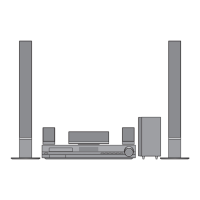
DVD KARAOKE RECEIVER
OWNER’S MANUAL
MODEL: XH-TK5020Q
Main Unit - XH-TK5020Q
Speakers - SH52PH-F
SH52PH-C
SH52PH-S
SH52PH-W
Before connecting, operating or adjusting this product, please
read this instruction booklet carefully and completely.
Internet address ; http://ua.lge.com
Customer Information Center LG ; (380-44) 490-7777,
8-800-303-0000
.
HT502PH-XK.JA8ULLD_ENG_MFL34656534
R

Other manuals for LG HT502PH

Questions and Answers

  • S
    Sara GibsonSep 17, 2025
    How to stop loud humming noise from LG Receiver?
    • T
      Tina CochranSep 17, 2025
      If you hear a loud hum or noise from your LG DVD/CD Receiver, check these: * Clean the disc. * Ensure the speakers and components are securely connected. * Move the TV away from the audio components.
  • S
    Steven CollinsAug 25, 2025
    Why is my LG HT502PH Receiver remote control not working?
    • J
      Jeffrey HoganAug 25, 2025
      If the remote control for your LG Receiver isn't working correctly, consider these potential causes: * Ensure the remote control is pointed at the remote sensor on the receiver. * Make sure you are within 23 ft (7 m) of the receiver. * Remove any obstacles blocking the path between the remote and the receiver. * Replace the batteries in the remote control with new ones.
  • M
    millerangieAug 25, 2025
    Why is there no sound coming from my LG HT502PH?
    • J
      jessica74Aug 26, 2025
      If you are experiencing a lack of sound or very low sound from your LG Receiver, consider the following: * Ensure the equipment connected with the audio cable is set to receive DVD audio signal output. * Check that the audio cables are securely connected. * Verify that the equipment connected with the audio cable is powered on. * If the audio connecting cable is damaged, replace it.
  • M
    meghan62Aug 27, 2025
    What to do if the LG HT502PH Receiver remote control does not work properly?
    • R
      Ronald SanfordAug 27, 2025
      If the remote control isn't working, make sure you're pointing it directly at the receiver's remote sensor from a distance of no more than 23 ft (7 m). Remove any obstacles that might be blocking the signal. If it still doesn't work, try replacing the batteries with new ones.
  • A
    Andrew GreenSep 18, 2025
    Why is the picture quality poor on my LG HT502PH Receiver?
    • K
      Kimberly ReyesSep 18, 2025
      If the playback picture on your LG DVD/CD Receiver is poor, try the following: * Clean the disc. * Insert a disc, if none is inserted. * Insert a playable disc. * Place the disc with the playback side down. * Place the disc correctly on the disc tray inside the guide. * Press the SETUP button to turn off the menu screen, if a menu is on the TV screen. * Cancel the Rating function or change the rating level, if the Rating level is set.
  • C
    Catherine SchneiderSep 23, 2025
    How to fix nothing displayed on LG Receiver front panel?
    • M
      Melissa DaySep 23, 2025
      To address a blank front panel display on your LG Receiver, press the DIMMER button on the remote control.
  • C
    Charles LopezSep 9, 2025
    How to fix no power on my LG Receiver?
    • M
      Morgan PatelSep 9, 2025
      If your LG Receiver has no power, ensure the power cord is securely plugged into the wall outlet. A loose connection is often the cause.
  • A
    Alicia McgeeSep 10, 2025
    How to troubleshoot no picture on LG Receiver?
    • J
      Justin MoraSep 10, 2025
      If there is no picture from your LG DVD/CD Receiver, make sure of the following: * The TV is set to receive DVD signal output. Select the appropriate video input mode on the TV. * The video cable is securely connected into the jacks. * The connected TV is turned on.
  • I
    isheltonSep 3, 2025
    Why is the playback picture quality poor on my LG HT502PH Receiver?
    • M
      monicabutlerSep 3, 2025
      If the playback picture quality on your LG Receiver is poor, consider these possibilities: * Clean the disc. * Insert a disc. Ensure that the DVD or audio CD indicator in the DVD display is lit. * Insert a playable disc, checking the disc type, color system, and regional code. * Place the disc with the playback side down. * Ensure the disc is placed correctly within the guide on the disc tray. * Press the SETUP button to turn off the menu screen, if it's on. * Cancel the Rating function or change the rating level, if it is set.
  • S
    Scott GentrySep 1, 2025
    What to do if there is no picture on my LG HT502PH?
    • A
      Angela HarperSep 1, 2025
      If you're not getting a picture from your LG Receiver, here are a few things to check: * Make sure the TV is set to the correct video input mode to receive the DVD signal output. * Ensure the video cable is securely connected to the jacks. * Verify that the connected TV is turned on.

LG HT502PH Specifications

General IconGeneral
TypeHome Theater System
Channels5.1
Total Power Output500 W
DVD PlaybackYes
HDMI OutputYes
USB PortYes
BluetoothNo
Progressive ScanYes
USB HostYes
Audio Formats SupportedDolby Digital
Video Formats SupportedMPEG2, DivX
ConnectivityHDMI, USB

Related product manuals