EasyManua.ls Logo

LG HT502PH - User Manual

LG HT502PH
30 pages
Print Icon
To Next Page IconTo Next Page
Loading...
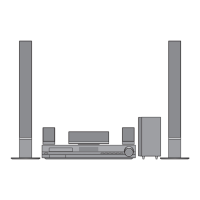
DVD KARAOKE RECEIVER
OWNER’S MANUAL
MODEL: XH-TK5020Q
Main Unit - XH-TK5020Q
Speakers - SH52PH-F
SH52PH-C
SH52PH-S
SH52PH-W
Before connecting, operating or adjusting this product, please
read this instruction booklet carefully and completely.
Internet address ; http://ua.lge.com
Customer Information Center LG ; (380-44) 490-7777,
8-800-303-0000
.
HT502PH-XK.JA8ULLD_ENG_MFL34656534
R

Other manuals for LG HT502PH

Questions and Answers

  • C
    Christopher LandrySep 2, 2025
    How to eliminate loud hum or noise from my LG Receiver?
    • M
      matthew26Sep 2, 2025
      If you're hearing a loud hum or noise from your LG Receiver, try the following: * Clean the disc. * Ensure the speakers and components are securely connected. * Move the TV away from the audio components.
  • S
    Scott GentrySep 1, 2025
    What to do if there is no picture on my LG HT502PH?
    • A
      Angela HarperSep 1, 2025
      If you're not getting a picture from your LG Receiver, here are a few things to check: * Make sure the TV is set to the correct video input mode to receive the DVD signal output. * Ensure the video cable is securely connected to the jacks. * Verify that the connected TV is turned on.
  • H
    henrymelissaAug 31, 2025
    How to fix an LG Receiver that has no power?
    • W
      williamhensonAug 31, 2025
      If your LG Receiver isn't turning on, the power cord might be disconnected. Ensure the power cord is securely plugged into the wall outlet.
  • B
    bstevensAug 30, 2025
    What to do if my LG Receiver has no picture?
    • H
      Hannah MilesAug 30, 2025
      If there is no picture on your LG DVD/CD Receiver, make sure of the following: * The TV is set to the correct video input mode to receive the DVD signal. * The video cable is securely connected to the jacks. * The connected TV is turned on.
  • W
    wmendozaAug 29, 2025
    Why is there no sound from my LG HT502PH?
    • T
      Tyler SmithAug 29, 2025
      If you're experiencing no sound or very low sound from your LG DVD/CD Receiver, here are a few things to check: 1. Ensure the equipment connected with the audio cable is set to receive DVD signal output. Select the correct input mode on the audio receiver. 2. Verify the audio cables are securely connected into the jacks. 3. Confirm that the equipment connected with the audio cable is turned on. 4. If the issue persists, the audio connecting cable may be damaged. Try replacing it with a new one.
  • R
    russelljavierAug 28, 2025
    What to do if LG Receiver remote control is not working?
    • C
      Cassandra BowmanAug 28, 2025
      If the remote control for your LG DVD/CD Receiver isn't working correctly, consider the following: * Ensure the remote is pointed directly at the receiver's remote sensor. * Make sure you are within 23 ft (7 m) of the receiver. * Remove any obstacles between the remote and the receiver. * Replace the remote's batteries with new ones.
  • M
    morrisonnicoleAug 27, 2025
    How to fix loud hum or noise heard from LG HT502PH Receiver?
    • R
      Raymond JohnsonAug 27, 2025
      Ensure the disc is clean. Check that the speakers and components are securely connected. Also, move the TV away from the audio components to reduce interference.
  • M
    meghan62Aug 27, 2025
    What to do if the LG HT502PH Receiver remote control does not work properly?
    • R
      Ronald SanfordAug 27, 2025
      If the remote control isn't working, make sure you're pointing it directly at the receiver's remote sensor from a distance of no more than 23 ft (7 m). Remove any obstacles that might be blocking the signal. If it still doesn't work, try replacing the batteries with new ones.
  • M
    millerangieAug 25, 2025
    Why is there no sound coming from my LG HT502PH?
    • J
      jessica74Aug 26, 2025
      If you are experiencing a lack of sound or very low sound from your LG Receiver, consider the following: * Ensure the equipment connected with the audio cable is set to receive DVD audio signal output. * Check that the audio cables are securely connected. * Verify that the equipment connected with the audio cable is powered on. * If the audio connecting cable is damaged, replace it.
  • S
    Steven CollinsAug 25, 2025
    Why is my LG HT502PH Receiver remote control not working?
    • J
      Jeffrey HoganAug 25, 2025
      If the remote control for your LG Receiver isn't working correctly, consider these potential causes: * Ensure the remote control is pointed at the remote sensor on the receiver. * Make sure you are within 23 ft (7 m) of the receiver. * Remove any obstacles blocking the path between the remote and the receiver. * Replace the batteries in the remote control with new ones.

LG HT502PH Specifications

General IconGeneral
TypeHome Theater System
Channels5.1
Total Power Output500 W
DVD PlaybackYes
HDMI OutputYes
USB PortYes
BluetoothNo
Progressive ScanYes
USB HostYes
Audio Formats SupportedDolby Digital
Video Formats SupportedMPEG2, DivX
ConnectivityHDMI, USB

Related product manuals