EasyManua.ls Logo

LG HT502TH-D0 - User Manual

LG HT502TH-D0
26 pages
Print Icon
To Next Page IconTo Next Page
Loading...
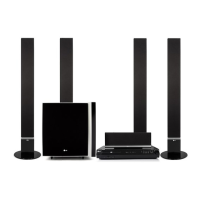
DVD RECEIVER
OWNER’S MANUAL
MODEL: HT502TH
Main Unit - HT502TH-D0
Speakers - SH52TH-S
SH52TH-C
SH52TH-W
Before connecting up, operating or repairing this product,
please read this instruction booklet carefully and
completely.
HT502TH-D0.NA9SSLD_ENG_MFL34656544
R
USB

Questions and Answers

Summary

Safety Precautions

Power Cord Safety Guidelines

Essential safety instructions for the proper and safe use of the power cord.

Environmentally Responsible Disposal

Instructions for disposing of the old appliance according to European directives.

Introduction to the LG DVD Receiver

Pre-Operation User Guidance

Key information and advice to read before using the DVD/CD Receiver.

Understanding Manual Symbols

Explanation of symbols used in the owner's manual for clarity.

Compatible Disc Formats

Lists all types of discs supported by the unit, including various formats.

Regional Code Restrictions

Information on DVD regional coding and playback limitations.

Component Identification and Layout

Front Panel Controls and Indicators

Detailed overview of buttons, ports, and display on the front of the unit.

Rear Panel Connectivity Ports

Identification and function of all input and output terminals on the rear.

Remote Control Operation

Remote Control Button Functions

Comprehensive explanation of every button's function on the remote control.

Remote Control Usage Recommendations

Guidelines on effective operating range and angles for the remote sensor.

Remote Control Battery Installation

Instructions for correctly inserting batteries into the remote control.

Installation and Connections

Connecting the DVD Receiver to a TV

Step-by-step guide for various TV connection methods and cable types.

Connecting External Audio and Data Sources

Connecting Optional Equipment

How to connect USB devices, portable players, and other audio sources.

Antenna Connection for Radio

Instructions for connecting FM and AM antennas for optimal radio reception.

Speaker System Setup

Connecting Surround Sound Speakers

Diagram and instructions for connecting front, center, rear, and subwoofer speakers.

General Operation and System Settings

Viewing Disc Information On-Screen

How to access and display playback details like track, chapter, and audio status.

Navigating the Initial Setup Menu

Guide to accessing and configuring various system settings for the first time.

Language and OSD Settings

How to select system language, disc audio, subtitle, and menu languages.

Display and Video Output Settings

Setting TV Aspect Ratio

Adjusts picture aspect ratio (4:3 or 16:9) based on the connected TV.

Display Mode Options (Letterbox;Panscan)

How to display 4:3 content with letterbox or panscan formats.

Progressive Scan Video Configuration

Enables high-quality progressive scan output for compatible TVs.

Audio and Surround Sound Configuration

Selecting Audio Output Options

Choosing audio settings based on the connected sound system or disc audio tracks.

Dynamic Range Control (DRC) Adjustment

Compresses audio dynamic range for clearer sound at lower volumes.

Vocal Mode for Karaoke DVDs

Activates vocal channels specifically for multi-channel karaoke discs.

5.1 Channel Speaker Setup

Configuring individual speaker settings (size, volume, distance) for 5.1 surround sound.

Advanced System Configuration

Parental Control and Rating System

Blocks playback of DVDs based on their content rating level.

Password Management and Recovery

Procedures for setting, changing, or clearing the parental control password.

DVD Regional Code Settings

Setting the unit's area code to match DVD disc regional codes.

Playback Control (PBC) Settings

Controls the playback behavior of Video CDs (VCDs) with PBC features.

DivX Video Registration

Obtaining a registration code for DivX VOD services for renting and purchasing videos.

General Playback Features and Controls

Basic Playback Button Operations

Explains functions of buttons like OPEN/CLOSE, PAUSE, SKIP, SCAN, REPEAT during playback.

Advanced Playback Functions

Details features like ZOOM, TITLE/MENU access, SUBTITLE, AUDIO language, and SLOW playback.

Enhanced Playback and System Interaction

Additional Playback Features

Covers 1.5x speed playback, time search, and marker search for precise playback control.

Screen Saver and Last Scene Memory

Automatic screen saver activation and memory for last playback scene.

Video Output System Selection

How to select PAL or NTSC video output systems for TV compatibility.

TV Control via Remote

Using the remote control to operate basic functions of compatible LG TVs.

Media File Playback Guide

Audio CD, MP3, and WMA Playback

Instructions for playing audio CDs and MP3/WMA files, including compatibility notes.

Programmed Playback and Track Management

Creating, managing, and playing custom programmed track lists from discs.

Photo File Viewing

JPEG Image File Playback

How to view JPEG files, navigate folders, and use slideshow features.

Video File Playback

DivX Movie File Playback

Guide to playing DivX movie files, including subtitle support and compatibility details.

Radio Operation and Features

Presetting and Tuning Radio Stations

How to store favorite radio stations and manually tune frequencies.

Listening to Preset Radio Stations

Accessing and listening to previously stored radio stations.

RDS Radio Information System

Understanding RDS Data Display

How RDS provides station name, program type, and text information.

Programme Type (PTY) Search

Searching for radio stations based on their broadcast program type.

System Controls and Audio Enhancements

Sleep Timer Function

Setting the unit to automatically turn off after a specified duration.

Display Brightness Adjustment

Adjusting the brightness level of the front panel display window.

Mute Audio Output

Temporarily disabling the audio output of the unit.

Selecting Input Signal Sources

Switching between different audio/video input sources like AUX and Optical.

XTS;XTS Pro Sound Enhancement

Applying enhanced sound modes for improved bass or clarity.

Virtual Surround Sound Modes

Selecting different virtual sound field effects for immersive audio.

Sound Mode Presets

Choosing from various pre-programmed sound fields for different audio content.

Reference Data Tables

Language Code Reference List

A table listing language codes for initial settings like disc audio and subtitles.

Geographic Area Code Reference

A table listing country codes used for DVD regional playback settings.

Troubleshooting Common Issues

Power, Unit Malfunction, and No Picture Solutions

Troubleshooting steps for power loss, unit unresponsiveness, and lack of video output.

Audio and Playback Problem Resolution

Solutions for no sound, low sound levels, poor picture quality, and playback errors.

Radio Tuning and Remote Control Issues

Troubleshooting steps for problems with radio reception and remote control functionality.

Display Brightness and Other Issues

Solutions for a dim front panel display and other minor operational problems.

Technical Specifications

General and Video;CD;DVD Specifications

Technical details on power, dimensions, video systems, and disc playback capabilities.

Tuner, Amplifier, and Speaker Specifications

Detailed specifications for the tuner, amplifier output power, and speaker systems.

Summary

Safety Precautions

Power Cord Safety Guidelines

Essential safety instructions for the proper and safe use of the power cord.

Environmentally Responsible Disposal

Instructions for disposing of the old appliance according to European directives.

Introduction to the LG DVD Receiver

Pre-Operation User Guidance

Key information and advice to read before using the DVD/CD Receiver.

Understanding Manual Symbols

Explanation of symbols used in the owner's manual for clarity.

Compatible Disc Formats

Lists all types of discs supported by the unit, including various formats.

Regional Code Restrictions

Information on DVD regional coding and playback limitations.

Component Identification and Layout

Front Panel Controls and Indicators

Detailed overview of buttons, ports, and display on the front of the unit.

Rear Panel Connectivity Ports

Identification and function of all input and output terminals on the rear.

Remote Control Operation

Remote Control Button Functions

Comprehensive explanation of every button's function on the remote control.

Remote Control Usage Recommendations

Guidelines on effective operating range and angles for the remote sensor.

Remote Control Battery Installation

Instructions for correctly inserting batteries into the remote control.

Installation and Connections

Connecting the DVD Receiver to a TV

Step-by-step guide for various TV connection methods and cable types.

Connecting External Audio and Data Sources

Connecting Optional Equipment

How to connect USB devices, portable players, and other audio sources.

Antenna Connection for Radio

Instructions for connecting FM and AM antennas for optimal radio reception.

Speaker System Setup

Connecting Surround Sound Speakers

Diagram and instructions for connecting front, center, rear, and subwoofer speakers.

General Operation and System Settings

Viewing Disc Information On-Screen

How to access and display playback details like track, chapter, and audio status.

Navigating the Initial Setup Menu

Guide to accessing and configuring various system settings for the first time.

Language and OSD Settings

How to select system language, disc audio, subtitle, and menu languages.

Display and Video Output Settings

Setting TV Aspect Ratio

Adjusts picture aspect ratio (4:3 or 16:9) based on the connected TV.

Display Mode Options (Letterbox;Panscan)

How to display 4:3 content with letterbox or panscan formats.

Progressive Scan Video Configuration

Enables high-quality progressive scan output for compatible TVs.

Audio and Surround Sound Configuration

Selecting Audio Output Options

Choosing audio settings based on the connected sound system or disc audio tracks.

Dynamic Range Control (DRC) Adjustment

Compresses audio dynamic range for clearer sound at lower volumes.

Vocal Mode for Karaoke DVDs

Activates vocal channels specifically for multi-channel karaoke discs.

5.1 Channel Speaker Setup

Configuring individual speaker settings (size, volume, distance) for 5.1 surround sound.

Advanced System Configuration

Parental Control and Rating System

Blocks playback of DVDs based on their content rating level.

Password Management and Recovery

Procedures for setting, changing, or clearing the parental control password.

DVD Regional Code Settings

Setting the unit's area code to match DVD disc regional codes.

Playback Control (PBC) Settings

Controls the playback behavior of Video CDs (VCDs) with PBC features.

DivX Video Registration

Obtaining a registration code for DivX VOD services for renting and purchasing videos.

General Playback Features and Controls

Basic Playback Button Operations

Explains functions of buttons like OPEN/CLOSE, PAUSE, SKIP, SCAN, REPEAT during playback.

Advanced Playback Functions

Details features like ZOOM, TITLE/MENU access, SUBTITLE, AUDIO language, and SLOW playback.

Enhanced Playback and System Interaction

Additional Playback Features

Covers 1.5x speed playback, time search, and marker search for precise playback control.

Screen Saver and Last Scene Memory

Automatic screen saver activation and memory for last playback scene.

Video Output System Selection

How to select PAL or NTSC video output systems for TV compatibility.

TV Control via Remote

Using the remote control to operate basic functions of compatible LG TVs.

Media File Playback Guide

Audio CD, MP3, and WMA Playback

Instructions for playing audio CDs and MP3/WMA files, including compatibility notes.

Programmed Playback and Track Management

Creating, managing, and playing custom programmed track lists from discs.

Photo File Viewing

JPEG Image File Playback

How to view JPEG files, navigate folders, and use slideshow features.

Video File Playback

DivX Movie File Playback

Guide to playing DivX movie files, including subtitle support and compatibility details.

Radio Operation and Features

Presetting and Tuning Radio Stations

How to store favorite radio stations and manually tune frequencies.

Listening to Preset Radio Stations

Accessing and listening to previously stored radio stations.

RDS Radio Information System

Understanding RDS Data Display

How RDS provides station name, program type, and text information.

Programme Type (PTY) Search

Searching for radio stations based on their broadcast program type.

System Controls and Audio Enhancements

Sleep Timer Function

Setting the unit to automatically turn off after a specified duration.

Display Brightness Adjustment

Adjusting the brightness level of the front panel display window.

Mute Audio Output

Temporarily disabling the audio output of the unit.

Selecting Input Signal Sources

Switching between different audio/video input sources like AUX and Optical.

XTS;XTS Pro Sound Enhancement

Applying enhanced sound modes for improved bass or clarity.

Virtual Surround Sound Modes

Selecting different virtual sound field effects for immersive audio.

Sound Mode Presets

Choosing from various pre-programmed sound fields for different audio content.

Reference Data Tables

Language Code Reference List

A table listing language codes for initial settings like disc audio and subtitles.

Geographic Area Code Reference

A table listing country codes used for DVD regional playback settings.

Troubleshooting Common Issues

Power, Unit Malfunction, and No Picture Solutions

Troubleshooting steps for power loss, unit unresponsiveness, and lack of video output.

Audio and Playback Problem Resolution

Solutions for no sound, low sound levels, poor picture quality, and playback errors.

Radio Tuning and Remote Control Issues

Troubleshooting steps for problems with radio reception and remote control functionality.

Display Brightness and Other Issues

Solutions for a dim front panel display and other minor operational problems.

Technical Specifications

General and Video;CD;DVD Specifications

Technical details on power, dimensions, video systems, and disc playback capabilities.

Tuner, Amplifier, and Speaker Specifications

Detailed specifications for the tuner, amplifier output power, and speaker systems.

LG HT502TH-D0 Specifications

General IconGeneral
TypeHome Theater System
Audio Channels5.1
Total Power Output500W
USB PlaybackYes
BluetoothNo
DTSYes
Dolby DigitalYes
DVD PlayerYes
Optical Input1
HDMI Output1
ConnectivityHDMI, USB, Optical

Related product manuals