EasyManua.ls Logo

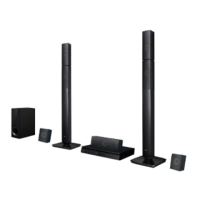
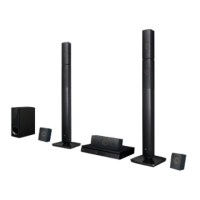
LG HT502TH-A2 - User Manual

LG HT502TH-A2
24 pages
Print Icon
To Next Page IconTo Next Page
Loading...
DVD RECEIVER
OWNER’S MANUAL
MODEL: HT502TH
HT502TH-A2
SH52TH-F
SH52TH-S
SH52TH-C
SH52TH-W
Before connecting, operating or adjusting this product,
please read this instruction booklet carefully and
completely.
HT502TH-A2_DAGOILK_ENG_6953
R
USB

Questions and Answers

Summary

Maintenance and Service

Handling the unit

Instructions for handling the unit, especially during shipping.

Keeping the exterior surfaces clean

Advice on cleaning exterior surfaces without damage.

Cleaning the unit

Method for cleaning the player using soft cloth and mild detergent.

Maintaining the Unit

Recommendations for regular inspection and maintenance.

Introduction

Before use

Read the manual carefully for proper use.

Symbol Used in this Manual

Explains the meaning of symbols used in the manual.

Types of Playable Discs

Lists the types of discs the unit can play.

Regional Code

Information about DVD regional codes and compatibility.

Front Panel;Rear Panel

Front Panel Controls

Identifies main controls on the front panel like power, volume, disc tray, USB port, and other buttons.

Rear Panel Connections

Identifies rear panel connectors for power, speakers, antennas, and audio/video outputs.

Remote Control

Remote Control Buttons

Explains the function of various buttons on the remote control.

Remote Control Operation Range

Specifies the effective range and angle for remote operation.

Remote control battery installation

Instructions for inserting batteries into the remote control.

Installation and Setup

TV Connection

Guides on connecting the receiver to a TV via video or component cables.

Video connection

How to connect the MONITOR OUT to the TV's VIDEO IN.

Component Video connection

How to connect COMPONENT VIDEO OUT to TV's corresponding jacks.

Optional Equipment Connection

USB connection (U)

Connecting USB devices like memory sticks or MP3 players.

Removing the USB Device from the unit

Steps to safely remove a connected USB device.

Antenna Connection

Instructions for connecting FM/AM antennas.

AUX IN connection (A)

Connecting auxiliary devices to the AUX AUDIO Input.

OPTICAL IN connection (O)

Connecting optical output from digital devices.

AUDIO IN connection (D)

Connecting audio output from portable devices.

Assembling and Connecting to the Speakers

How to connect the Speakers

Step-by-step guide for assembling speakers and connecting them.

Speaker System Connection

Diagram and guidance for connecting speakers to the receiver.

Displaying Disc Information On-screen

Displaying Disc Information

How to view playback information like title, chapter, time, audio, etc.

Initial Settings

Initial Settings Menu

How to access and navigate the setup menu for adjustments.

LANGUAGE

Setting language for Setup menu and OSD.

Disc Audio; Subtitle; Menu

Selecting preferred languages for disc audio, subtitles, and menus.

Display

TV Aspect

Setting the aspect ratio (4:3 or 16:9) for the TV display.

Display Mode

Options like Letterbox and Panscan for 4:3 aspect ratio.

Progressive Scan

Information and steps to enable progressive scan for higher quality video.

AUDIO

Dynamic Range Control (DRC)

Compressing audio dynamic range for clearer listening at lower volumes.

Vocal

Enabling vocal mix for karaoke DVDs.

5.1 Speaker Setup

Speaker selection

Selecting and adjusting individual speakers (Front, Center, Rear, etc.).

Volume

Adjusting the output level for selected speakers.

Distance

Setting speaker distance to ensure synchronized sound arrival.

Test

Testing speaker signals to match system volume.

LOCK (Parental Control)

Rating

Blocking playback of DVDs based on content rating.

Password

Setting or changing the parental control password.

If you forget your password

Procedure to reset a forgotten password.

Area Code

Entering the area code for DVD rating standards.

OTHERS

PBC

Setting Playback Control for Video CDs.

DivX(R) Registration

Obtaining a registration code for DivX VOD services.

Semi Karaoke

Enabling score display and fanfare for karaoke playback.

Operation

General Playback Controls

Explains basic playback functions using buttons like OPEN/CLOSE, PAUSE, SKIP, SCAN, REPEAT, ZOOM, SUBTITLE, SLOW.

Additional features

1.5 times speed playback

How to play discs at 1.5 times the normal speed.

Time Search

How to jump to a specific time point on a disc.

Marker Search

How to set, recall, and clear playback markers.

Controlling the TV

Setting Remote Control Codes for LG TV

Instructions for setting up the remote to control an LG TV.

Playing an Audio CD or MP3;WMA file

Playing Audio CDs and MP3;WMA Files

How to play audio CDs, MP3, and WMA files.

ID3 TAG

How to view track information using the DISPLAY button.

MP3; WMA disc compatibility

Notes on compatibility for MP3 and WMA file formats.

Programmed Playback

Programmed Playback Function

How to store and play favorite tracks from a disc.

Repeat Programmed Tracks

How to set repeat modes for programmed tracks.

Erasing a Track from Program List

How to remove individual tracks from the program list.

Erasing the Complete Program List

How to clear all programmed tracks.

Viewing a JPEG file

Playing JPEG Files

How to play discs containing JPEG image files.

Slide Show

How to activate and control the slide show feature for JPEG files.

Still Picture

How to pause and resume a slide show or view individual pictures.

Moving to another File

How to advance to the next or previous file during viewing.

Rotating the picture

How to rotate an image clockwise or counter-clockwise.

Zoom

How to enlarge or reduce the image size.

JPEG disc compatibility

Notes on compatibility for JPEG files and discs.

Playing a DivX Movie file

Playing DivX Movie Files

How to play discs with DivX movie files.

Notice for displaying the Divx subtitle

Troubleshooting steps for subtitle display issues.

DivX disc compatibility

Notes on DivX file formats, codecs, and compatibility.

Presetting the Radio Stations

Presetting Radio Stations

Step-by-step guide to store up to 50 FM/AM radio stations.

To tune in a station with a weak signal

Manual tuning method for weak signals.

To clear all the stored stations

How to erase all preset radio stations.

Listening to the Radio

Listening to Preset Radio Stations

How to select and listen to stored radio stations.

To listen to non-preset radio stations

Tuning to stations not stored in memory.

To select a preset radio station directly

Using number buttons to directly access preset stations.

For your reference

Tips for improving FM reception and stereo effect.

Sleep Timer Setting

Sleep Timer Setting

How to set the unit to turn off automatically.

Selecting input source

Selecting Input Source

How to choose between AUX, OPTICAL IN, and AUDIO IN sources.

XTS;XTS pro

XTS;XTS pro Settings

Adjusting XTS/XTS pro sound enhancement settings.

VIRTUAL sound

VIRTUAL Sound Settings

How to set virtual sound modes like 3D STEREO.

Sound Mode

Sound Mode Selection

Selecting pre-programmed sound fields for 2-channel audio.

Reference

Language Codes

List of codes for setting disc audio, subtitle, and menu languages.

Area Codes

List of country codes used for DVD rating standards.

Troubleshooting

Troubleshooting Guide

Overview of common problems and solutions for power, picture, sound, and playback issues.

No Power

Solutions for issues related to the unit not turning on.

Receiver Unresponsive

Solutions for when the unit is powered on but does not operate.

No Picture

Solutions for problems with video output or display.

Audio Issues

Solutions for problems such as no sound or very low sound levels.

Poor Picture Quality

Solutions for issues resulting in a poor quality video image.

Playback Errors

Solutions for when the DVD/CD Receiver fails to start playback.

Hum or Noise

Solutions for audio problems causing loud hum or unwanted noise.

Troubleshooting (Continued)

Radio Tuning Problems

Solutions for problems tuning radio stations.

Remote Control Issues

Solutions for remote control malfunctions.

Dim Front Panel Display

Solution for a dim front panel display.

Specifications

General Specifications

General technical details like power supply, dimensions, and operating conditions.

Tuner Specifications

Technical details for FM/AM tuner functions.

Video Specifications

Technical details for video output and input.

CD;DVD Specifications

Technical details related to CD and DVD playback.

Amplifier Specifications

Technical details for amplifier performance and modes.

Speakers Specifications

Technical details for speaker types, impedance, and power.

Summary

Maintenance and Service

Handling the unit

Instructions for handling the unit, especially during shipping.

Keeping the exterior surfaces clean

Advice on cleaning exterior surfaces without damage.

Cleaning the unit

Method for cleaning the player using soft cloth and mild detergent.

Maintaining the Unit

Recommendations for regular inspection and maintenance.

Introduction

Before use

Read the manual carefully for proper use.

Symbol Used in this Manual

Explains the meaning of symbols used in the manual.

Types of Playable Discs

Lists the types of discs the unit can play.

Regional Code

Information about DVD regional codes and compatibility.

Front Panel;Rear Panel

Front Panel Controls

Identifies main controls on the front panel like power, volume, disc tray, USB port, and other buttons.

Rear Panel Connections

Identifies rear panel connectors for power, speakers, antennas, and audio/video outputs.

Remote Control

Remote Control Buttons

Explains the function of various buttons on the remote control.

Remote Control Operation Range

Specifies the effective range and angle for remote operation.

Remote control battery installation

Instructions for inserting batteries into the remote control.

Installation and Setup

TV Connection

Guides on connecting the receiver to a TV via video or component cables.

Video connection

How to connect the MONITOR OUT to the TV's VIDEO IN.

Component Video connection

How to connect COMPONENT VIDEO OUT to TV's corresponding jacks.

Optional Equipment Connection

USB connection (U)

Connecting USB devices like memory sticks or MP3 players.

Removing the USB Device from the unit

Steps to safely remove a connected USB device.

Antenna Connection

Instructions for connecting FM/AM antennas.

AUX IN connection (A)

Connecting auxiliary devices to the AUX AUDIO Input.

OPTICAL IN connection (O)

Connecting optical output from digital devices.

AUDIO IN connection (D)

Connecting audio output from portable devices.

Assembling and Connecting to the Speakers

How to connect the Speakers

Step-by-step guide for assembling speakers and connecting them.

Speaker System Connection

Diagram and guidance for connecting speakers to the receiver.

Displaying Disc Information On-screen

Displaying Disc Information

How to view playback information like title, chapter, time, audio, etc.

Initial Settings

Initial Settings Menu

How to access and navigate the setup menu for adjustments.

LANGUAGE

Setting language for Setup menu and OSD.

Disc Audio; Subtitle; Menu

Selecting preferred languages for disc audio, subtitles, and menus.

Display

TV Aspect

Setting the aspect ratio (4:3 or 16:9) for the TV display.

Display Mode

Options like Letterbox and Panscan for 4:3 aspect ratio.

Progressive Scan

Information and steps to enable progressive scan for higher quality video.

AUDIO

Dynamic Range Control (DRC)

Compressing audio dynamic range for clearer listening at lower volumes.

Vocal

Enabling vocal mix for karaoke DVDs.

5.1 Speaker Setup

Speaker selection

Selecting and adjusting individual speakers (Front, Center, Rear, etc.).

Volume

Adjusting the output level for selected speakers.

Distance

Setting speaker distance to ensure synchronized sound arrival.

Test

Testing speaker signals to match system volume.

LOCK (Parental Control)

Rating

Blocking playback of DVDs based on content rating.

Password

Setting or changing the parental control password.

If you forget your password

Procedure to reset a forgotten password.

Area Code

Entering the area code for DVD rating standards.

OTHERS

PBC

Setting Playback Control for Video CDs.

DivX(R) Registration

Obtaining a registration code for DivX VOD services.

Semi Karaoke

Enabling score display and fanfare for karaoke playback.

Operation

General Playback Controls

Explains basic playback functions using buttons like OPEN/CLOSE, PAUSE, SKIP, SCAN, REPEAT, ZOOM, SUBTITLE, SLOW.

Additional features

1.5 times speed playback

How to play discs at 1.5 times the normal speed.

Time Search

How to jump to a specific time point on a disc.

Marker Search

How to set, recall, and clear playback markers.

Controlling the TV

Setting Remote Control Codes for LG TV

Instructions for setting up the remote to control an LG TV.

Playing an Audio CD or MP3;WMA file

Playing Audio CDs and MP3;WMA Files

How to play audio CDs, MP3, and WMA files.

ID3 TAG

How to view track information using the DISPLAY button.

MP3; WMA disc compatibility

Notes on compatibility for MP3 and WMA file formats.

Programmed Playback

Programmed Playback Function

How to store and play favorite tracks from a disc.

Repeat Programmed Tracks

How to set repeat modes for programmed tracks.

Erasing a Track from Program List

How to remove individual tracks from the program list.

Erasing the Complete Program List

How to clear all programmed tracks.

Viewing a JPEG file

Playing JPEG Files

How to play discs containing JPEG image files.

Slide Show

How to activate and control the slide show feature for JPEG files.

Still Picture

How to pause and resume a slide show or view individual pictures.

Moving to another File

How to advance to the next or previous file during viewing.

Rotating the picture

How to rotate an image clockwise or counter-clockwise.

Zoom

How to enlarge or reduce the image size.

JPEG disc compatibility

Notes on compatibility for JPEG files and discs.

Playing a DivX Movie file

Playing DivX Movie Files

How to play discs with DivX movie files.

Notice for displaying the Divx subtitle

Troubleshooting steps for subtitle display issues.

DivX disc compatibility

Notes on DivX file formats, codecs, and compatibility.

Presetting the Radio Stations

Presetting Radio Stations

Step-by-step guide to store up to 50 FM/AM radio stations.

To tune in a station with a weak signal

Manual tuning method for weak signals.

To clear all the stored stations

How to erase all preset radio stations.

Listening to the Radio

Listening to Preset Radio Stations

How to select and listen to stored radio stations.

To listen to non-preset radio stations

Tuning to stations not stored in memory.

To select a preset radio station directly

Using number buttons to directly access preset stations.

For your reference

Tips for improving FM reception and stereo effect.

Sleep Timer Setting

Sleep Timer Setting

How to set the unit to turn off automatically.

Selecting input source

Selecting Input Source

How to choose between AUX, OPTICAL IN, and AUDIO IN sources.

XTS;XTS pro

XTS;XTS pro Settings

Adjusting XTS/XTS pro sound enhancement settings.

VIRTUAL sound

VIRTUAL Sound Settings

How to set virtual sound modes like 3D STEREO.

Sound Mode

Sound Mode Selection

Selecting pre-programmed sound fields for 2-channel audio.

Reference

Language Codes

List of codes for setting disc audio, subtitle, and menu languages.

Area Codes

List of country codes used for DVD rating standards.

Troubleshooting

Troubleshooting Guide

Overview of common problems and solutions for power, picture, sound, and playback issues.

No Power

Solutions for issues related to the unit not turning on.

Receiver Unresponsive

Solutions for when the unit is powered on but does not operate.

No Picture

Solutions for problems with video output or display.

Audio Issues

Solutions for problems such as no sound or very low sound levels.

Poor Picture Quality

Solutions for issues resulting in a poor quality video image.

Playback Errors

Solutions for when the DVD/CD Receiver fails to start playback.

Hum or Noise

Solutions for audio problems causing loud hum or unwanted noise.

Troubleshooting (Continued)

Radio Tuning Problems

Solutions for problems tuning radio stations.

Remote Control Issues

Solutions for remote control malfunctions.

Dim Front Panel Display

Solution for a dim front panel display.

Specifications

General Specifications

General technical details like power supply, dimensions, and operating conditions.

Tuner Specifications

Technical details for FM/AM tuner functions.

Video Specifications

Technical details for video output and input.

CD;DVD Specifications

Technical details related to CD and DVD playback.

Amplifier Specifications

Technical details for amplifier performance and modes.

Speakers Specifications

Technical details for speaker types, impedance, and power.

LG HT502TH-A2 Specifications

General IconGeneral
TypeHome Theater System
Channels5.1
DVD PlayerYes
BluetoothNo
Audio Formats SupportedDolby Digital, DTS
ConnectivityHDMI, USB
InputsHDMI, USB
OutputsHDMI

Related product manuals