EasyManua.ls Logo

LG HT502PH-AM - User Manual

LG HT502PH-AM
26 pages
Print Icon
To Next Page IconTo Next Page
Loading...
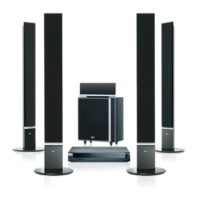
DVD RECEIVER
OWNER’S MANUAL
MODEL: HT502PH
Main Unit - HT502PH-AM
Speakers - SH52PH-F
SH52PH-S
SH52PH-C
SH52PH-W
Before connecting, operating or adjusting this product,
please read this instruction booklet carefully and
completely.
HT502PH-AM.BMYSLLP_ENG_6968
R
USB

Questions and Answers

  • C
    Christy SanchezAug 14, 2025
    Why is there no sound from my LG HT502PH-AM Receiver?
    • C
      Chelsea BlackAug 15, 2025
      If you're experiencing no sound or very low sound from your LG DVD/CD Receiver, consider the following: * Ensure the equipment connected with the audio cable is set to receive the DVD audio signal output by selecting the correct input mode on the receiver. * Check that the audio cables are securely connected to the jacks. * Verify that the equipment connected with the audio cable is turned on. * If the audio connecting cable is damaged, replace it.
  • C
    Connor ThompsonAug 18, 2025
    Why is my LG Receiver remote control not working?
    • B
      Brianna WalkerAug 18, 2025
      If the remote control for your LG DVD/CD Receiver isn't working properly, try these steps: * Point the remote control at the remote sensor on the DVD/CD Receiver. * Ensure you are within 23 ft (7 m) of the DVD/CD Receiver. * Remove any obstacles between the remote control and the DVD/CD Receiver. * Replace the batteries in the remote control with new ones.
  • B
    Brittany PotterAug 21, 2025
    What to do if my LG HT502PH-AM has no picture?
    • J
      Julia LopezAug 21, 2025
      If there is no picture on your LG DVD/CD Receiver, make sure of the following: * The TV is set to the correct video input mode to receive the DVD signal. * The video cable is securely connected to the jacks. * The connected TV is turned on.
  • L
    Lauren BrownAug 25, 2025
    How to fix no power on my LG Receiver?
    • G
      gloria67Aug 25, 2025
      If your LG Receiver has no power, the power cord might be disconnected. Ensure the power cord is securely plugged into the wall outlet.
  • M
    Molly FischerAug 28, 2025
    How to stop loud humming noise from LG HT502PH-AM Receiver?
    • H
      Haley HowellAug 28, 2025
      If you hear a loud hum or noise from your LG DVD/CD Receiver, check these: * Clean the disc. * Ensure the speakers and components are securely connected. * Move the TV away from the audio components.
  • W
    wilsonkimberlyAug 31, 2025
    Why is the picture quality poor on my LG HT502PH-AM?
    • B
      Bradley MorrisAug 31, 2025
      If the playback picture on your LG DVD/CD Receiver is poor, try the following: * Clean the disc. * Insert a disc, if none is inserted. * Insert a playable disc. * Place the disc with the playback side down. * Place the disc correctly on the disc tray inside the guide. * Press the SETUP button to turn off the menu screen, if a menu is on the TV screen. * Cancel the Rating function or change the rating level, if the Rating level is set.
  • M
    Michael TurnerSep 4, 2025
    Why can't I tune into radio stations on my LG HT502PH-AM Receiver?
    • F
      fhudsonSep 4, 2025
      If radio stations cannot be tuned in on your LG Receiver, consider these solutions: * Connect the antenna securely. * Tune in the station manually if the signal strength is weak. * Preset the stations (page 20).
  • S
    Sherry HicksSep 6, 2025
    What to do if LG HT502PH-AM audio CD indicator doesn't work?
    • M
      Mrs. Krista Lopez MDSep 7, 2025
      If the power is on but the audio CD indicator on your LG DVD/CD Receiver isn't working, it might be because no disc is inserted. Try inserting a disc.
  • K
    Katherine YoungSep 12, 2025
    How to fix nothing displayed on LG Receiver front panel?
    • A
      Alexis MurphySep 12, 2025
      To address a blank front panel display on your LG Receiver, press the DIMMER button on the remote control.

Summary

Safety and Precautions

Electrical Safety and Enclosure Hazards

Warnings about electric shock risks, opening the enclosure, and proper ventilation.

Power Cord and Laser Safety

Guidelines for safe power cord usage and laser system operation to prevent injury.

Introduction and System Setup

System Introduction and Overview

Guide to manual, symbols, playable discs, regional codes, and SIMPLINK.

Connecting Hardware Components

Instructions for TV, speakers, antenna, USB, AUX, and HDMI connections.

Core Operation and Settings

Display, Setup, and Audio Configuration

Managing display settings, initial setup, audio options, and speaker configuration.

Parental Controls and System Management

Managing parental locks, DivX registration, and other system settings.

Media Playback and Radio Features

Playing Audio, Video, and Image Files

Step-by-step guide for playing Audio CDs, MP3/WMA, JPEG, and DivX media.

Radio Tuning and Listening

Tuning radio stations, preset storage, and listening to radio broadcasts.

Advanced Functions and Reference

Timers, Sound Modes, and Input Selection

Setting sleep timers, adjusting sound modes, and selecting input sources.

Troubleshooting and Specifications

Common issues, solutions, language codes, area codes, and technical specifications.

LG HT502PH-AM Specifications

General IconGeneral
TypeHome Theater System
Channels5.1
Total Power Output500W
DVD PlayerYes
USB PortYes
HDMI OutputYes
BluetoothNo
Supported FormatsMP3, WMA, JPEG
Video UpconversionYes

Related product manuals