13
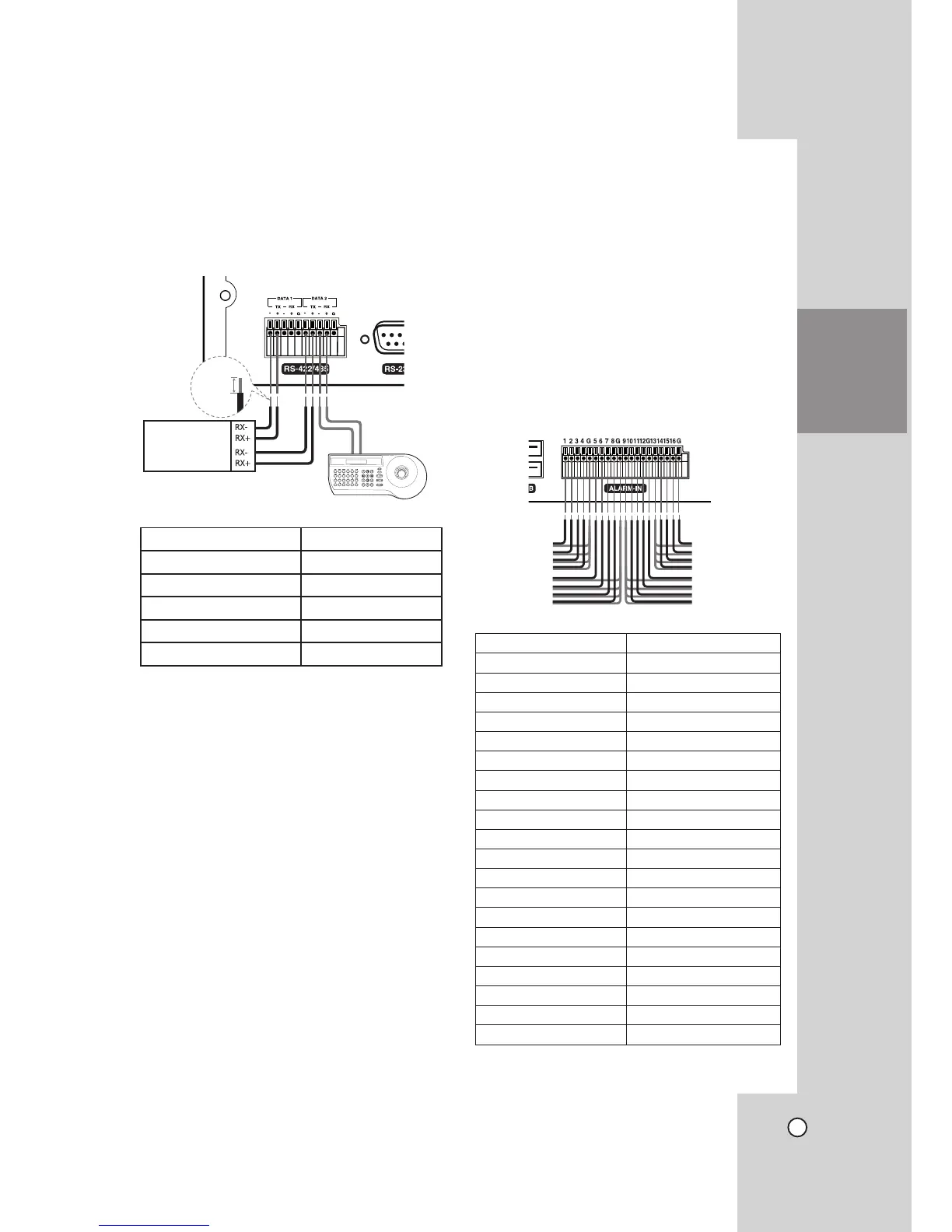
Connecting the RS-422/485
Device
This DVR has two data terminals.
Use this port to connect PTZ cameras, DVRs or key-
pads (optional).
RS-422/485 Terminal Description
TX - (DATA -) Data Transmission
TX + (DATA +) Data Transmission
RX - (DATA -) Data Reception
RX + (DATA +) Data Reception
GND Shield
Connecting the PTZ camera
Connecting the PTZ serial communication lines to the
RS-422/485 terminal.
Notes:
• When connecting lines, connect the TX - of the
DVR to RX - of the PTZ unit and TX + of the DVR
to RX + (TX +: LG_LS903 protocol only) of the
PTZ unit correctly.
• Recommended initial data are 9600 Baud Rate,
8 Data bits, 1 Stop bit and No parity.
• When connecting PTZ cameras to DVRs it is
necessary to set the setup menu for this unit
according to the RS-485 settings of the camera
and DVRs.
Connecting the LKD1000 controller
Connecting the LKD1000 controller to control the
DVR. (Refer to the manuals of the LKD1000 control-
ler for more details.).
Connecting Sensor Input and
Alarm Output
Alarm terminals are used to connect the alarm devic-
es such as sensors, door switches, etc.
Sensor Input
You can connect up to 16 alarm sensors (LE3108/
LE2108: 8 alarm sensors).
Each alarm sensor should be connected with G
(GND). The signal state is adjustable to N/O (Normal
Open) or N/C (Normal Close) through the setup
menu.
Terminal No. Description
1 Sensor Input 1
2 Sensor Input 2
3 Sensor Input 3
4 Sensor Input 4
G Ground
5 Sensor Input 5
6 Sensor Input 6
7 Sensor Input 7
8 Sensor Input 8
G Ground
9 Sensor Input 9
10 Sensor Input 10
11 Sensor Input 11
12 Sensor Input 12
G Ground
13 Sensor Input 13
14 Sensor Input 14
15 Sensor Input 15
16 Sensor Input 16
G Ground
HOOKUP AND
SETTINGS
PTZ Units
(RS-422/485 TYPE)
5~7 mm
TX+
TX-
Rear of
the DVR
Rear of the DVR


 To Next Page